63
Web Smart Gigabit Switch Family User's Guide
TL-SG2216WEB/TL-SG2224WEB
Appendix A Pin Explain For RJ-45 Connector
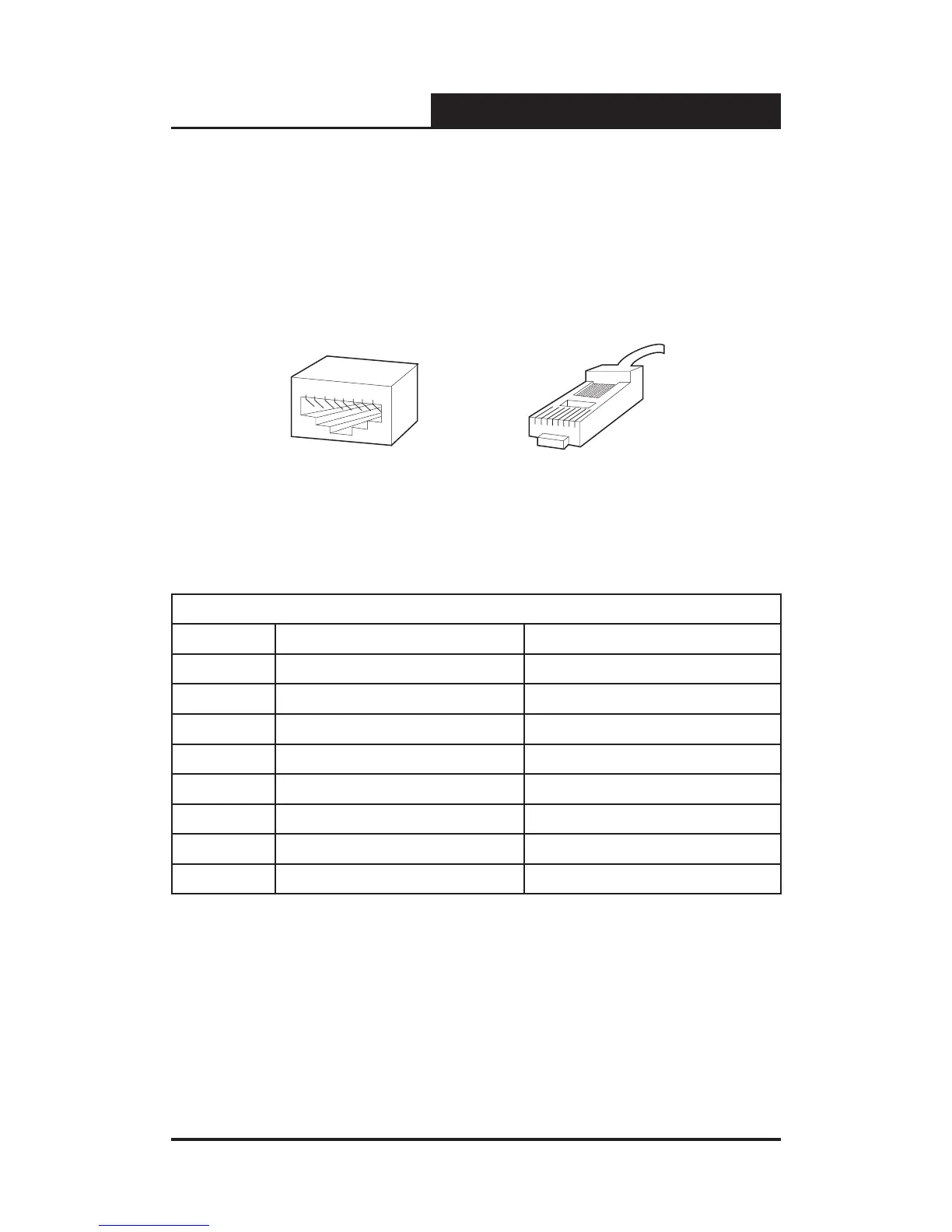
The switching port can connect to stations wired in standard RJ-45 Ethernet
station mode using straight cables. Transmission devices connected to each
other use crossed cables. The following gure illustrates the pin allocation:
Figure RJ-45 connector
The following shows the way to make the cable use to connect switch to
network adapter, and cable use to connect switch to switch/hub/bridge.
Pin signal allocation for RJ-45 connector
Pin MDI-II MDI-X
1 TX+ (send) RX+ (receive)
2 TX- (send) RX- (receive)
3 RX+ (receive) TX+ (send)
4 No use No use
5 No use No use
6 RX- (receive) TX- (send)
7 No use No use
8 No use No use
Straight cable: use to connect switch (uplink port) or network adapter to switch/
hub/other device (normal port).










 To Next Page