34
Web Smart Gigabit Switch Family User's Guide
TL-SG2216WEB/TL-SG2224WEB
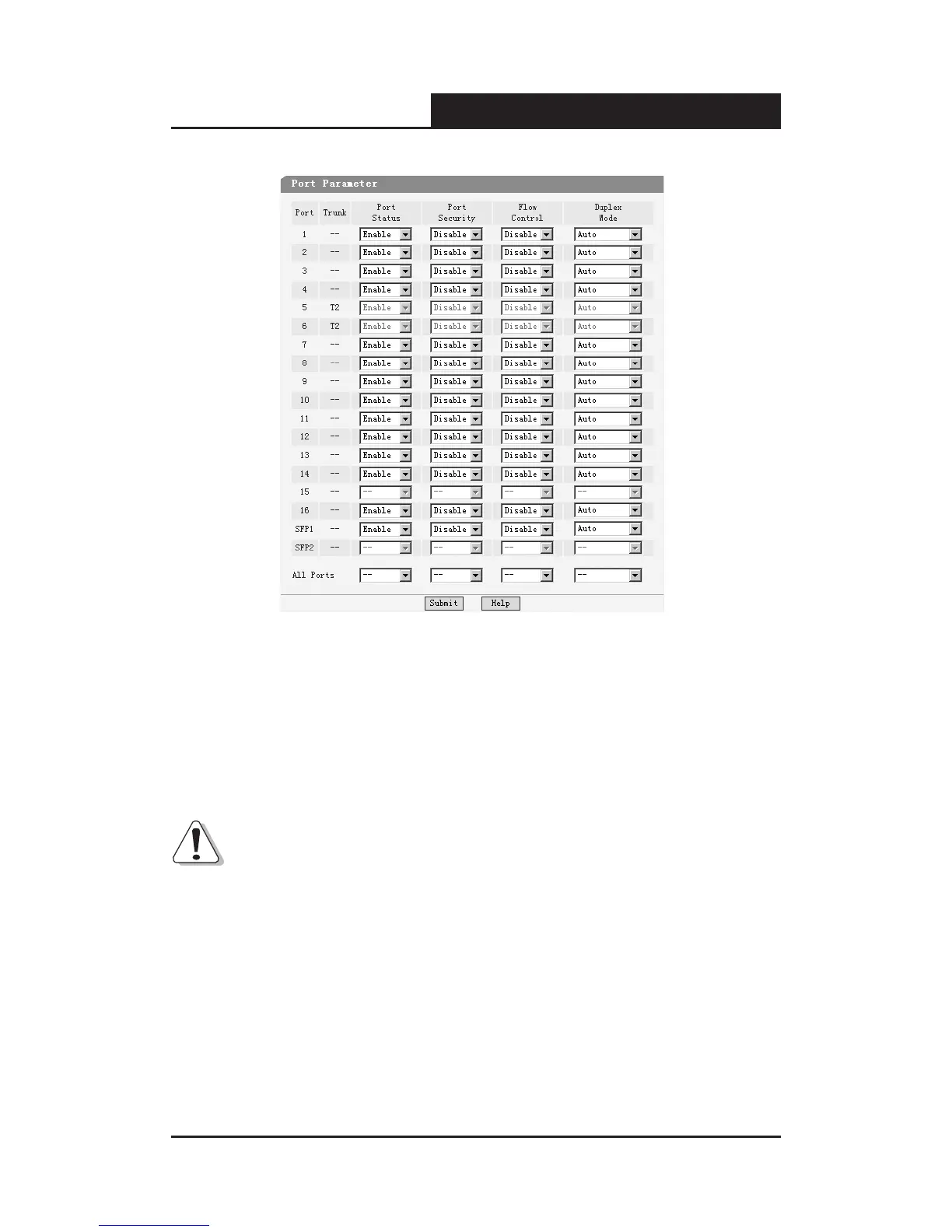
Figure 5-18 Port Parameter
Port Status: Indicates whether the port is operational or non-operational.”
Enable" Indicates that the port is operational and "Disable" Indicates the
port is non-operational. If a port is unused for a long time, it can be set to
be non-operational to cut down the energy cost.
Notice:
1) You can't manage the switch via the port, which is non-operational, please
set the value of the management port to “enable”.
2) SFP port is a combo port sharing a connection with a Giga port. In TL-
SG2216WEB, SFP1 and port 15 compose a combo port, SFP2 and
port 16 compose a combo port; In TL-SG2224WEB, SFP1 and port 23
compose a combo port, SFP2 and port 24 compose a combo port. For a










 To Next Page