55
Web Smart Gigabit Switch Family User's Guide
TL-SG2216WEB/TL-SG2224WEB
VLAN ID: congure the VLAN ID.
Port: The switch port number.
Member: Select the member of the VLAN here. If this eld is checked, it
indicates that the port belongs to the current VLAN.
Egress Frame: The solution to the egress frame. "Drop Tag" indicates
drop the tag header before sending the frame. "Add Tag" indicates add the
tag header before sending the frame.
Description: Display the user-dened port description.
All Ports: By operating on this eld expediently, you can set the values of
all ports in the corresponding eld.
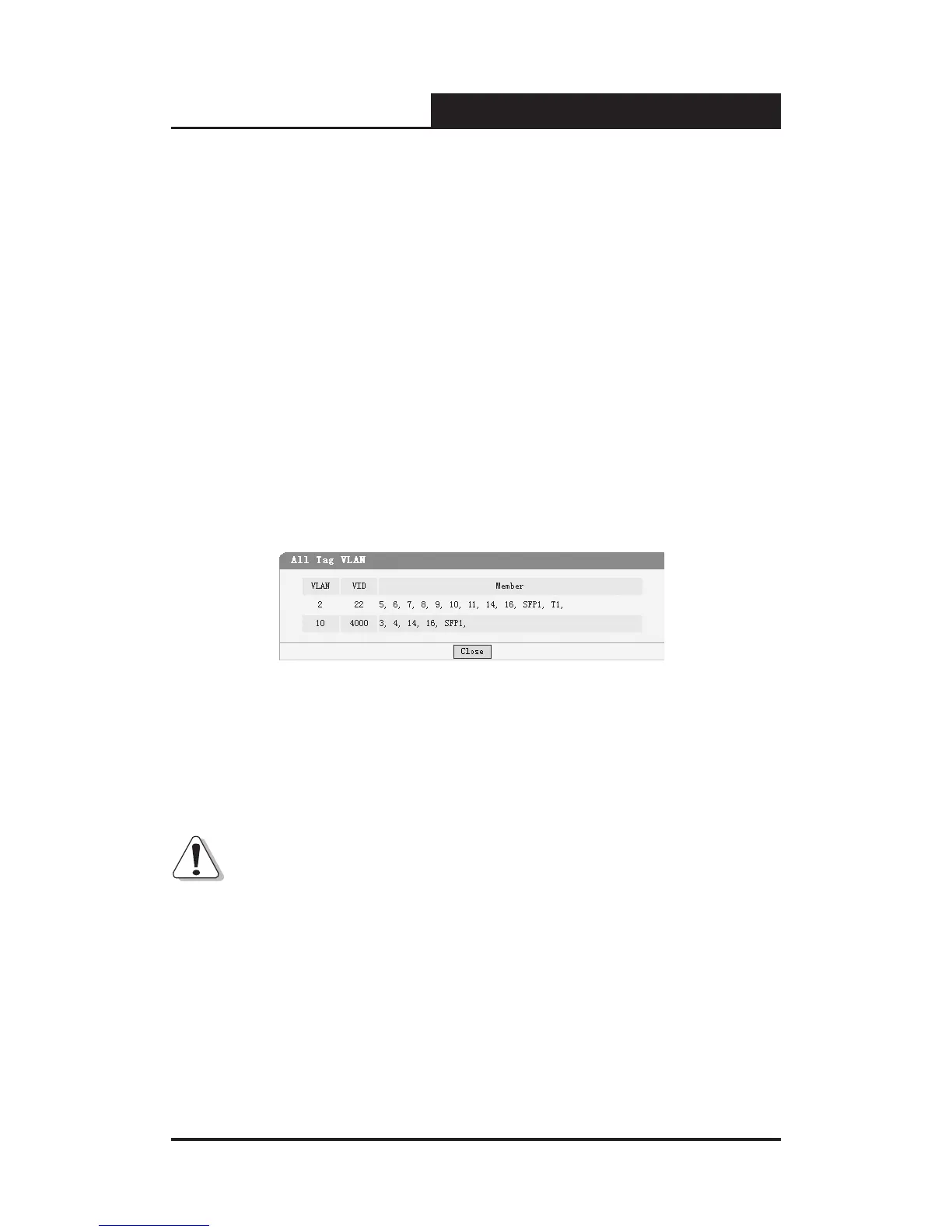
All VLAN: Display all dened Tag VLANs.
Figure 5-37 All Tag VLAN
Select All: Select all ports to be VLAN members.
Clean Up: Clean up all members of the VLAN.
Submit: Submit to buildup a VLAN with the selected members.
Notice:
1) VID of the VLAN must be unique and within the range of 1 to 4094.
2) At least two port members should be included to add a VLAN group. (If the
page is submitted with 0 VLAN member, it indicates to delete the VLAN.)
3) If any Trunk has been set, the Trunk can be configured as a VLAN
member and member ports of the Trunk cannot be congured (see Port 1
and 2 in the gure for example).



 To Next Page