4.4 Cloud management
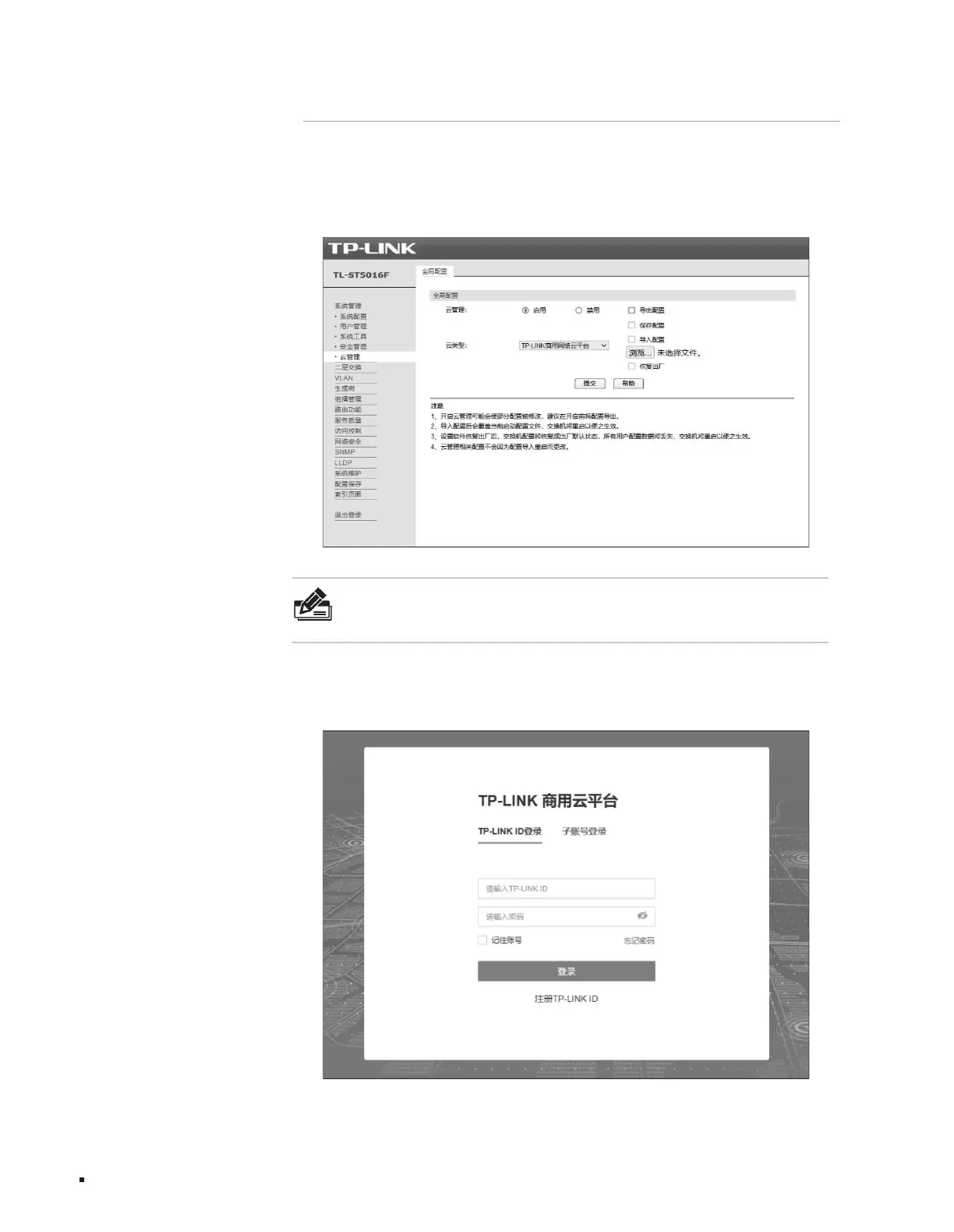
1. Enter the switch Web interface, as shown in the figure below, click <Cloud Management> to enter the cloud management configuration page. on this page
2. Open the browser, enter https://smbcloud.tp-link.com.cn/login.html in the address bar, press the Enter key to enter the login page, enter the TP-LINK ID
and password, if there is no TP- LINK ID, you can click below <Create TP-
On the page, turn on <Global Switch>.
Please refer to the following steps to migrate to the cloud (taking TL-ST5016F as an example):
LINK ID >ÿ
Configuration Guide
Layer 3 managed switch installation manual
Figure 4-11 Log in to the TP-LINK commercial cloud platform
Note:
You can also download the TP-LINK Shangyun APP, identify the QR code on this interface, and configure it in the APP. This manual uses the
Web interface as an example for explanation.
19
Figure 4-10 Entering the cloud management configuration page
Machine Translated by Google



 To Next Page