EasyManua.ls Logo

TRENDnet TV-IP321PI - Daylight Savings

TRENDnet TV-IP321PI
63 pages
Print Icon
To Next Page IconTo Next Page
To Previous Page IconTo Previous Page
Loading...
TRENDnet User’s Guide TV-IP321PI
© Copyright 2015 TRENDnet. All Rights Reserved. 32
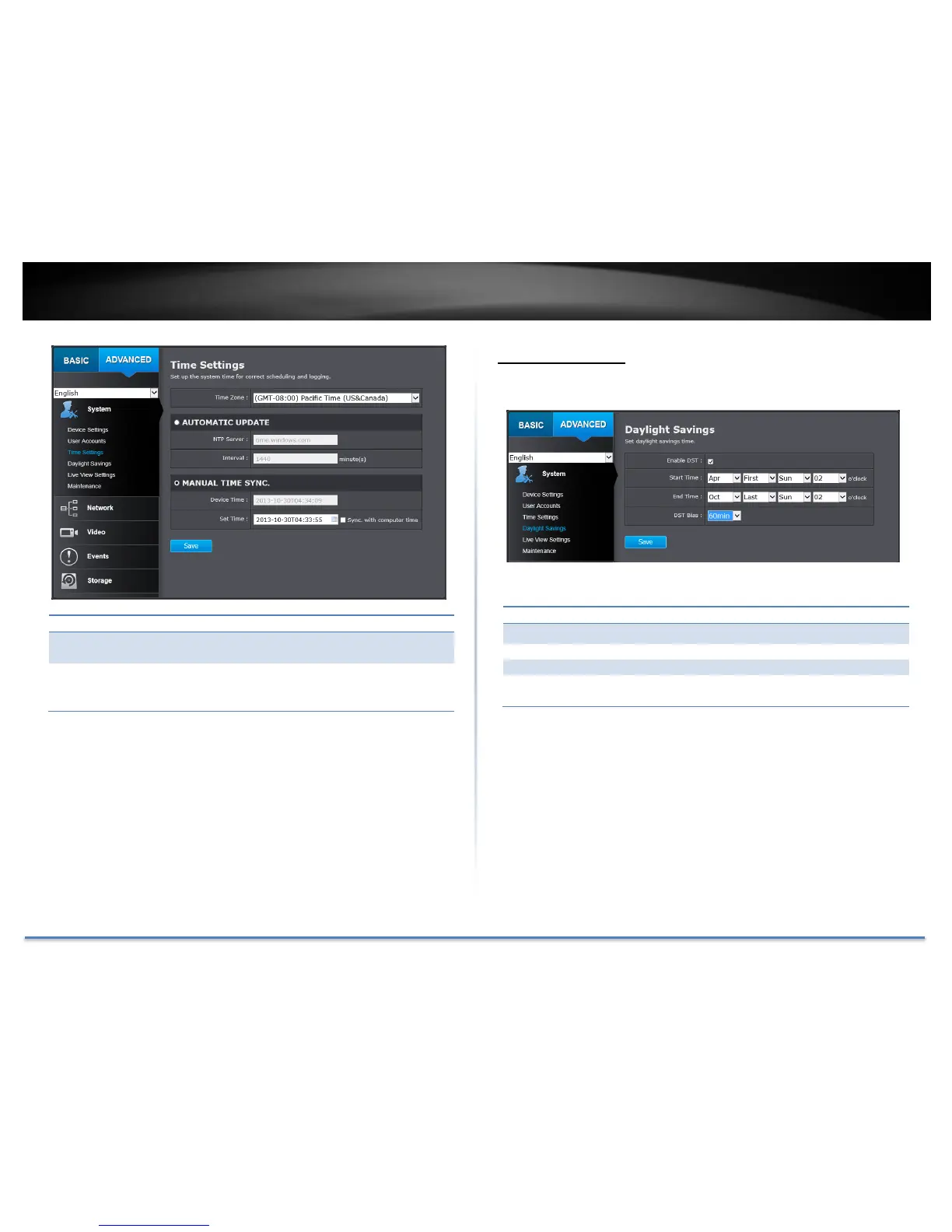
Manual Time Sync
Device
Time:
The system time of this camera.
Set Time:
Click the calendar icon and manually select the date.
Check the Sync. with computer time to copy the time
from your computer.
Click Save to save the changes
Daylight Savings
Setup daylight savings.
Automatic Update
Enable DST:
Check this box if your time zone has daylight savings.
Start Time:
Enter the date that daylight savings starts
End Time:
Enter the date that daylight savings ends
DST Bias
Enter how much time the daylight saving adjusted by
daylight savings.
Click Save to save the changes

Table of Contents

Other manuals for TRENDnet TV-IP321PI

Related product manuals