EasyManua.ls Logo

TRENDnet TV-IP321PI - Video Recording Settings

TRENDnet TV-IP321PI
63 pages
Print Icon
To Next Page IconTo Next Page
To Previous Page IconTo Previous Page
Loading...
TRENDnet User’s Guide TV-IP321PI
© Copyright 2015 TRENDnet. All Rights Reserved. 46
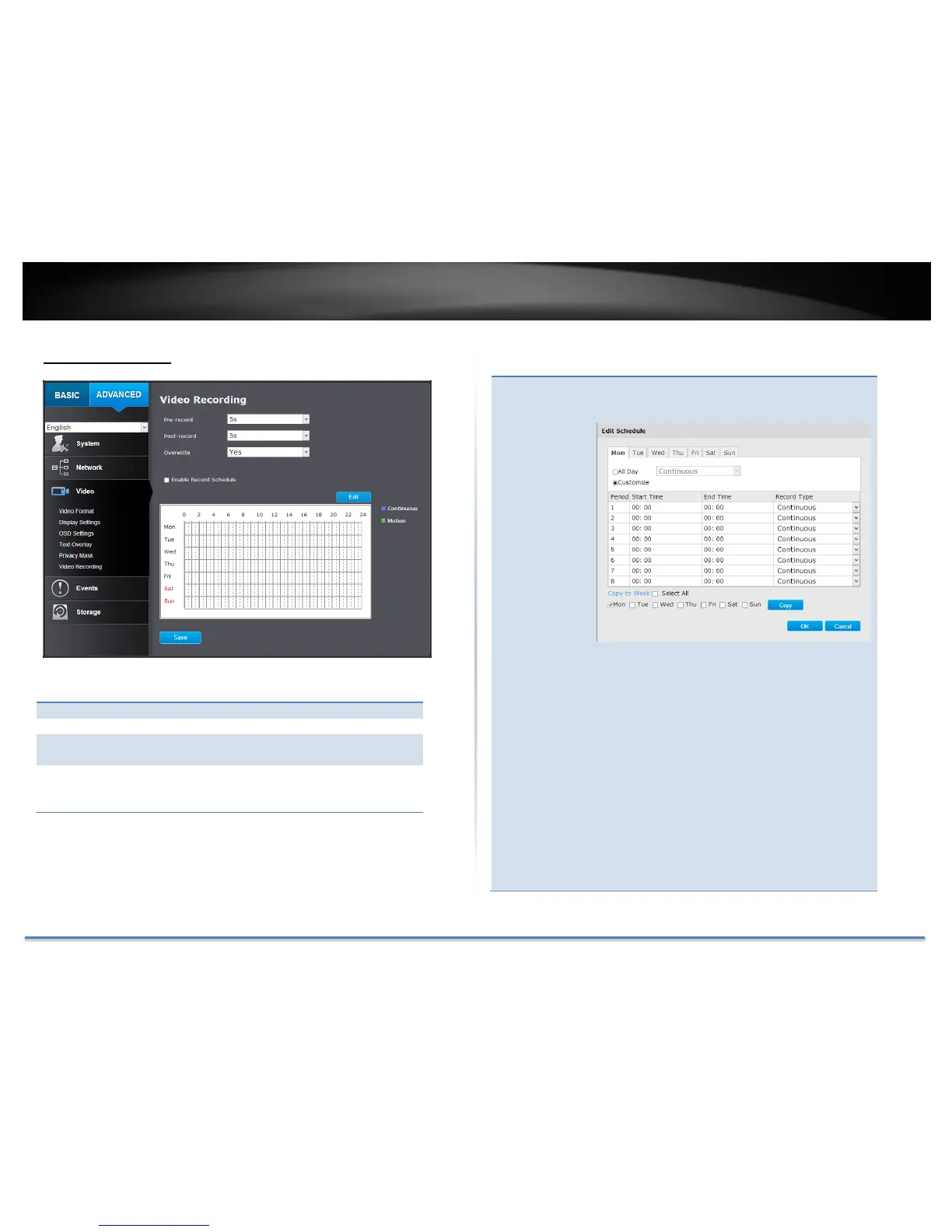
Video Recording
Pre-record:
Recording time before trigger event.
Post-record:
Recording time after trigger event.
Overwrite:
Select Yes to allow older recordings to be
overwritten.
Enable
Record
Schedule:
Check this box and then click Save to enable
video recording.
Click Save to save the changes
Edit:
Click Edit to edit the recording schedule. The
Edit Schedule window will pop up.
1. Select day of the week you want to edit.
2. Select All Day or Customized schedule
of the day.
3. Set the time period and the event you
want to trigger the video recording
continuous (always recording) or
motion detection.
4. Click Select All or the weekday you
want to have the same schedule on
different day.
5. Click another day of the week by clicking
on its tab to set the next schedule. Click
OK when you have finished your
settings.

Table of Contents