TRENDnet User’s Guide TV-IP321PI
© Copyright 2015 TRENDnet. All Rights Reserved. 44
Back Light
Compensation
and
Digital Wide-
Dynamic-Range:
Back light compensation: Setup a fixed light
source position to compensate and adjust the
image in the dark.
Choose the area that you want to enhance (dark
area, not light source).
Note: By default, the D-WDR is enabled. Please disable D-
WDR to set up back light compensation.
D-WDR: Digital Wide Dynamic Range compensates
for the dark area dynamically.
D-WDR Level: The level of compensation.
Range: 0-100%, default: 20%.
Choose a color
temperature as the white
color and compensate the
color on the whole image.
Choose the mode of noise reduction.
Normal Mode
Noise Reduction Level: Adjust the effect of digital
noise reduction. Range: 0-100%, default : 100%
Expert Mode
Space DNR Level: Adjust the special digital noise
reduction with adjacent pixels. Change the range
(0-100%) to change the adjacency effect, default :
50%
Time DNR Level: Adjust the 3D digital noise
reduction. Compare and reduce noise between
video frames. Range: 0-100%, default : 100%
Click Reset to reset the display adjustments
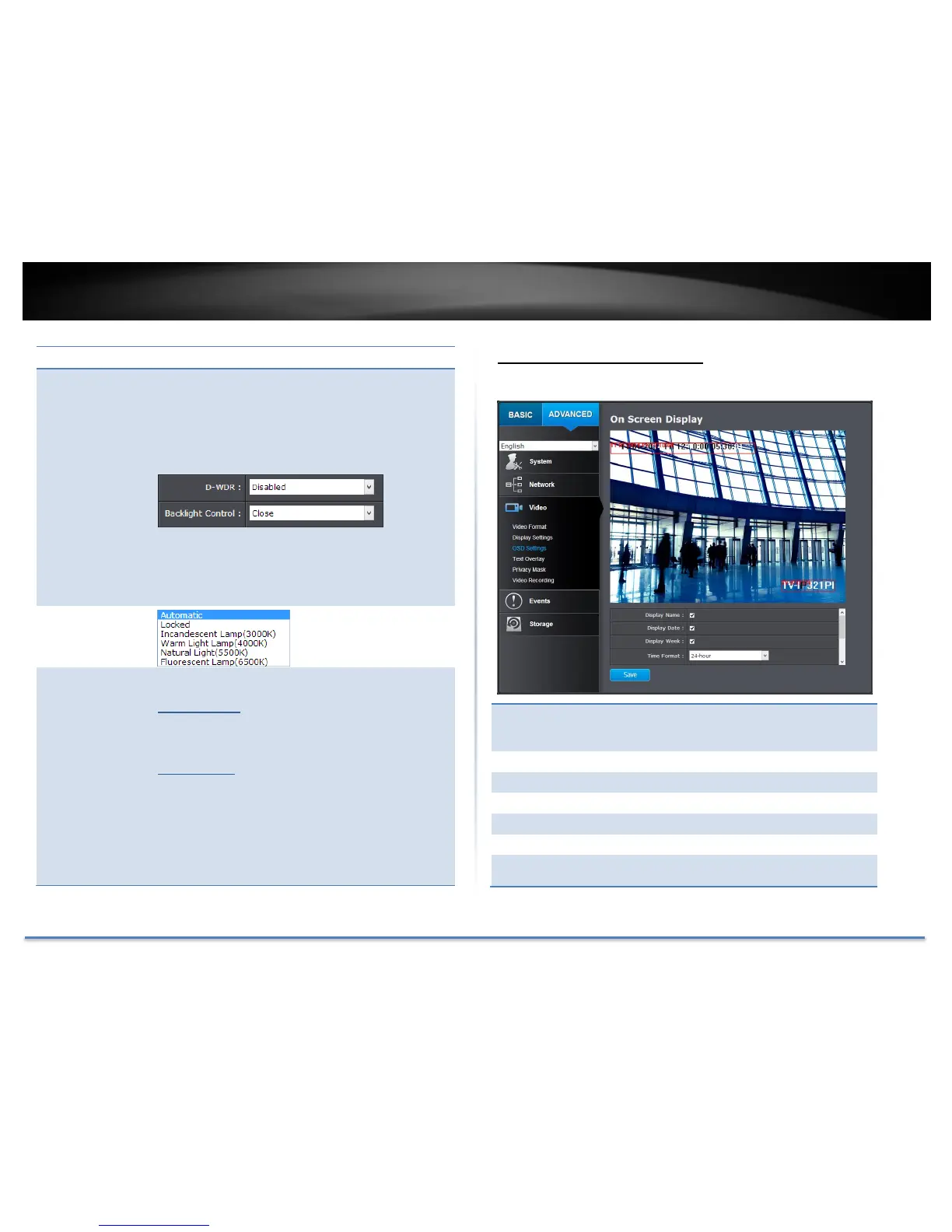
On Screen Display Settings
Display the camera name and the time the video is shooting on the screen.
Check this box to display the product name that
was setup in the device settings (refer to page
30 Device Settings to change the device name.)
Check this box to display system time.
Check this box to display time of the week.
Select 12 or 24-hour time format.
Choose how the text will show on the screen.
Select the text size from 16 to 64 or adjusted by
screen size automatically.
Move the red box to position the text. Click Save to save the changes.





 To Next Page