TRENDnet User’s Guide TV-IP321PI
© Copyright 2015 TRENDnet. All Rights Reserved. 53
Email
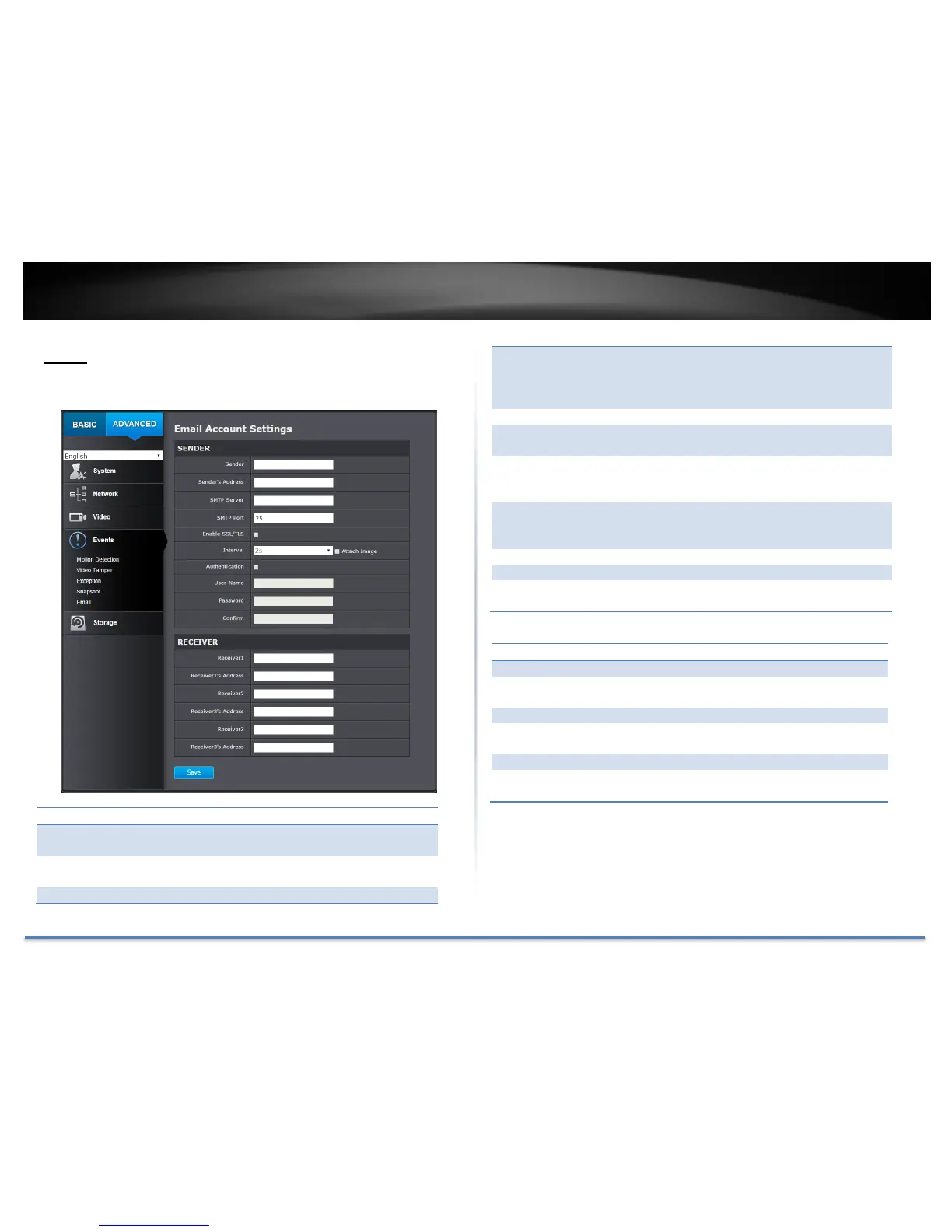
Set up email accounts for notifications.
Enter the name to be appeared as the email
sender.
Enter sender’s email address.
Simple Mail Transportation Protocol Server
address, the outgoing email server address. It
may be has address as your incoming email
server, maybe not. Please ask your email service
provider for detail.
Service port number for outgoing email.*
Check this box if your service provider requires a
SSL or TLS secured connection.
Check Attach Image if you want to send a
snapshot image with the email notification and
select the interval of snapshots in seconds.
Check this box if your server requires a password
in order to send email. Most email servers require
authentication when sending an email.
Enter the user name of outgoing email account
Enter the password again to confirm that the
password was entered correctly.
Click Save to save the changes
The first receiver’s name.
The first receiver’s email address.
The second receiver’s name.
The second receiver’s email address.
The third receiver’s name.
The third receiver’s email address.
Click Save to save the changes
*Note: Many ISPs does not allow service port 25 going through their network.
Other popular ports are 587 and 465. Please consult your email service provider
and ISP for detail.






 To Next Page