TRENDnet User’s Guide TV-IP321PI
© Copyright 2015 TRENDnet. All Rights Reserved. 56
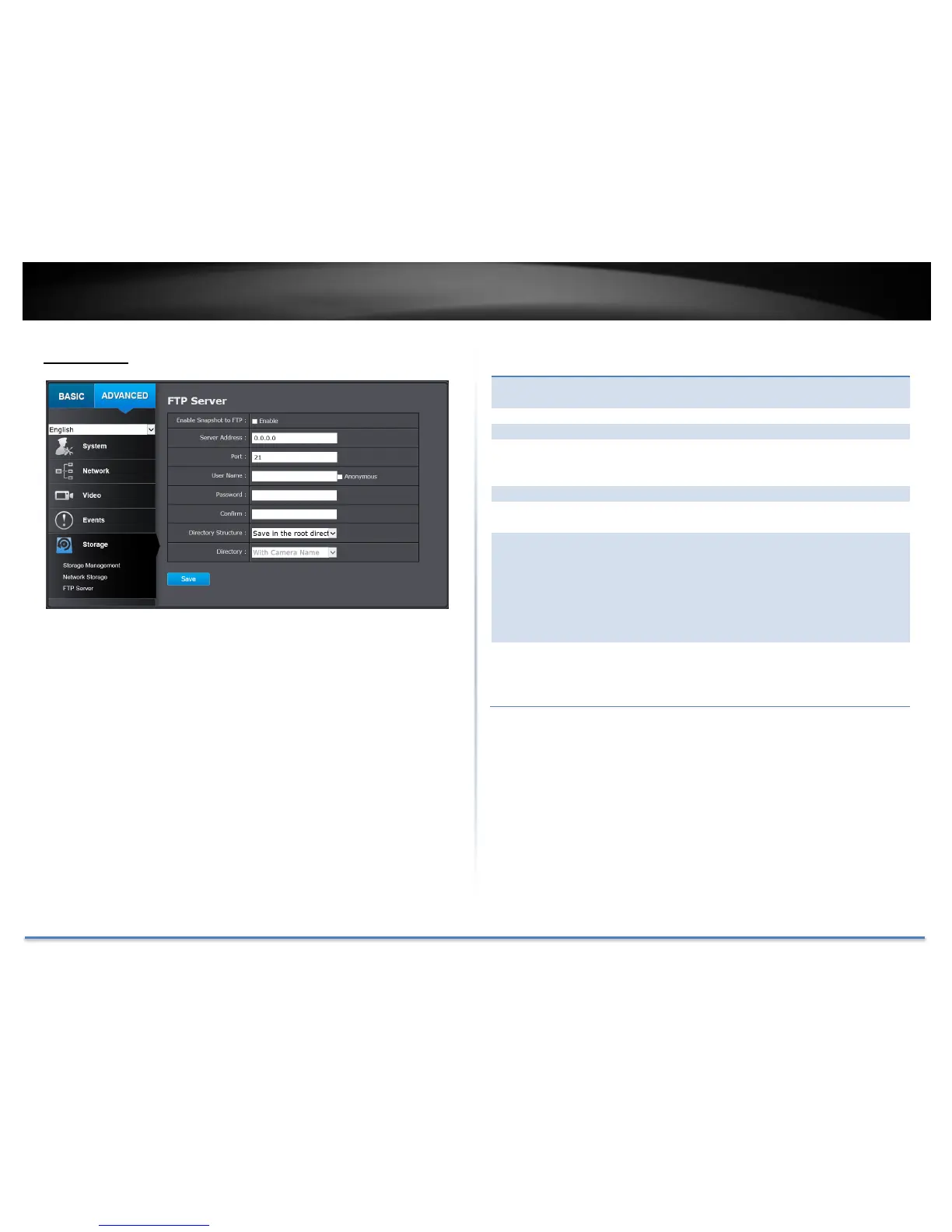
FTP Server
Check this box if you want to store snapshots on
the FTP.
Enter the FTP server IP address.
Enter the service port number of the FTP server.
Check Anonymous if the FTP server does not
require authentication. Enter the User Name if the
FTP server requires authentication.
Enter the password of the FTP account.
Enter the password again to make sure the
password was entered correctly.
When saving snapshots on an FTP server, they can
be saved in a single place or organized with
meaningful directory names.
Save in root directory: You can choose to store
all files in the same folder of FTP login.
Save in directory: Structure your folders with
camera name or IP address.
Use Camera Name: Use the camera name to
organize the saved files.
Use Camera IP: Use the camera IP address to
organize the saved files.
Click Save to save the changes





 To Next Page