TRENDnet User’s Guide TV-IP321PI
© Copyright 2015 TRENDnet. All Rights Reserved. 52
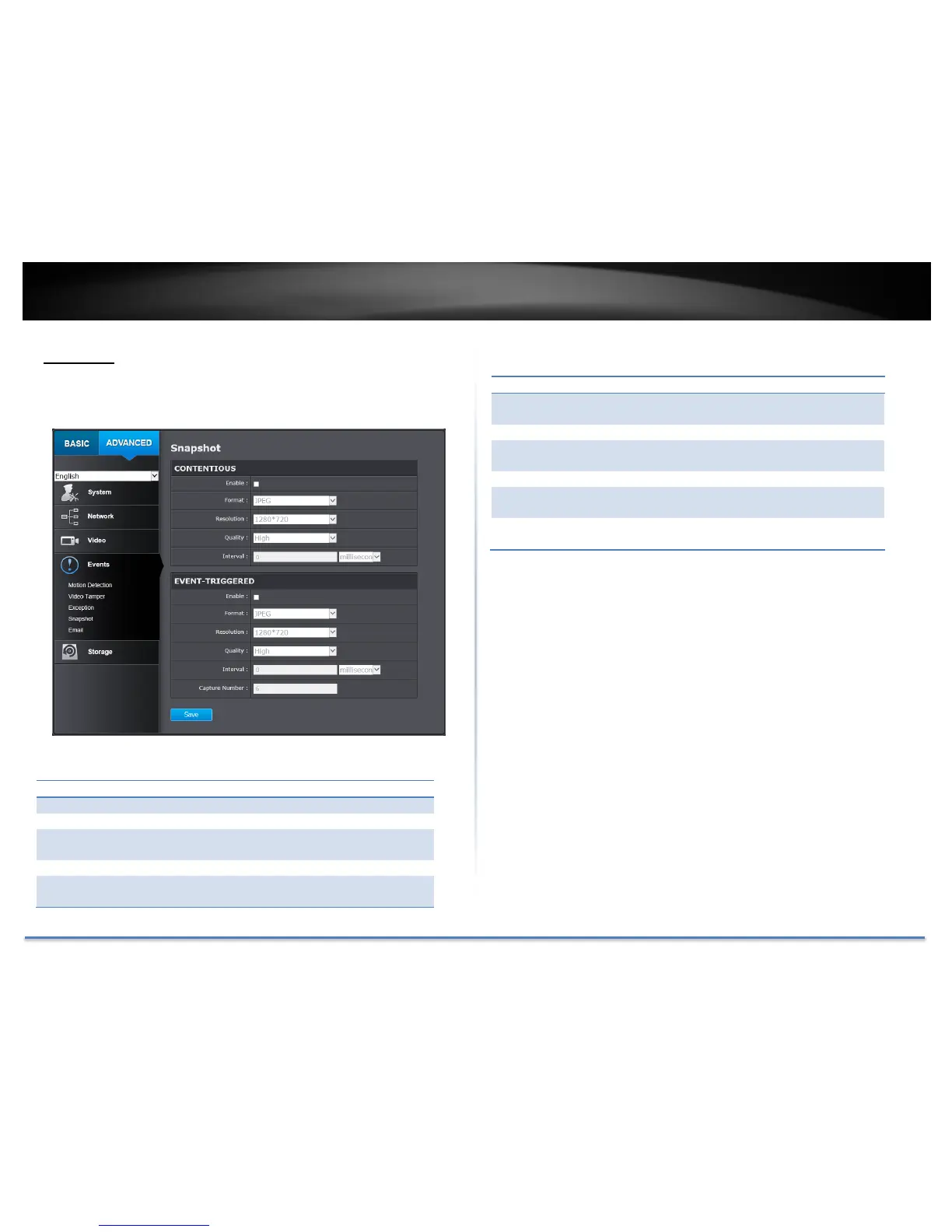
Snapshot
You can set up your camera to continuously taking snapshots or taking
snapshots only when events happening.
Check this box to take snapshots continuously.
Save snapshots in JPEG format
Uses the same resolution set in Video Format for
the snapshot resolution.
Choose a compression quality for snapshots.
State the time interval between snapshots. The
default interval is 10 seconds.
Check this box to take snapshots when an event is
occurred.
Save snapshots in JPEG format
Uses the same resolution set in Video Format for
the snapshot resolution.
Choose a compression quality for snapshot.
State the time interval between this series of
snapshots. The default interval is 1 second.
State how many snapshots you want to take in a
single triggered event. Default: 3 pictures.
Click Save to save the changes





 To Next Page