TRENDnet User’s Guide TV-IP321PI
© Copyright 2015 TRENDnet. All Rights Reserved. 40
Quality of Service (QoS)
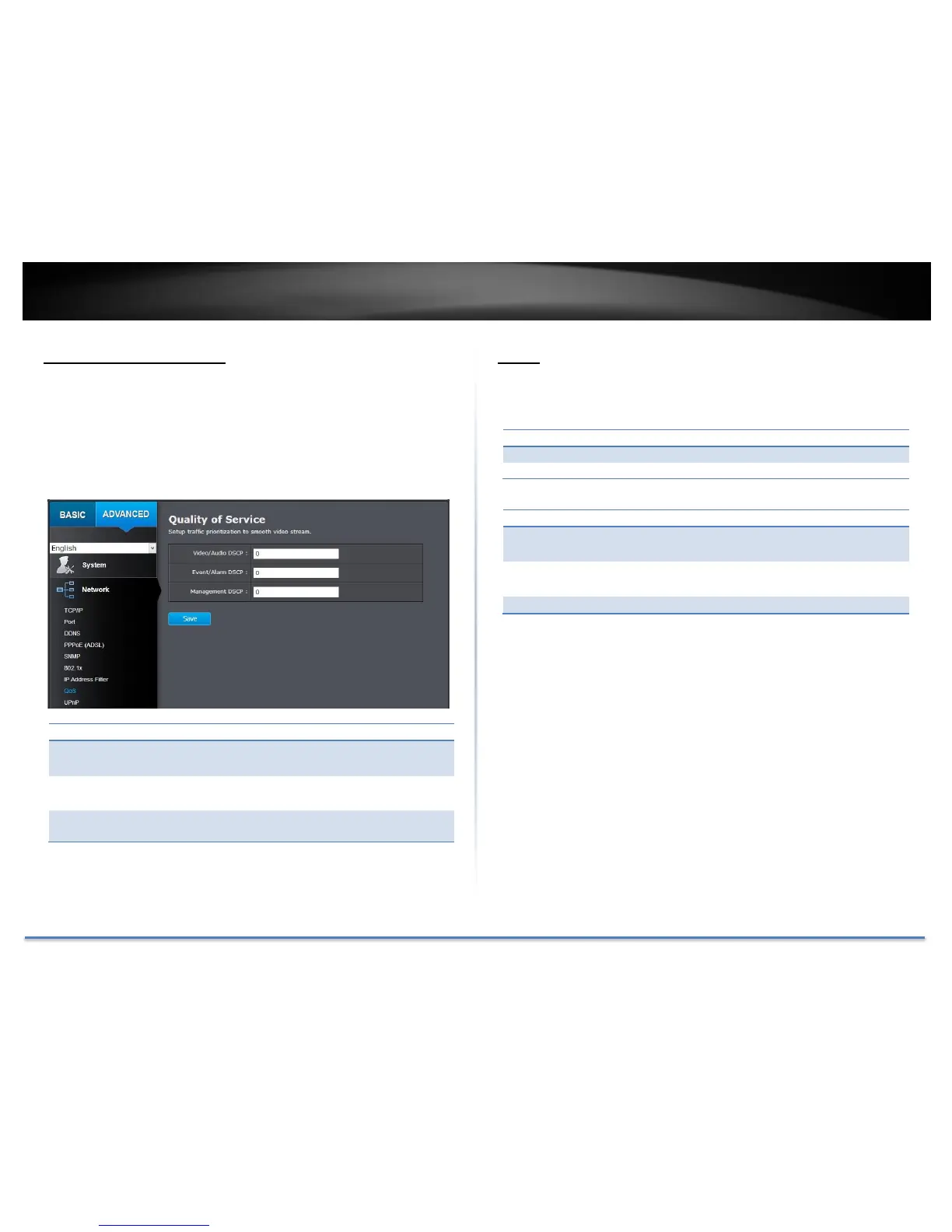
Setup traffic prioritization tags the video packets to go through network
switches and routers with assigned priority. You can set the
Differentiated Services Code Point (DSCP) bits on outgoing data streams.
The QoS capable network device will forward different data in different
priorities. The meaning of the value is different in different DiffServ
domains. Consult your network manager for the setup details.
Enter Video/Audio DSCP. Default: 0.
Enter Event/Alarm DSCP. Default: 0.
Enter Management DSCP. Default: 0.
Click Save to save the changes
UPnP
Universal Plug-and-Play is a device discovery protocol set. It allows your
camera to easily be found, for example, on a Windows operation system.
Check this box to enable UPnP connection.
The name that will be appeared when searched.
Check this box to enable UPnP connection.
Choose Manual or Auto port mapping.
Choose the port number for mapping.
Click Save to save the changes





 To Next Page