TRENDnet User’s Guide TV-IP321PI
© Copyright 2015 TRENDnet. All Rights Reserved. 35
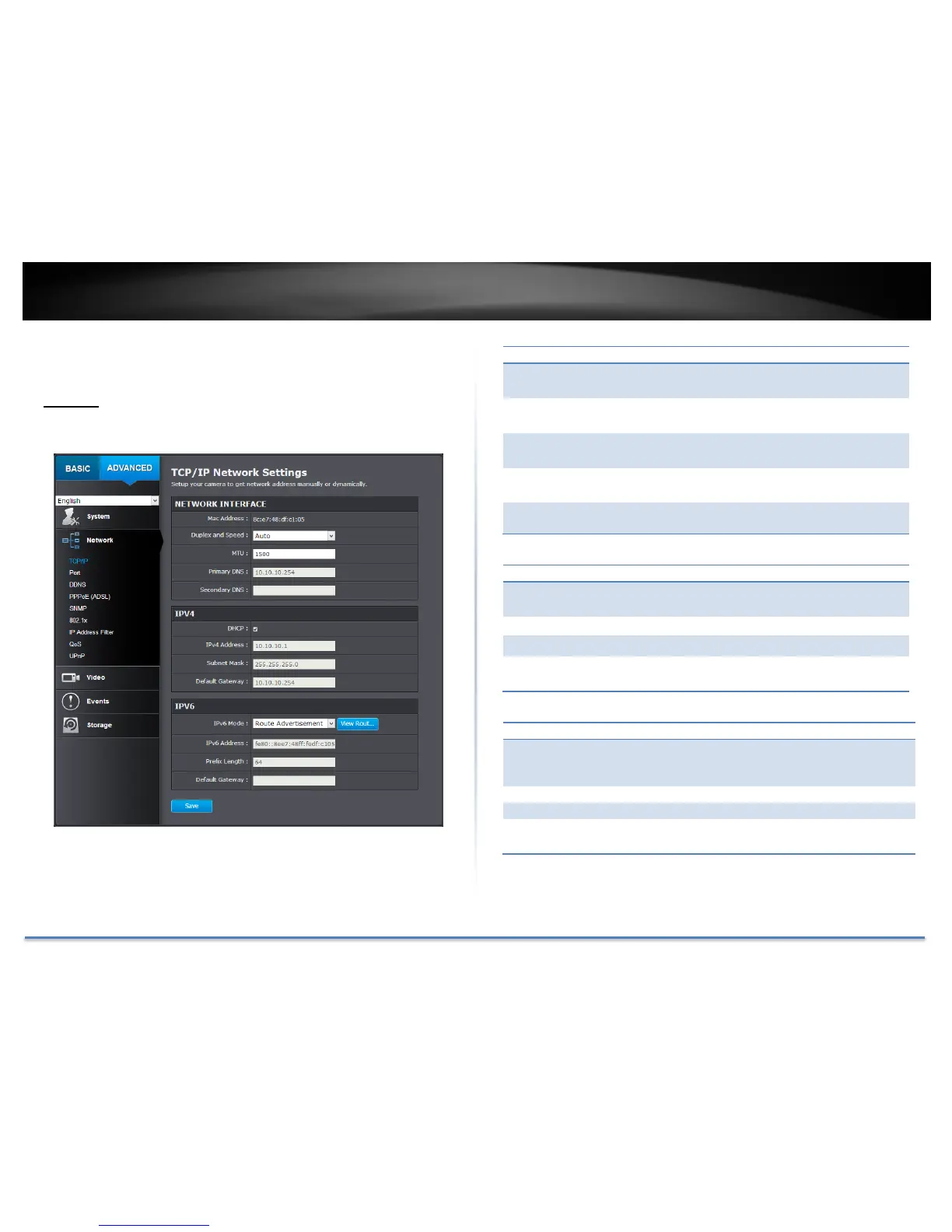
Network Settings
TCP/IP
Setup your basic IPv4 and IPv6 network settings on this page.
Click this button to reboot this camera.
Choose one of the Ethernet duplex and speed to
match your network. Default: auto.
Maximum transmission unit. The maximum field
size in the Ethernet packet.
Enter your first IPv4 or IPv6 DNS server address
Enter your second IPv4 or IPv6 DNS server
address
Check this box if the IP address is assigned by
DHCP server.
The IPv4 dynamic or static address
Network range of the subnet
The default route going further from TV-IP321PI
IPv4 subnet
Choose Manual, DHCP, or Route Advertisement.
Click View Route Advertisement to find a route
advertisement.
IPv6 address of TV-IP321PI
The default route going further from TV-IP321PI
IPv6 subnet





 To Next Page