TRENDnet User’s Guide TV-IP321PI
© Copyright 2015 TRENDnet. All Rights Reserved. 50
Check this box to enable tamper detection. Click
Save to save the settings.
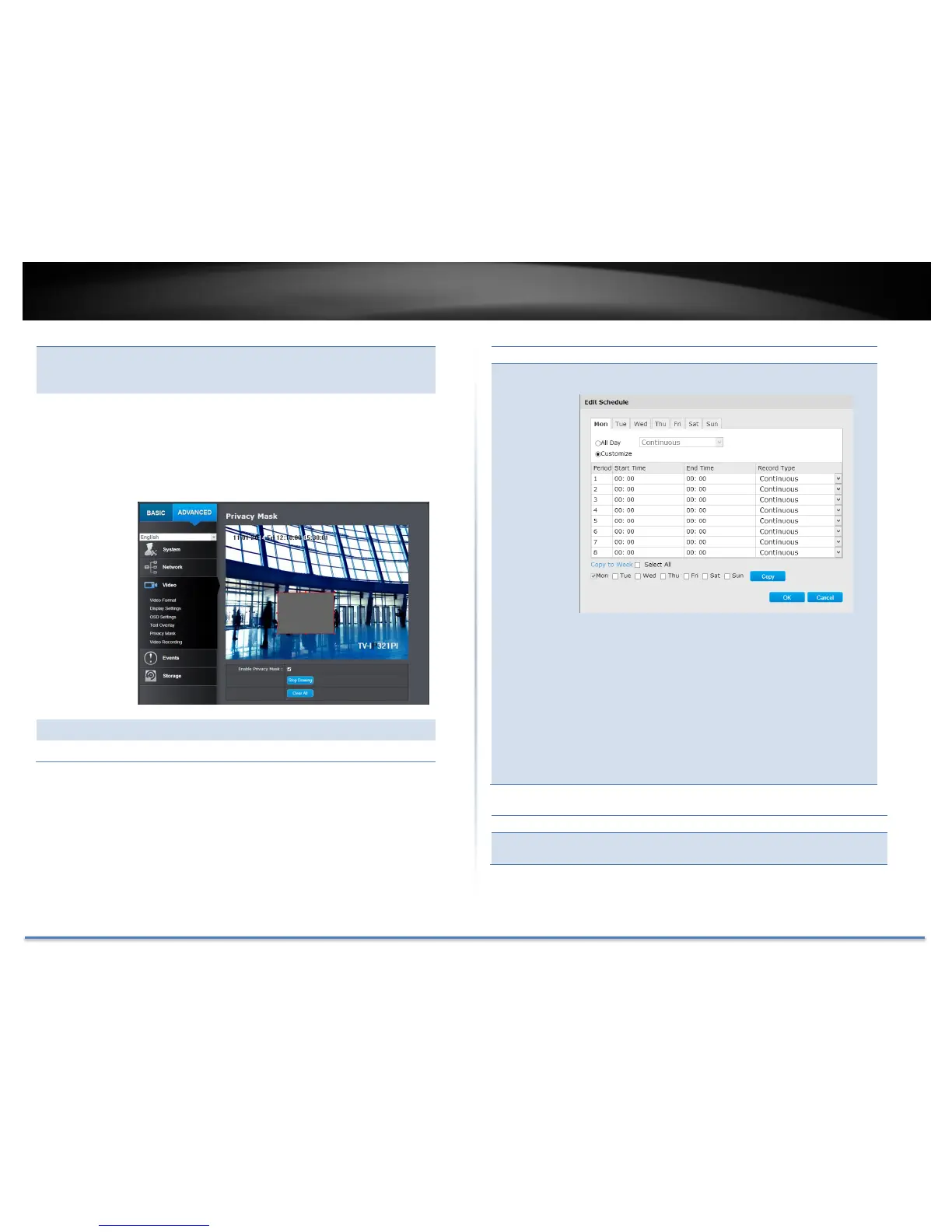
Click Draw Area button to start drawing. Click and
drag on the area you want to set up the tamper
detection. You can setup only one area for tamper
detection. Click Stop Drawing to stop drawing
motion detection areas. The gray block represents
the detection area.
Move the slider to adjust detection sensitivity.
Click this button to clear all the set up areas.
Click Edit to edit the recording schedule. The Edit
Schedule window will pop up.
1. Select day of the week you want to edit.
2. Select All Day or Customized schedule of
the day.
3. Set the time period and the event you want
to trigger the video recording continuous
(always recording) or motion detection.
4. Click Select All or the weekday you want to
have the same schedule on different day.
5. Click another day of the week by clicking on
its tab to set the next schedule. Click OK
when you have finished your settings.
Check this box to send an e-mail notification
when motion is detected.
Click Save to save the changes







 To Next Page