FMS-2000M
LIT-12013580
11
rooms you monitor.
Viewing all network variables
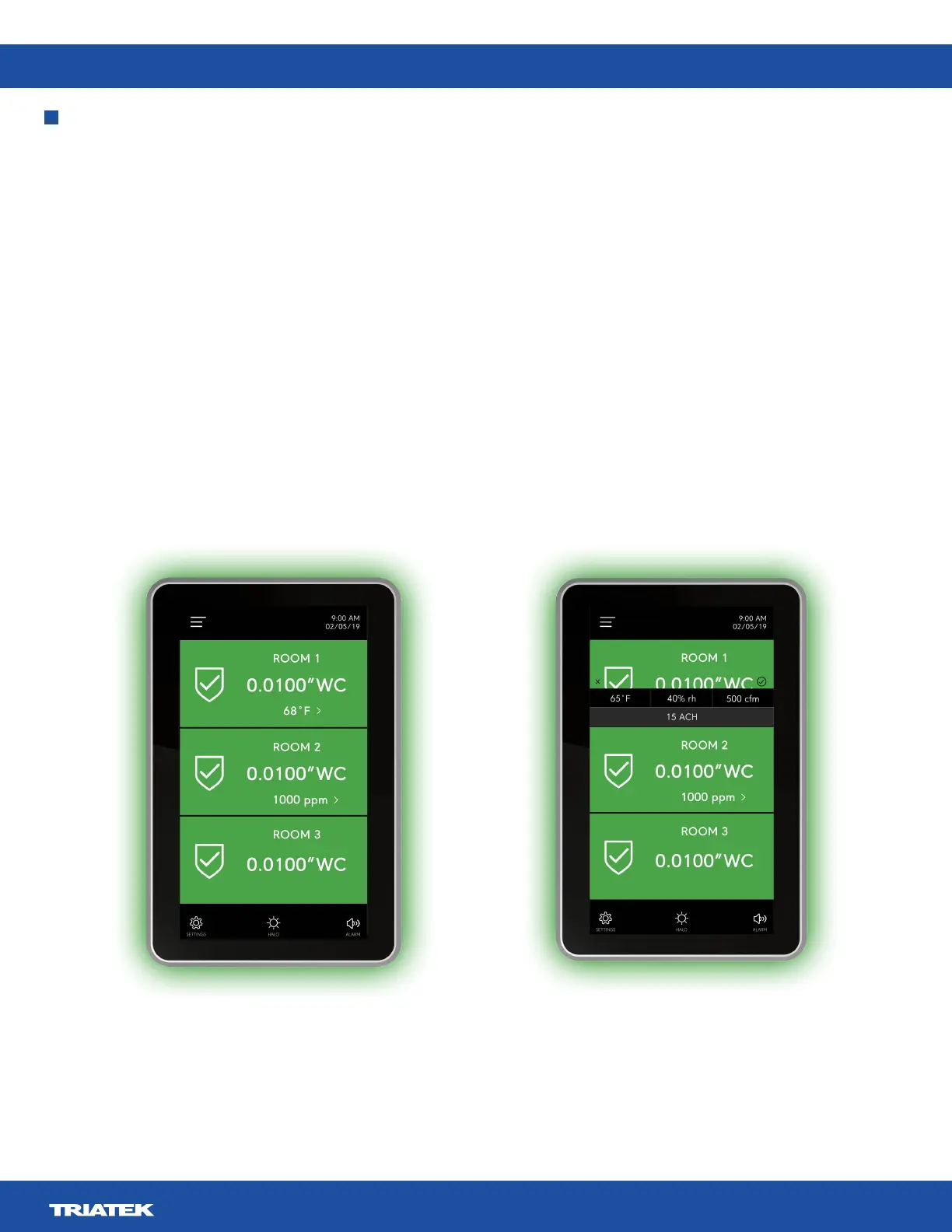
1. On the home screen, tap the arrow next to the network variable. If no arrow displays, no other network variables are available.
2. A pop-up menu appears that displays the readings for each variable at once, as shown in Figure 9.
3. Tap X to close the menu.
Changing the network variable that displays on the home screen
1. On the home screen, tap the arrow next to the network variable. If no arrow is visible, no other network variables are available.
2. A pop-up menu appears that displays the readings for each variable at once, as shown in Figure 9.
3. On the home screen, tap the variable that you want to appear. If you monitor two rooms you can select two variables to display.
4. To save your selections, tap the Checkmark icon, or tap X to cancel the selection and close the menu.
Navigating the multi-room monitor home screen
Figure 8: Three room monitoring with network variables Figure 9: Viewing and selecting network variables


 To Next Page