EasyManua.ls Logo

Trilogy Communications Commander - Page 29

Default Icon
81 pages
Print Icon
To Next Page IconTo Next Page
To Previous Page IconTo Previous Page
Loading...
Commander Installation Guide
Trilogy Communications Limited
Page 29 of 81
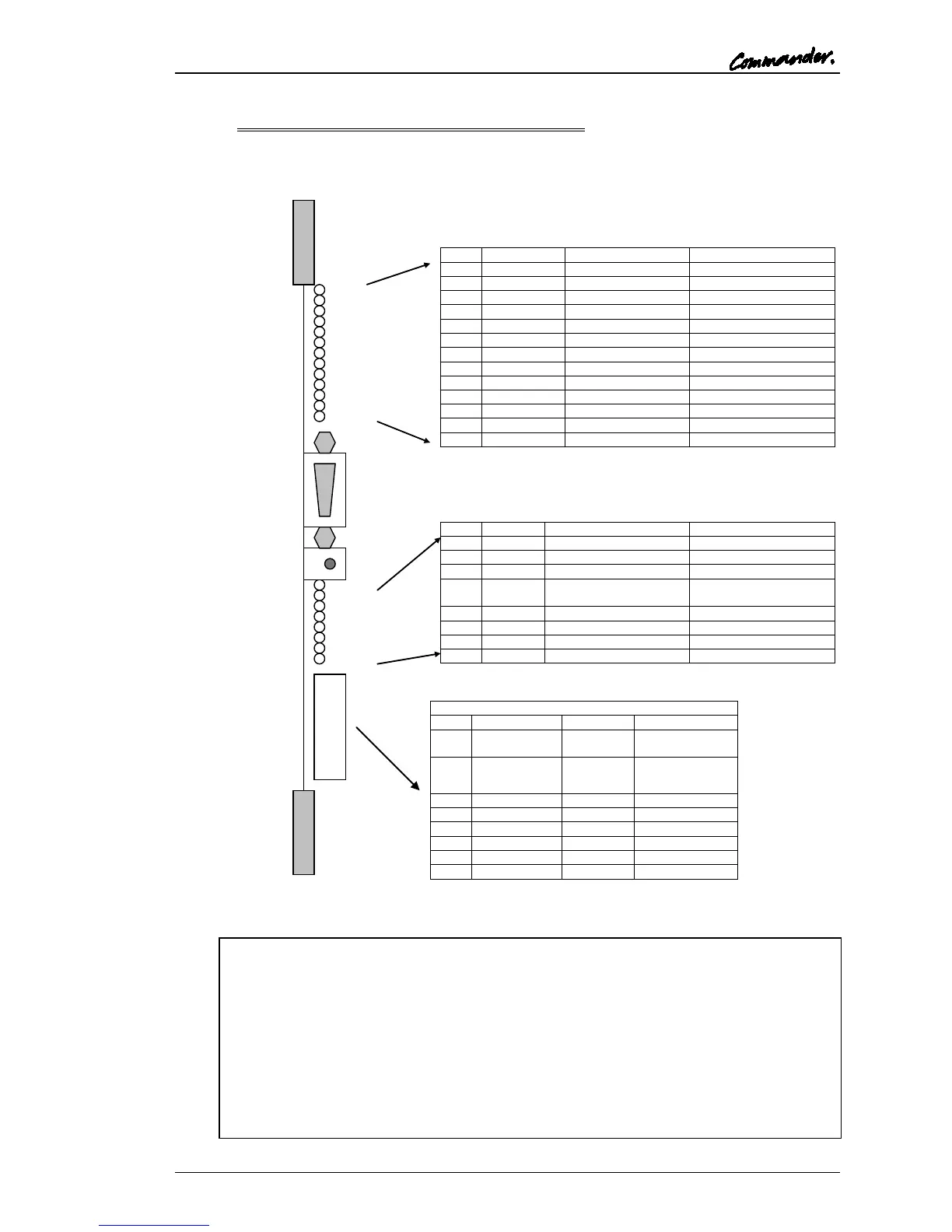
3.4.5.3 500-25 Network Card Indicators and Switches
Reset
8 way DIP Switch
1
|
|
|
|
8
1
|
|
|
|
|
|
|
|
|
13
LED
Legend
Activity
Function
D8
+5V
On
+5V
D1
1
1Hz
DSP 1 OK
D2
2
2Hz
DSP 2 OK
D6
RESET
Off
Reset
D3
NO E1 CLK
Off if net available
No E1 Clock
D9
TDM D
Off when started
TDM Disabled
D10
1 DIS
Off when started
DSP Disabled (TDM)
D11
BUSY
Quick flash
TDM Busy
D12
COM1
Quick flash
DSP Comms (TDM)
D13
E1 DIS
Off if data available
E1 Disabled
D14
2 DIS
On when E1 down
NET DSP Disabled
D15
BUSY
On when buffers full
NET DSP Busy
D16
COM2
Unused
NET DSP Comms
LED
Legend
Activity
Function
D17
1
1Hz
DSP 1 & 2 sync’d
D18
2
On when full
IN Buffer full
D19
3
On when full
OUT Buffer full
D20
4
On during start then off
E1 clk & event off
command
D21
5
On
Possible RX Data loss
D22
6
On if clk missing
E1 Clock off
D23
7
Normally toggles
Receiving H IP Data
D24
8
Normally toggles
Transmitting H IP Data
DIP Switch Functions
Sw
Function
Default
Note
1
Cable Match
OFF=
CAT 5
ON = Co-ax
2
Cable Length
ON =
norm
OFF = “long”
3
undefined
4
undefined
5
undefined
6
UART IN
OFF
7
UART OUT
OFF
8
ERR CORR
OFF
D1 and D2 will, under normal operation, flash at 1Hz and 2Hz respectively. If
there is a problem during start-up, one or both LEDs will flash considerably
faster.
D13 should be on under normal operating conditions. The LED turns off when
data comes in from a remote link but the off duration is very short and not
visible. It is therefore only useful to show an error condition.
D20 is turned on just after power-up then turned off under TDM control shortly
afterwards. The LED is also on during a TDM reconfiguration process. The state

of the LED is duplicated on a remote 500-25 if connected directly.

Table of Contents