CHAPTER 2: ASSEMBLY INSTRUCTIONS
BIKE ASSEMBLY STEPS (continued):
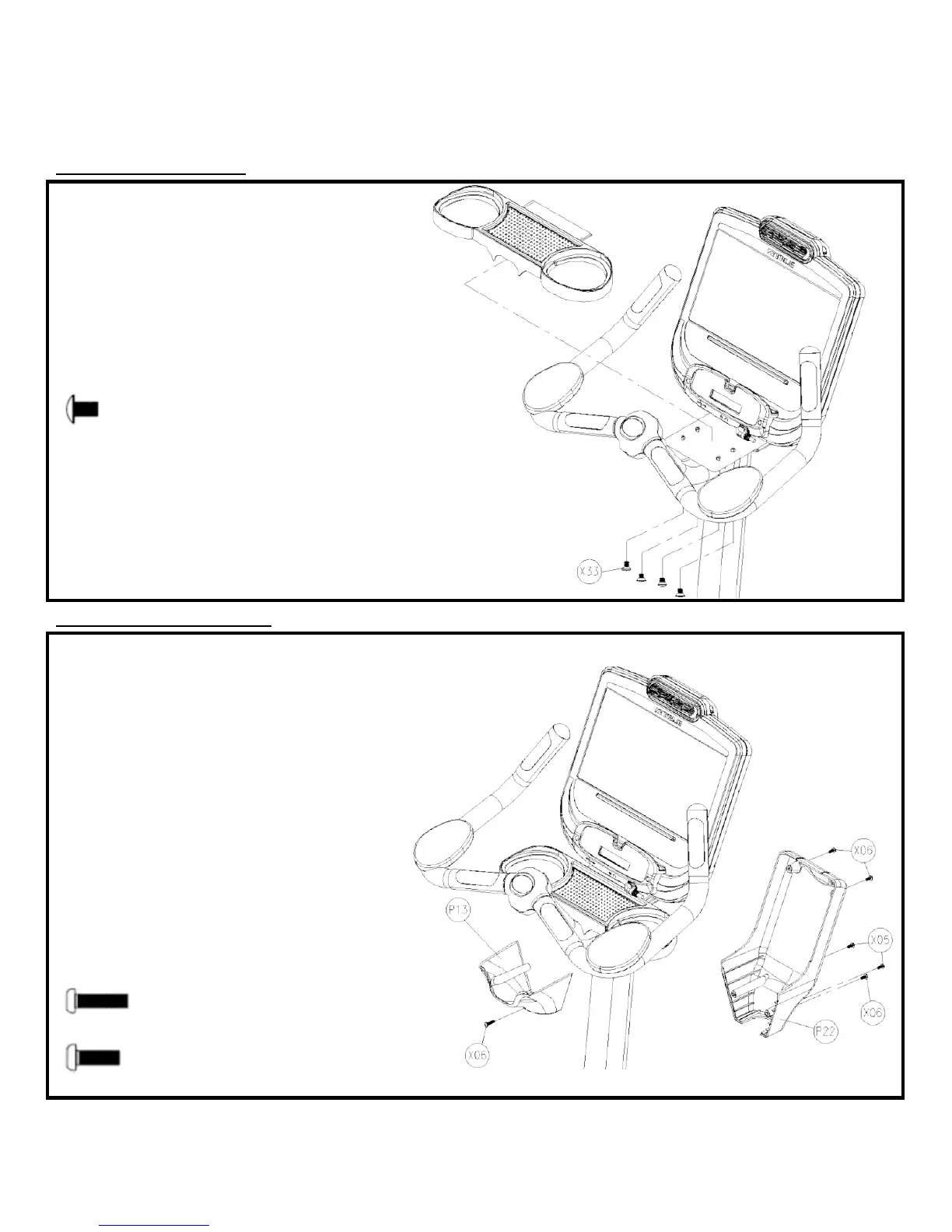
Step 11: Storage Tray:
) Insert the Storage Tray on top of the Front
Mast Mounting Plate; pay special attention to
make sure that the plastic lip of the Storage
Tray is tucked underneath the bottom of the
Console
b) Attach the Storage Tray to the Mounting
Plate by tightening all 4 screws with a Phillips
head screwdriver (not provided)
Hardware Required:
NOTE: For all hardware, tighten using a
Phillips head screwdriver (not provided)
a) Attach the Front Cover (P13) to the Front
Mast tube using a single (X06) screw; make
sure the Front Cover (P13) aligns with the
Storage Tray plastic around the Handlebar
b) Attach the Back Cover (P22) to the Console
Mounting Plate using two (X06) screws; top
screw hole locations
c) Attach the Back Cover (P22) to the Front
Cover (P13) using two (X05) screws; the longer
screws
d) Attach the Back Cover (P22) to the Front
Mast tube using the remaining single (X06)
screw.
Truefitness.com / 800.426.6570 / 636.272.7100 19



 To Next Page