CHAPTER 4: PROGRAMMING & OPERATION
Truetness.com / 800.426.6570 / 636.272.7100
33
ADVANCED CONSOLE FUNCTIONS CONTINUED:
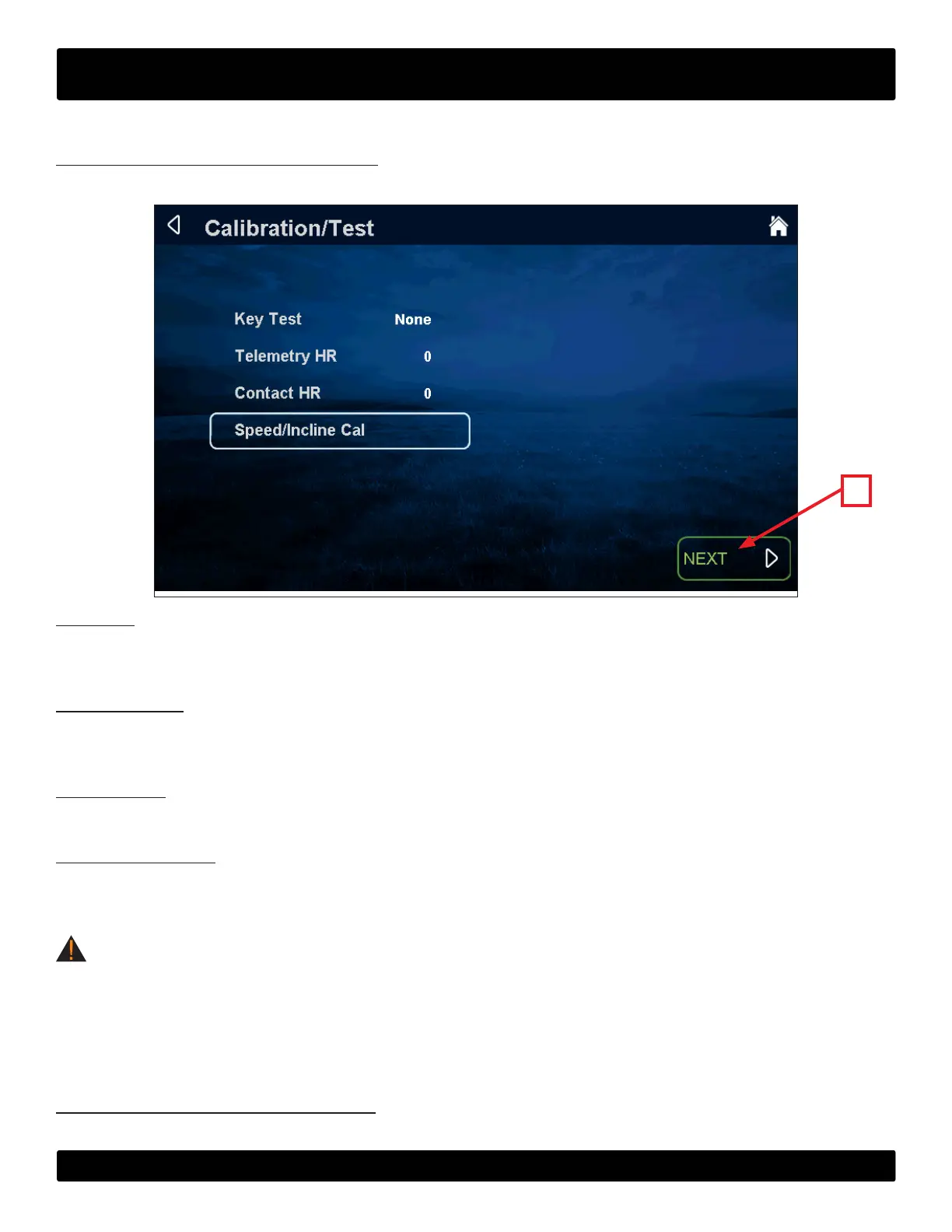
Diagnostics Menu - Calibration/Test:
is menu contains tools for testing and verifying treadmill operation.
A
Key Test:
When a key is pressed on the console “NONE” will change to indicate which key is being pressed. In the event of a stuck
key, the key that is being engaged will display.
Telemetry HR:
Use the supplied wireless heart rate strap or simulator to test if the unit is receiving wireless heart rate data. If there is a
reading displayed without the use of a heart rate strap or simulator, there is outside interference from another source.
Contact HR:
Ensures the unit is receiving the data by displaying the user’s heart rate when the contact heart rate pads are gripped.
Speed/Incline Cal:
Speed/Incline Cal (calibration) is selected by default in this menu. To run a calibration press the next button (A) and follow
the on screen instructions.
WARNING:
is process will take full control of the treadmill and can be dangerous if caution is not taken.
• Calibration can take up to two minutes to complete.
• Do not stand on the treadmill during the calibration procedure.
• Verify that the machine is free of all parts and tools.
• Keep children and animals at a safe distance.
Diagnostics Menu - Production Test:
The production test screen is used during the production process and is not used for service or troubleshooting.


 To Next Page