Page 94 of 102
TVL 351
ISSUE 15
Adjusting the Floor Levels
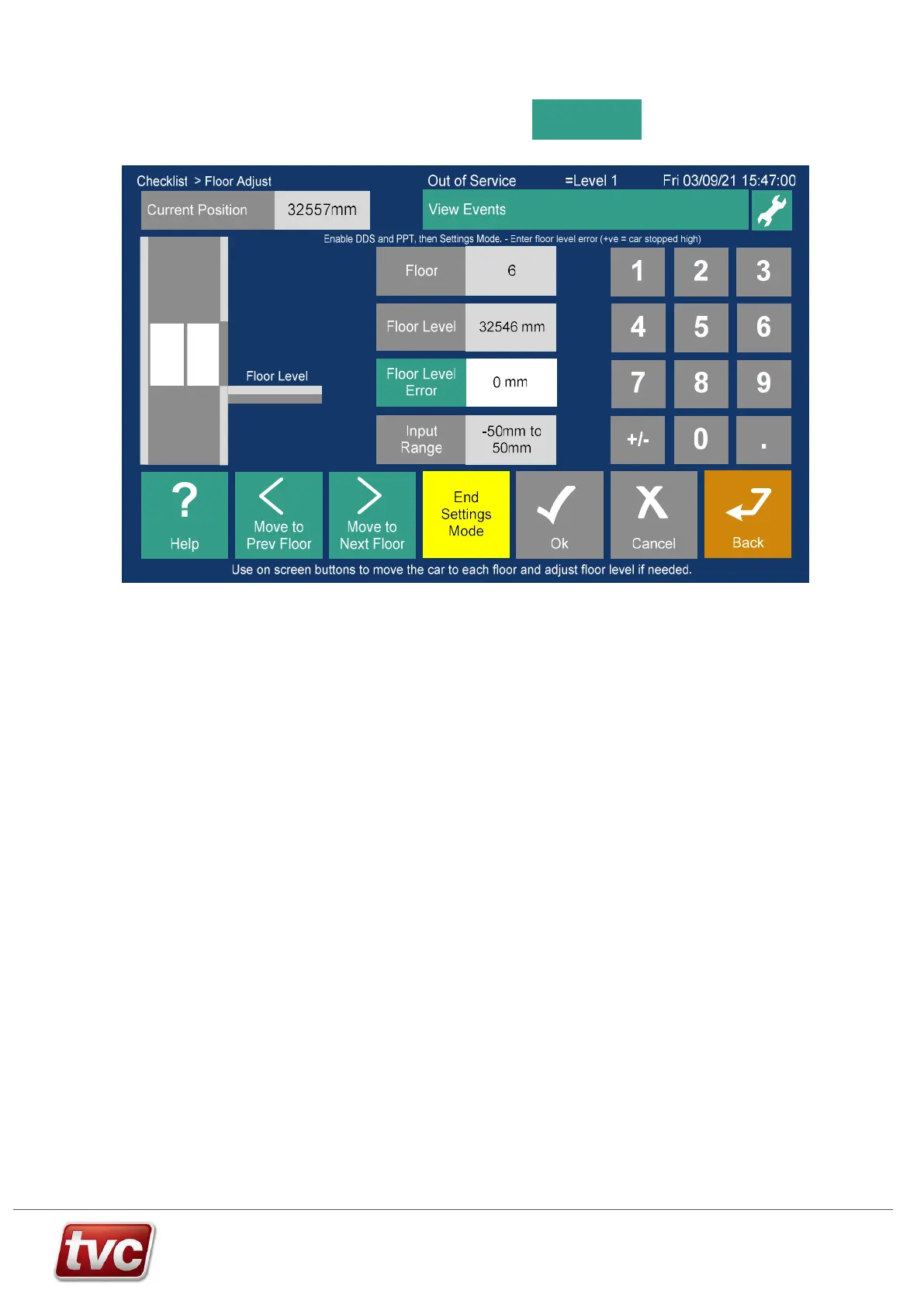
Floor Adjust
Arrive at this screen from
Checklist > Commission Group
Settings mode – To Adjust Floor Levels.
Floor Adjust, settings mode will only work if the following conditions are met:
1) In Normal (LAR Input Active) + Doors Disabled + Prepare to Test Active.
Sequence of Teach Adjust Operation:
1) Prior to adjusting floors make sure the car is stopping consistently and carry out a “DZ Stop Distance” learn.
The DZ Stop Distance learn button is in the checklist.
2) Select “Floor Adjust” from checklist.
3) Enable “Settings Mode”.
4) Move the car to the floor to be adjusted, by using the “Move to” buttons. The car will be moved automatically
by placing a car call.
5) Once the car is stationary at the taught level the floor can be adjusted up or down by up to 50mm. If the
level needs moving further re-teach the floor.
6) If re-levelling is enabled the car will re-level to the new position.
7) Move to the next floor to be adjusted using the “Move to Next/Prev” buttons.
8) Press “End Settings Mode” to activate the Limax3CP.



 To Next Page