4 Loading Media
4.2 Loading Externally Fed and Fanfold Media
2
6
3
4
5
7
1
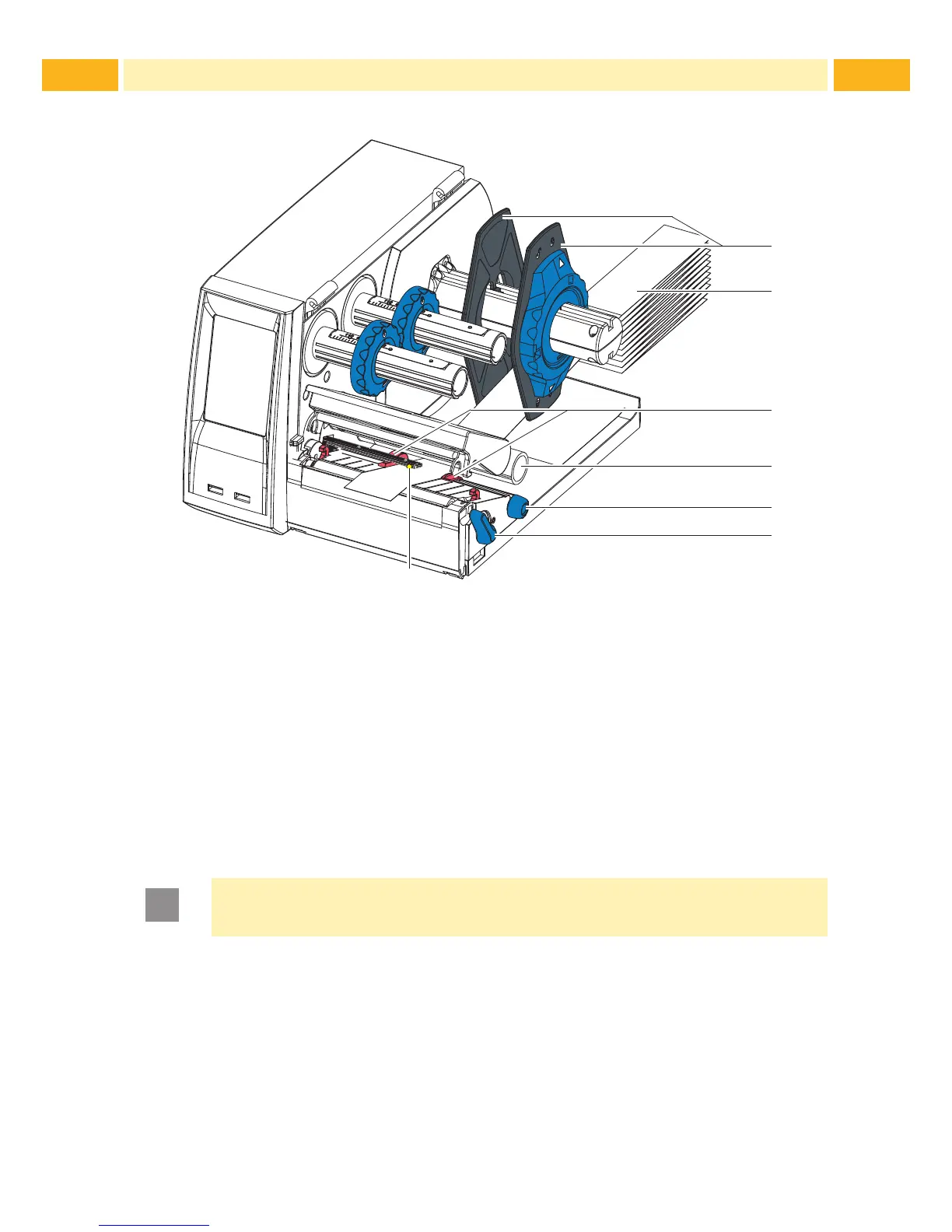
Fig. 8 Loading externally fed and fanfold media
1. Position media (2) behind the printer.
2. Guide the media below the roll retainer (1) to the printing unit. Ensure that
the printing side of the media is visible from above.
3. Turn lever (6) counterclockwise to open printhead.
4. If the printer is equipped with a cutter or perforator, fold it down.
5. Position guides (3) by turning the knob (5) so that they are several milli-
meters wider than the media.
6. Position media below the roller (4) and guide it through the print unit.
Attention!
Guide media through the print unit below the media sensor (7).
7. Move guides (3) closely to the edges of the media without clamping the
media.
8. Adjust media sensor ( 4.3 on page 17).
9. If the printer is equipped with a cutter / perforator, guide media through the
cutter / perforator and fold cutter / perforator back to the printing unit.
10. Press printhead down and turn lever (6) clockwise to lock the printhead.



 To Next Page