4 Loading Media
4.4 Loading Transfer Ribbon
6
7
8
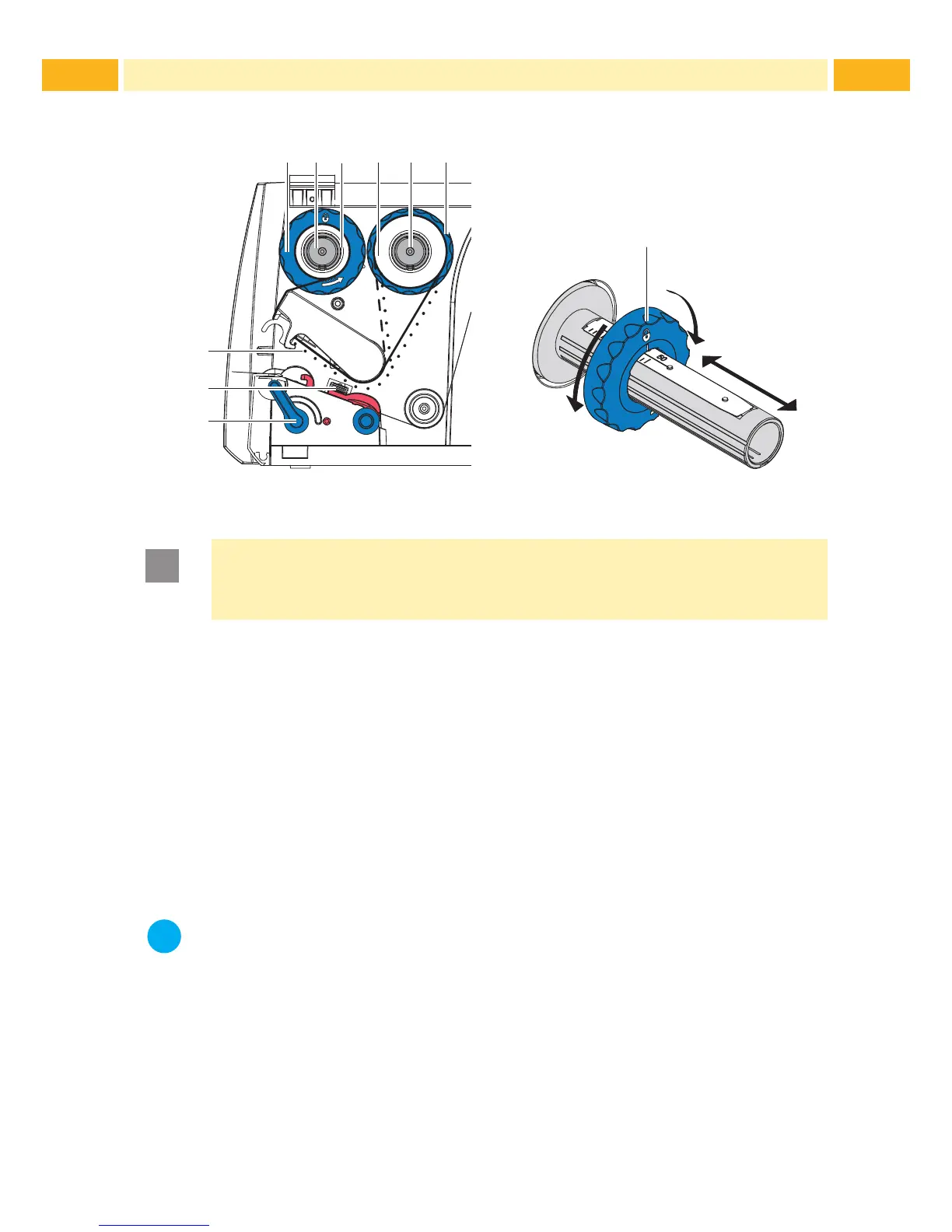
Fig. 10 Transfer Ribbon Feed Path
C
A
B
Fig. 11 Edge Guide Adjustment
Attention!
Clean the printhead before loading the transfer ribbon
( 7.2 on page 7.2).
1. Turn lever (6) counterclockwise to open the printhead.
2. Set guide (1) on both hubs (2, 5) to the correct transfer ribbon width
(Fig. 11):
• Hold hub and unlock guide (1) by turning it clockwise in direction A.
• Slide guide in direction B and adjust guide to ribbon width using the
scale.
• Hold hub and lock edge guide by turning it counterclockwise in
direction C.
3. Load transfer ribbon (4) on the hub (5) up to the edge guide (1) in a way
that the ink coating of the ribbon faces the opposite side of the print head
after being loaded.
Notice!
To wind the ribbon an empty ribbon core (3) is needed that must be
at least equal in width to the supply ribbon.
When changing the transfer ribbon use the empty supply ribbon
core for winding the next ribbon.
4. Adjust position of the edge guide on the take-up hub to the width of the
ribbon core (3) and push ribbon core on the take-up hub (2).
5. Guide the transfer ribbon through the printing unit as shown in Fig. 10 in
a way that the ink coating (8) of the ribbon contacts on the media to be
printed NOT the printhead.



 To Next Page