Ver. 01NL okt19
15
GC Amsterdam
Custom menu
There is no standard setting for
printing complex models.
Experimenting is recommended.
Always try to use as little support
material as possible in order to be
able to remove it easily, leaving as
few ‘scars’ as possible on the
model.
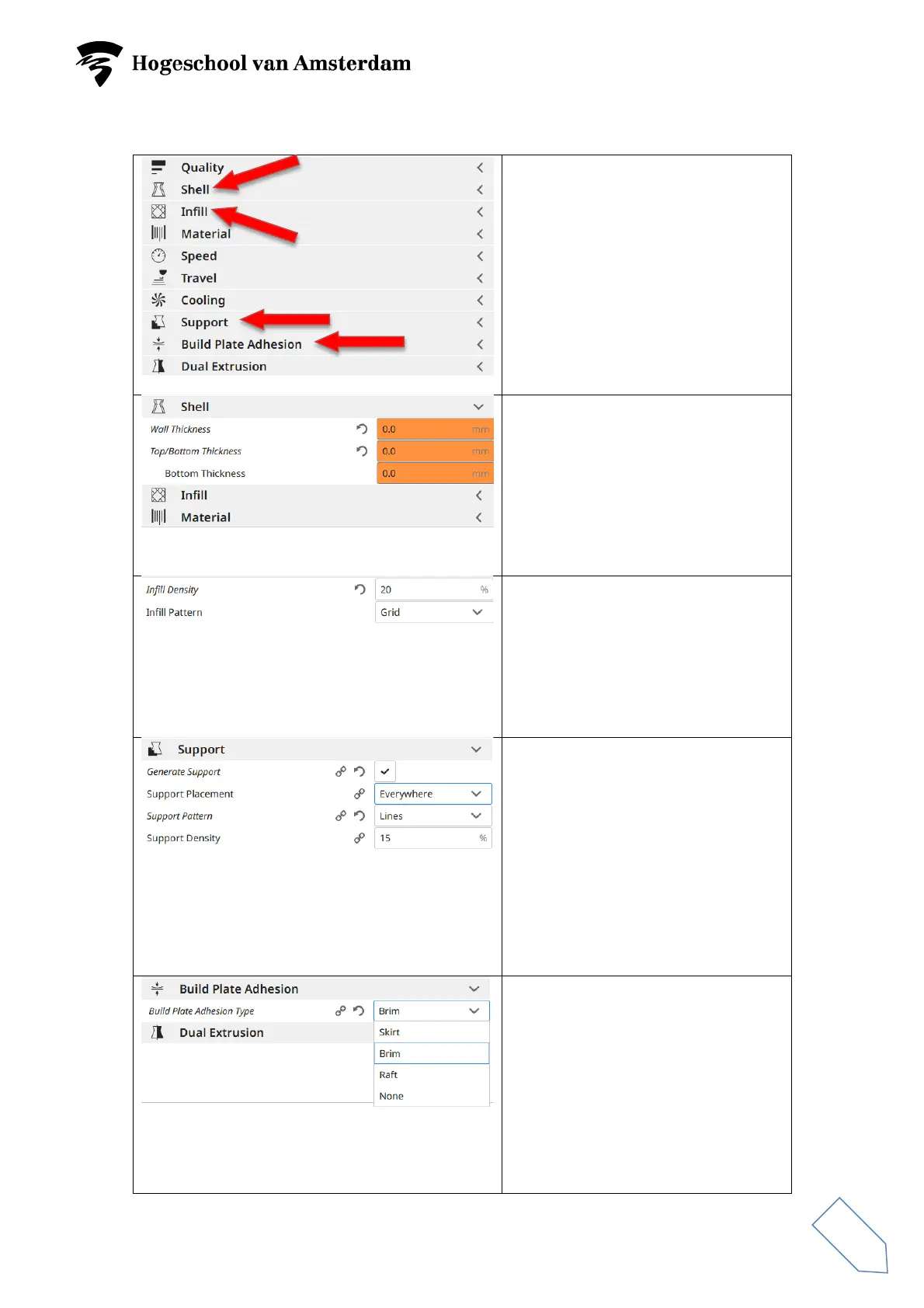
The ‘Shell’ menu is used to set the
thickness of the walls, bottom and
top. Things to consider regarding
settings:
• Strength of the product
• Costs
• Printing time
The ‘Infill’ menu is used to set the
density and the filling pattern.
Things to consider regarding
settings:
• Strength of the product
• Costs
The ‘Support’ menu is used to set
the pattern and density of the
support material. The
recommended Support Pattern is
‘Lines’.
Things to consider regarding
settings:
• Easy removal of support
material
• Support scarring left on
The ‘Build Plate Adhesion’ menu is
used to set the adhesion of the
model to the glass plate.
Build Plate Adhesion Type standard
= Brim or None.
A number of matters depend on the
dimensions and shape of the
footprint on the glass plate.



 To Next Page