18 • MAKING AND AN SWERING CALLS Customer Service: 888-269-7477
Placing a Call with Captions
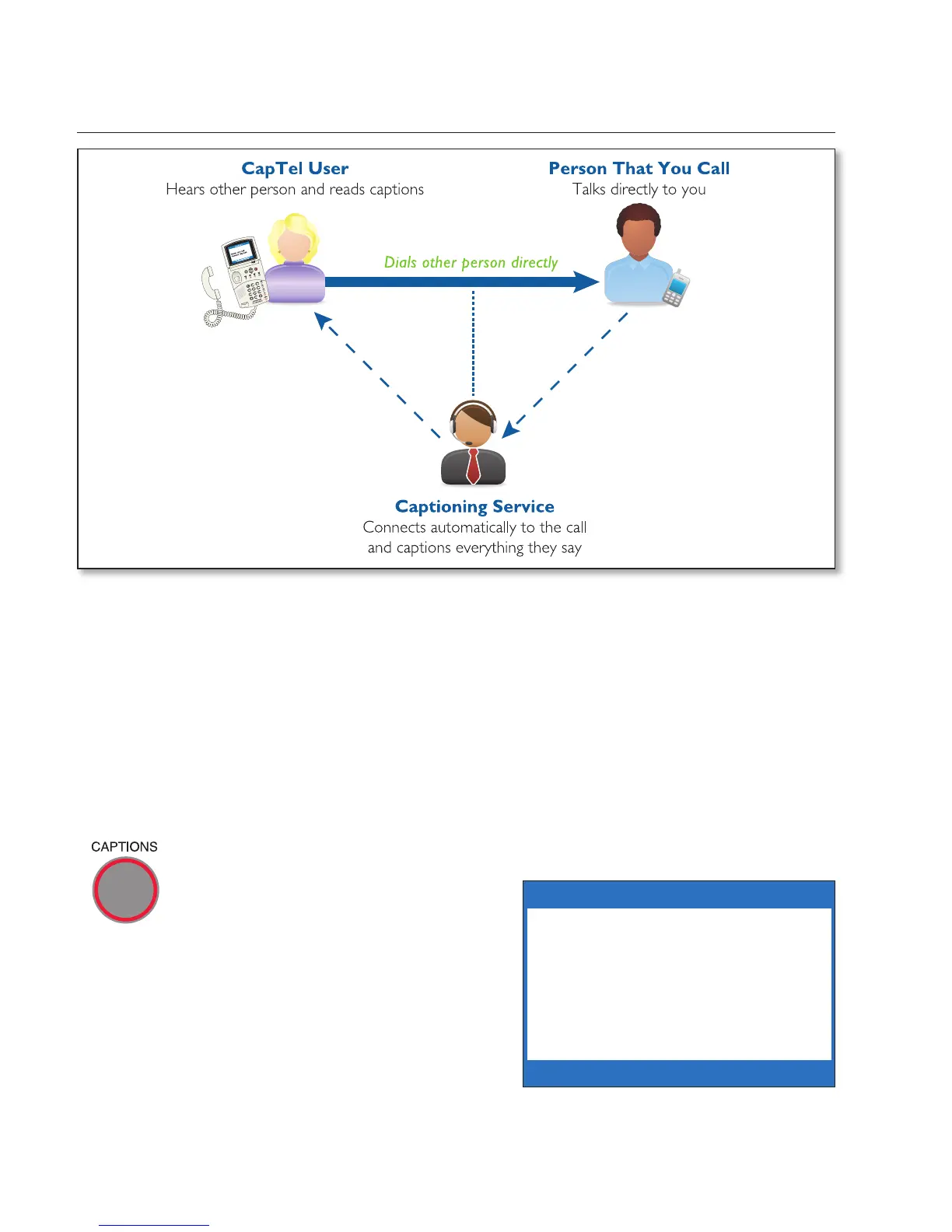
You place a call on your CapTel 840 the same way as with any other
telephone. As you dial, your CapTel phone automatically connects to the
Captioning Service to show you captions during the call.
NOTE: If you are in an office setting, please see “Dialing a Number to Get an
Outside Line” on page 77. If you have Call Waiting, please see page 79 for
special instructions.
To place a call with captions:
Before you dial, check that the red light around the CAPTIONS
button is on. The Captions
feature must be on before you
place a call in order for you to
get captions. If the light is off,
press the CAPTIONS button to
turn it on.
1. Lift the handset.
2. Dial the phone number of the
person you wish to call.
Dial a Number
or Press Speed Dial


 To Next Page