Customer Service: 888-269-7477 SET TINGS • 77
Dialing a Number to Get an Outside Line
Is a number required to get an “outside line” before you can place a call? In
some office settings, for example, you may need to dial a 9 or other number
to get an outside line. This number must be entered in the Dialing Prefix
menu in order for captions to work properly.
In 1-Line Mode: Your CapTel phone automatically enters the Dialing Prefix
for you at the start of every captioned call. If the Caption feature is OFF, you
will need to dial the Dialing Prefix manually before you place a call.
In 2-Line Mode: You still need to dial the Dialing Prefix manually before
you place a call, even after you’ve entered the Dialing Prefix in the CapTel
menu. The Dialing Prefix in the CapTel menu only applies to Line 2, the
telephone line that connects to the Captioning Service.
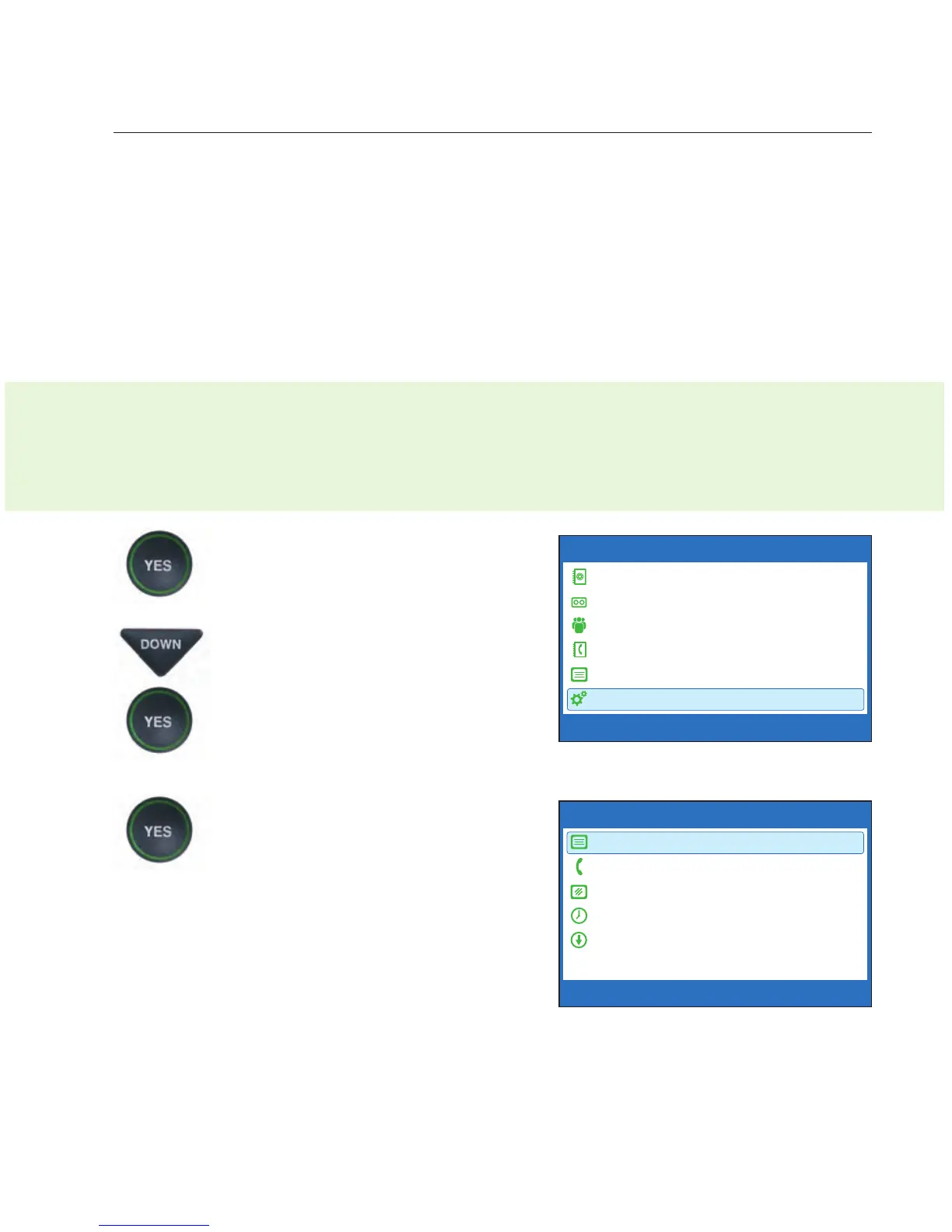
1. With the handset hung up,
press the YES button to see the
Options menu.
2. Press the DOWN arrow button
repeatedly until Settings is
highlighted. Press the YES
button to select.
3. Check that Caption Settings
is highlighted. Press the YES
button to select.
OPTIONS
Dial from Phone Book
Answering Machine
Call History
Edit Phone Book
Conversations
Settings
Press YES to select or press NO to exit Options



 To Next Page