56 • USING THE ANS WERING MACHI NE Customer Service: 888-269-7477
Recording a Personal Greeting Message
Before you begin making/receiving calls, you may want to record a personal
greeting message for the CapTel 840 Answering Machine. If you do not want
to record a personal greeting, the Answering Machine will use a pre-recorded
greeting that says, “Hello. No one is available to take your call. Please leave a
message after the tone.”
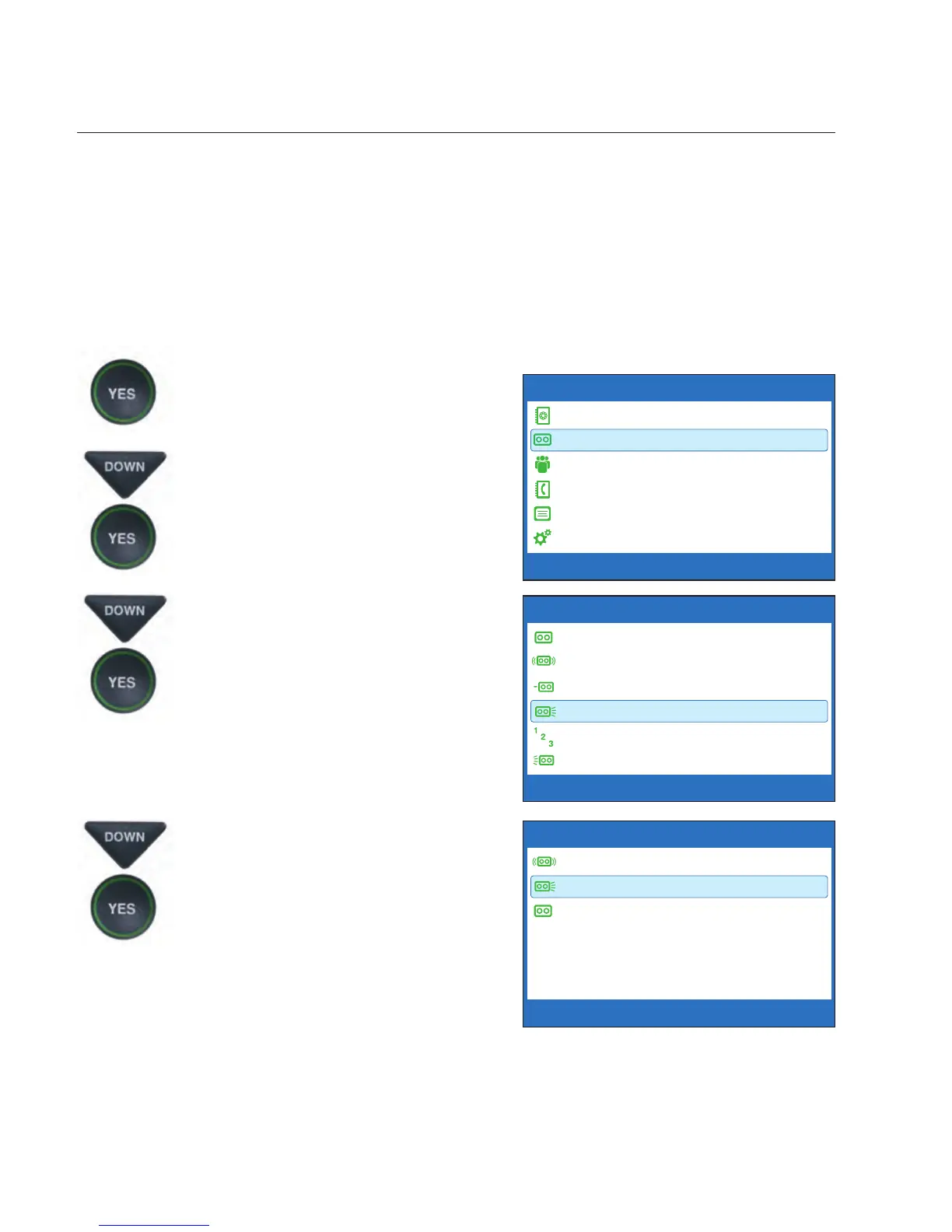
To record a personal greeting message:
1. Press the YES button to see the
Options menu.
2. Press the DOWN arrow button
to highlight Answering
Machine. Press YES to select.
3. Press the DOWN arrow button
to highlight Greeting Message.
Press YES to select.
4. Press the DOWN arrow button
to highlight Record New
Greeting. Press YES to select.
OPTIONS
Dial from Phone Book
Answering Machine
Call History
Edit Phone Book
Conversations
Settings
Press YES to select or press NO to exit Options



 To Next Page