58 • USING THE ANS WERING MACHI NE Customer Service: 888-269-7477
Setting the Number of Rings
Before Answering
You can set the approximate number of times the CapTel will ring before the
Answering Machine answers the call. The default setting is four (4) rings, but
you can set it to be any number of rings between three and eight.
NOTE: The ring count may be slightly different in telephone systems that use
“distinctive” ring patterns. Please experiment with this setting as needed for
your specific phone system.
To set the number of rings before answering:
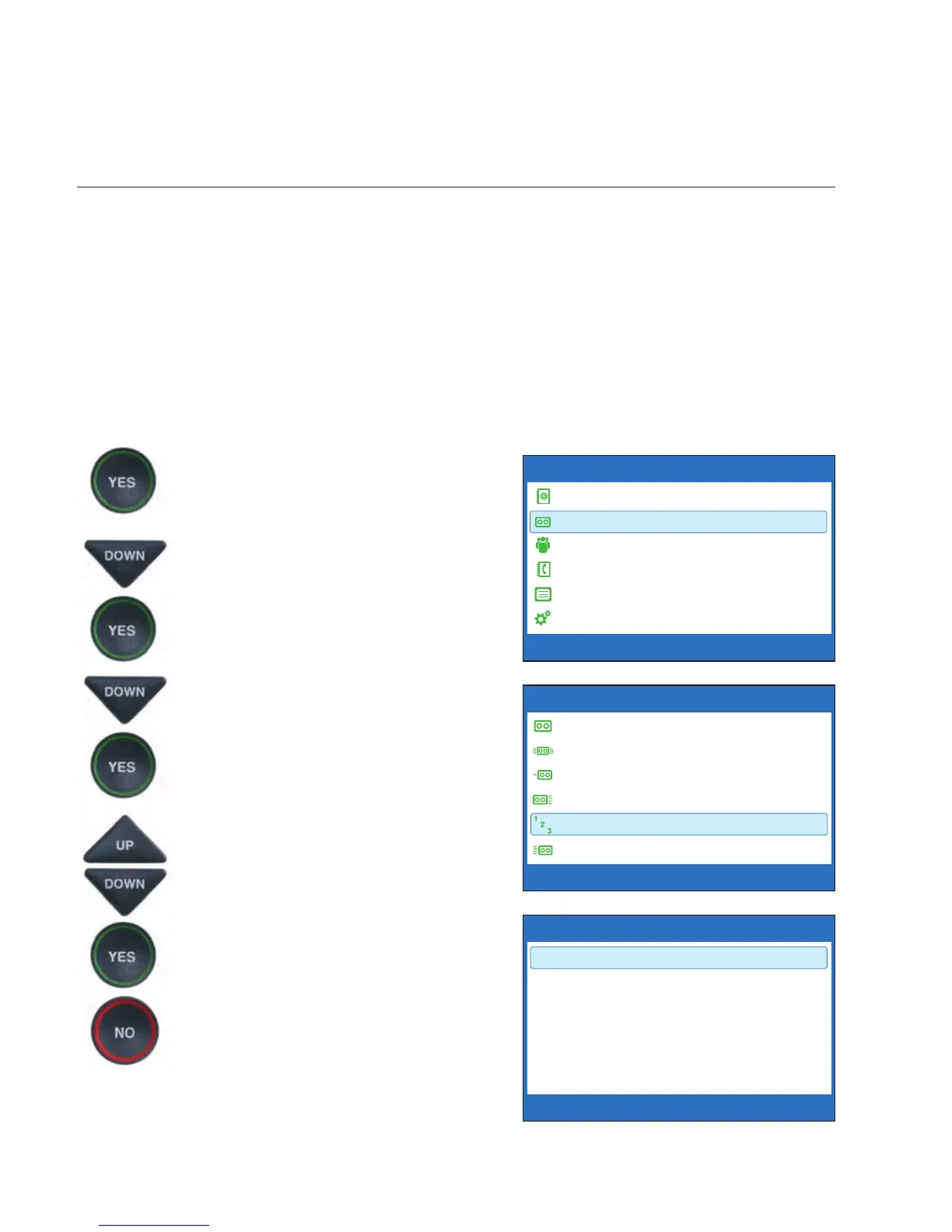
1. With the handset hung up,
press the YES button to see the
Options menu.
2. Press the DOWN arrow button
until Answering Machine is
highlighted. Press the YES
button to select.
3. Press the DOWN arrow button
repeatedly until Answer Ring
Count is highlighted. Press the
YES button to accept.
4.
Use the UP or DOWN
arrow
buttons to select the number of
rings, from 3 rings up to 8 rings
.
Press the YES button to select.
5. Press the NO button
repeatedly to exit.
On incoming calls, your CapTel phone will
ring this number of times before the
Answering Machine picks up the call.
OPTIONS
Dial from Phone Book
Answering Machine
Call History
Edit Phone Book
Conversations
Settings
Press YES to select or press NO to exit Options


 To Next Page