Customer Service: 888-269-7477 SET TINGS • 79
Setting a Call Waiting Block
Do you have Call Waiting as part of your telephone service? Call Waiting is
not supported in 1-Line Mode, as it may disrupt your captions. If you have
Call Waiting service, you need to set a Call Waiting Block in the CapTel menu.
Setting a Call Waiting Block only affects captioned calls. You can still use Call
Waiting when the Caption feature is off or on any other phones connected to
your telephone lines.
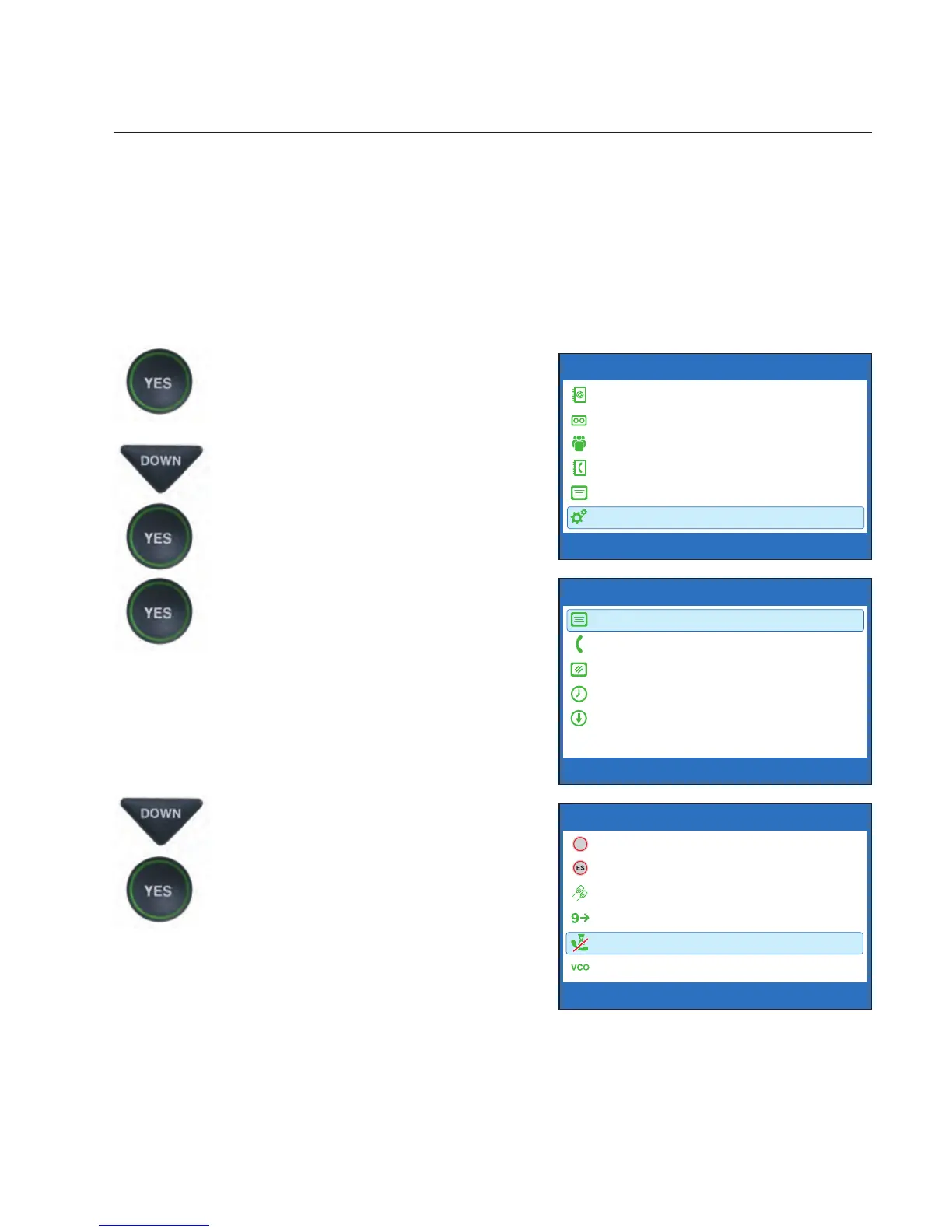
1. With the handset hung up,
press the YES button to see the
Options menu.
2. Press the DOWN arrow button
repeatedly until Settings is
highlighted. Press the YES
button to select.
3. Check that Caption Settings
is highlighted. Press the YES
button to select.
4. Press the DOWN arrow button
repeatedly until Block Call
Waiting is highlighted. Press
the YES button to select.
OPTIONS
Dial from Phone Book
Answering Machine
Call History
Edit Phone Book
Conversations
Settings
Press YES to select or press NO to exit Options


 To Next Page