Customer Service: 888-269-7477 SET TINGS • 83
Turning Keypad Lights On/Off
The CapTel 840 dialing keypad is lit to make
it easier to see the number keys.
The lights on the number keypad can be turned off in the CapTel Options
menu. When Keypad Lights Timeout is selected, the lights on the number
keypad go off automatically after approximately 60 seconds of inactivity.
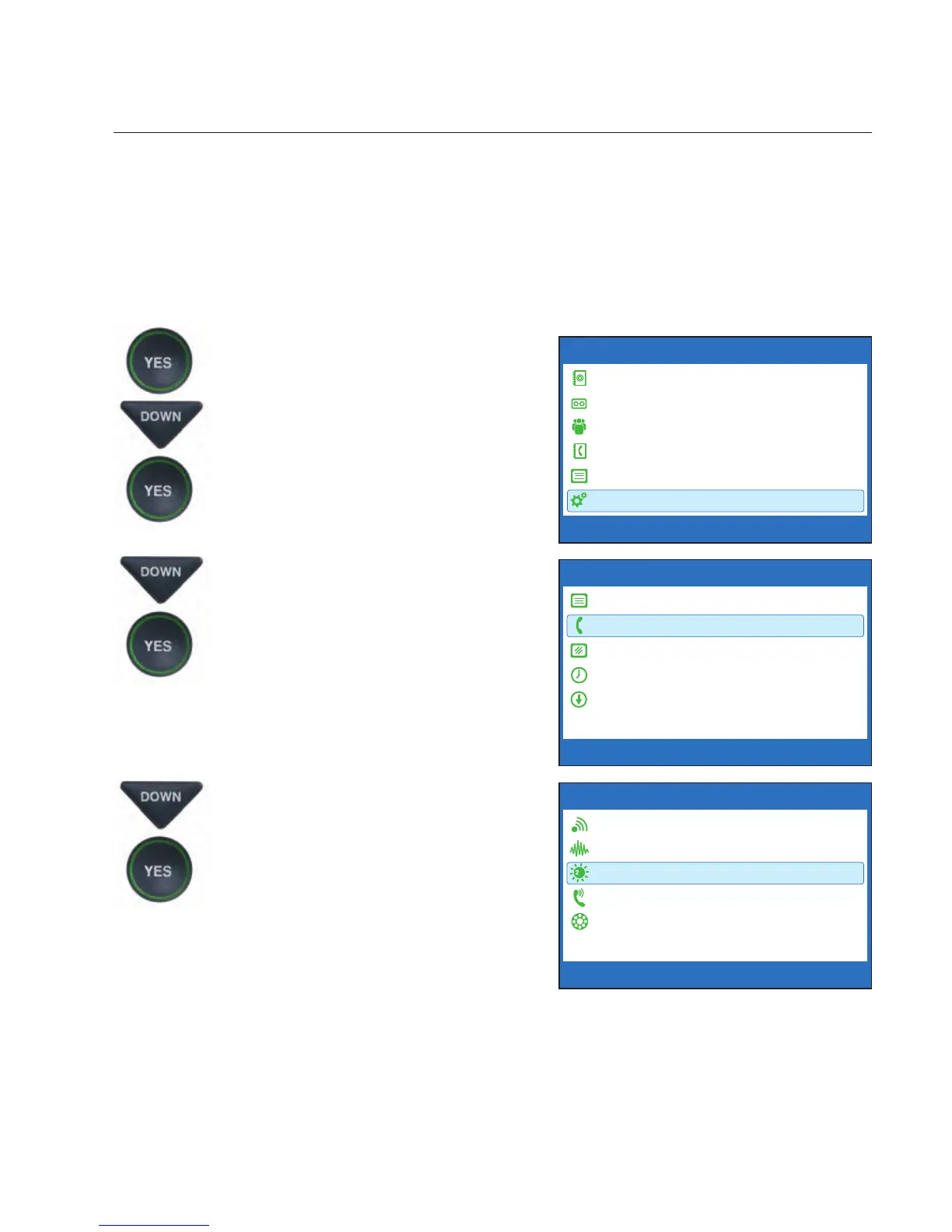
To turn the lights on the number keypad off:
1. Press the YES button to see the
Options menu.
2. Press the DOWN arrow button
until Settings is highlighted.
Press the YES button to select.
3. Press the DOWN arrow button
to highlight Phone Settings.
Press the YES button to select.
4. Press the DOWN arrow button
repeatedly until Keypad
Lights is highlighted. Press
the YES button to select.
OPTIONS
Dial from Phone Book
Answering Machine
Call History
Edit Phone Book
Conversations
Settings
Press YES to select or press NO to exit Options



 To Next Page