Customer Service: 888-269-7477 USI NG THE ANSWERI NG MACHINE • 53
Option 2: From the Options Menu
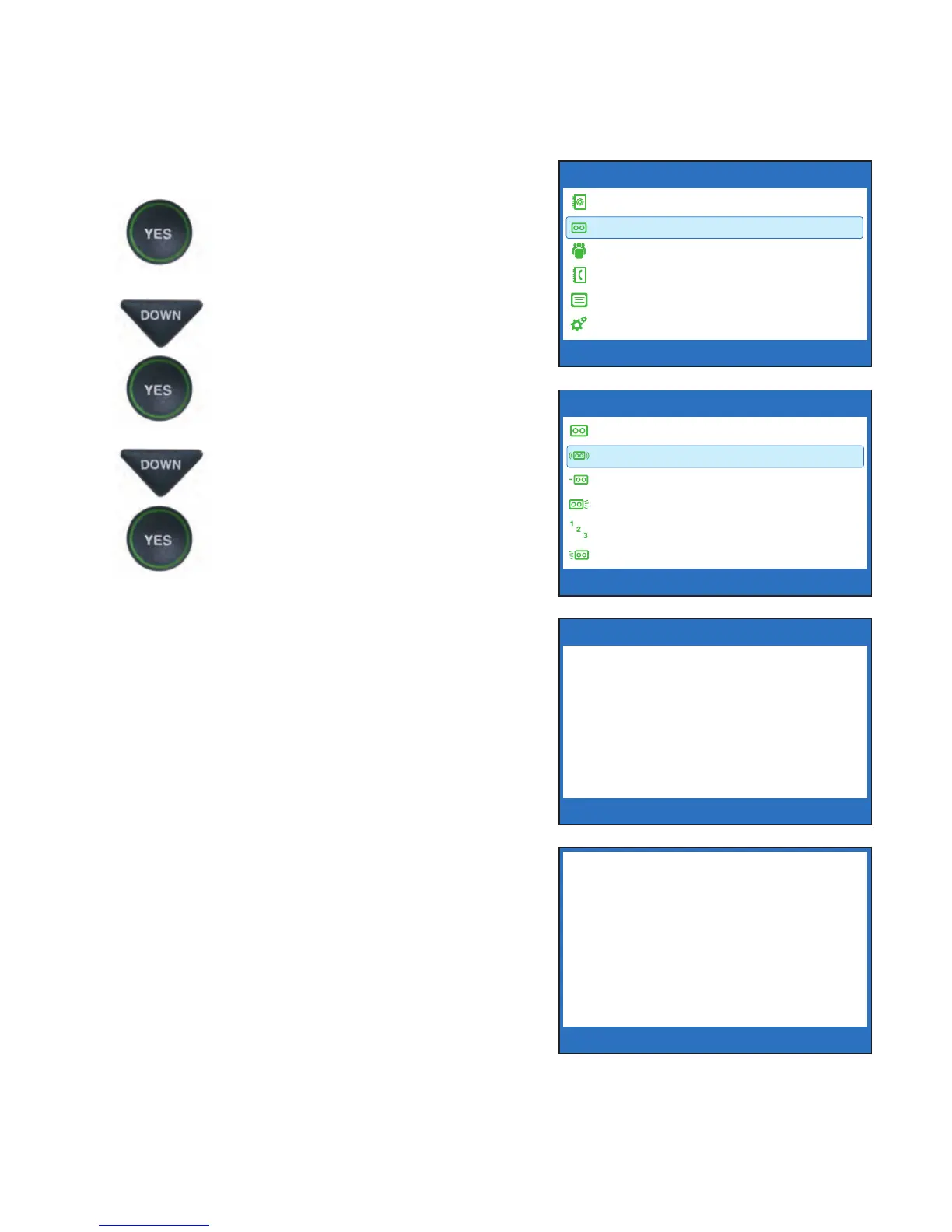
1. With the handset hung up,
press the YES button to see the
Options menu.
2. Press the DOWN arrow button
until Answering Machine is
highlighted. Press the YES
button to select.
3. Press the DOWN arrow button
to highlight Play Messages.
Press the YES button to select.
4. Follow the directions on the
display screen to lift the CapTel
handset and listen to your
messages. Captions of the
messages will appear on the
display screen while the
messages are playing.
doing a little shopping after
the kids get done with school
so if you want to meet me
please go ahead and give me
a call back and we will set
something up alright
MARY SMITH 321-555-1234 5/16 10:30 AM
Press YES to Erase or Press NO to Skip Message
OPTIONS
Dial from Phone Book
Answering Machine
Call History
Edit Phone Book
Conversations
Settings
Press YES to select or press NO to exit Options
ANSWERING MACHINE
Answering Machine On/Off
Play Messages
Clear All Messages
Greeting Message
Answer Ring Count
Incoming Messages
Press YES to select or press NO to exit
PLAY ANSWERING MACHINE MESSAGES
Please Lift Handset to Listen to
Answering Machine Messages
2 New Messages
3 Old Messages
Press NO to exit


 To Next Page