96 • USING CAPTEL IN 2-LI NE MODE Customer Service: 888-269-7477
4. Plug the telephone line cords into the appropriate wall jacks and
the AC adapter into an electrical outlet. Make sure that each
telephone cord plugs into a separate line, each with its own
telephone number, not just an extension line.
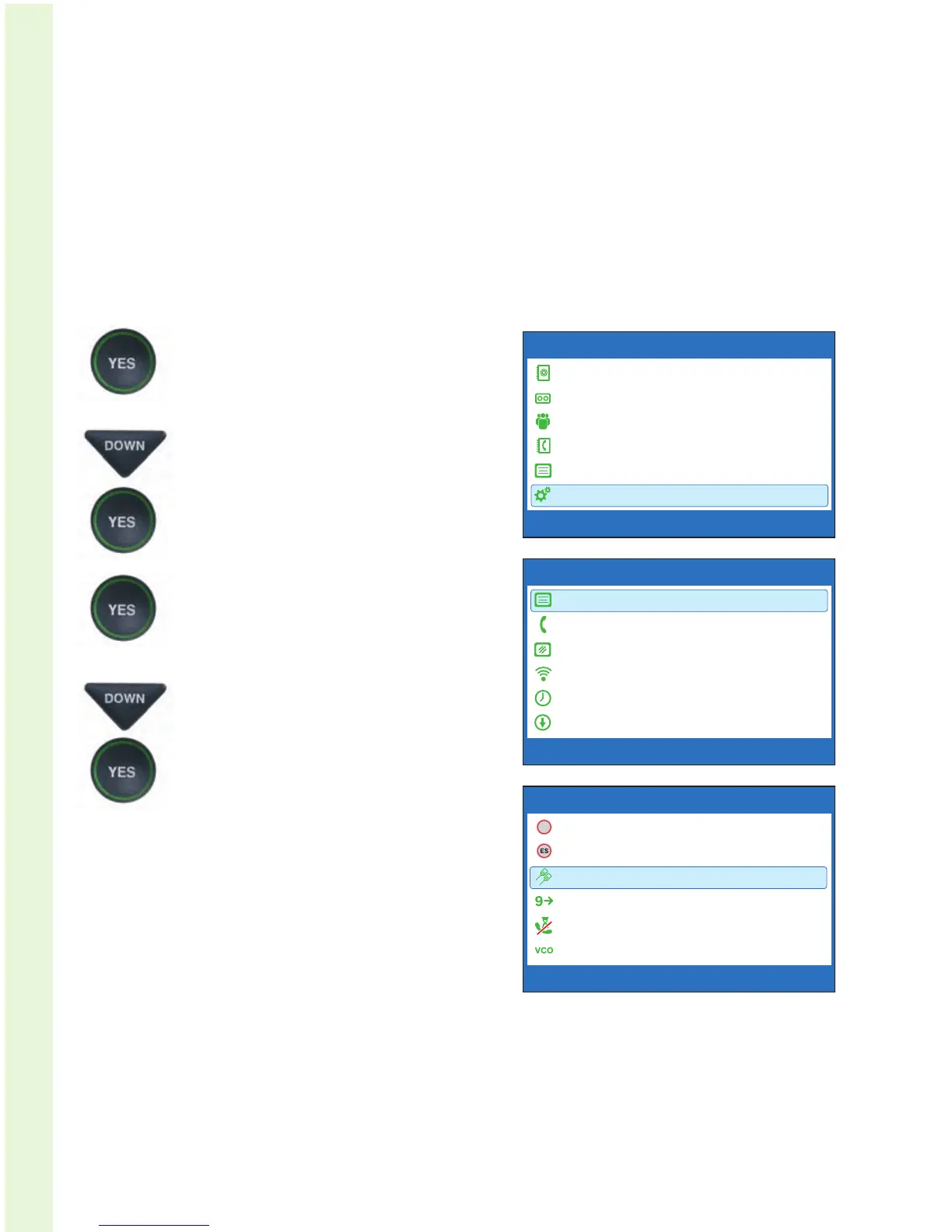
STEP 2: Activate the 2-Line Menu option:
1. With the handset hung up,
press the YES button to see the
Options menu.
2. Press the DOWN arrow button
repeatedly until Settings
is highlighted. Press the
YES button to select.
3. Check that Caption Settings
is highlighted. Press the YES
button to select.
4. Press the DOWN arrow button
until 1 or 2 Line Captions
is highlighted. Press the YES
button to select.
OPTIONS
Dial from Phone Book
Answering Machine
Call History
Edit Phone Book
Conversations
Settings
Press YES to select or press NO to exit Options


 To Next Page