UAD Powered Plug-Ins Manual - 305 - Chapter 35: Precision Maximizer
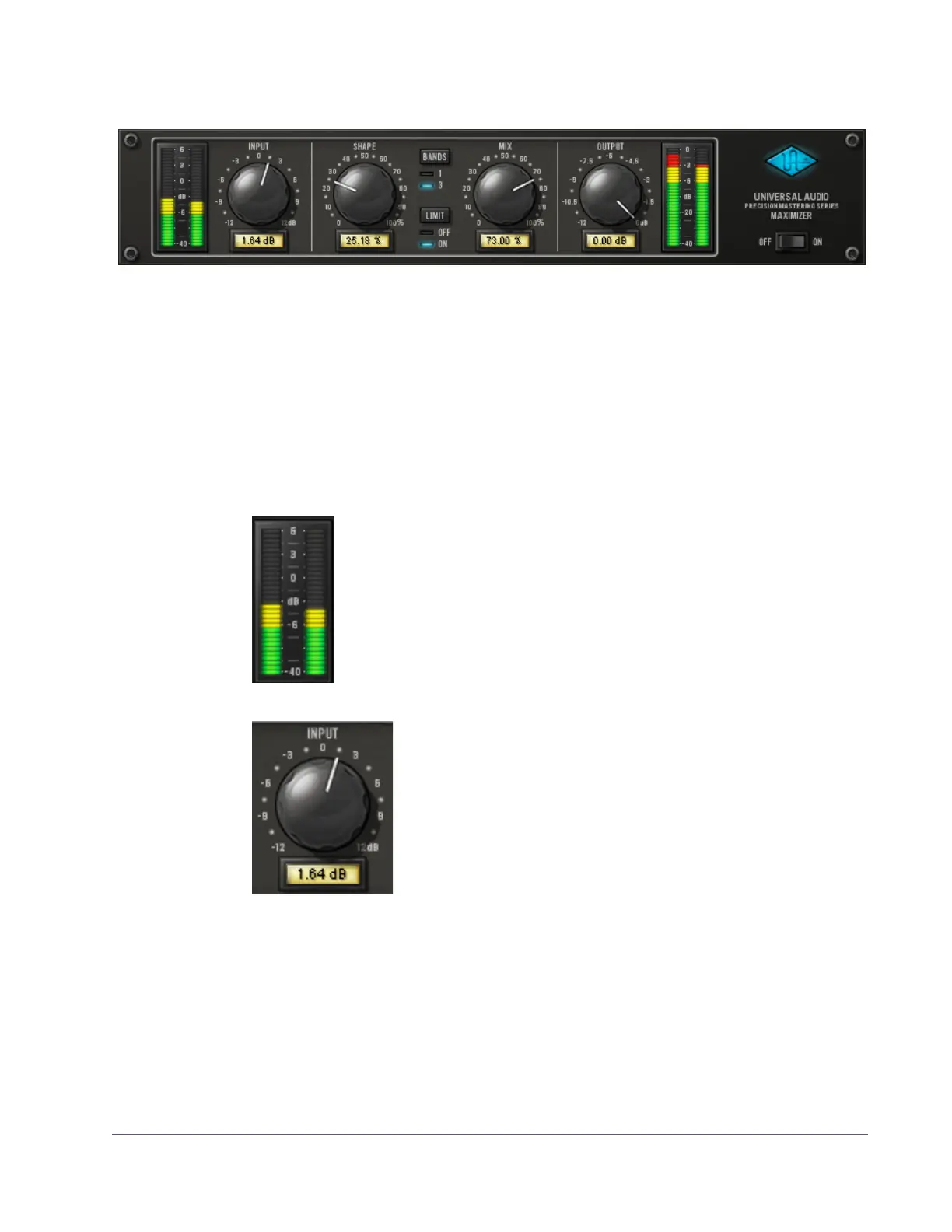
Precision Maximizer Screenshot
Precision Maximizer Controls
Control knobs for the Precision Maximizer behave the same way as all UAD
plug-ins. Input, Shape, Mix, and Output values can be modified with text en-
try.
Input Meter The stereo peak Input Meter displays the signal level at the input
of the processor, after the Input control.
0 dB represents digital full scale (0 dBFS). Precision Maximizer
can utilize input signals up to +6 dB at the input before input clip-
ping occurs.
The displayed range is from –40 dB to +6 dB.
Input The Input Level knob controls the signal level that is input to
the plug-in. Increasing the input will generally result in
more processing (depending on the settings of the other
parameters).
By increasing the Input knob, input levels higher than
0 dBFS (up to +6 dBFS) within the plug-in can be pro-
cessed. This can increase the distortion characteristic at
the output, particularly when the Limit function (“Limit” on page 307) is en-
gaged.
The available range is ±12 dB. A good starting point for sonic experimenta-
tion is to set the input level so the input peaks occur around 0 dB, then adjust
the other controls to taste.
Figure 95. The Precision Maximizer plug-in window



 To Next Page
 Loading...







