EasyManua.ls Logo

Utax 256i - Prevent Bleed-Through

Utax 256i
370 pages
Print Icon
To Next Page IconTo Next Page
To Previous Page IconTo Previous Page
Loading...
3-56
Common Operations > Using Various Functions
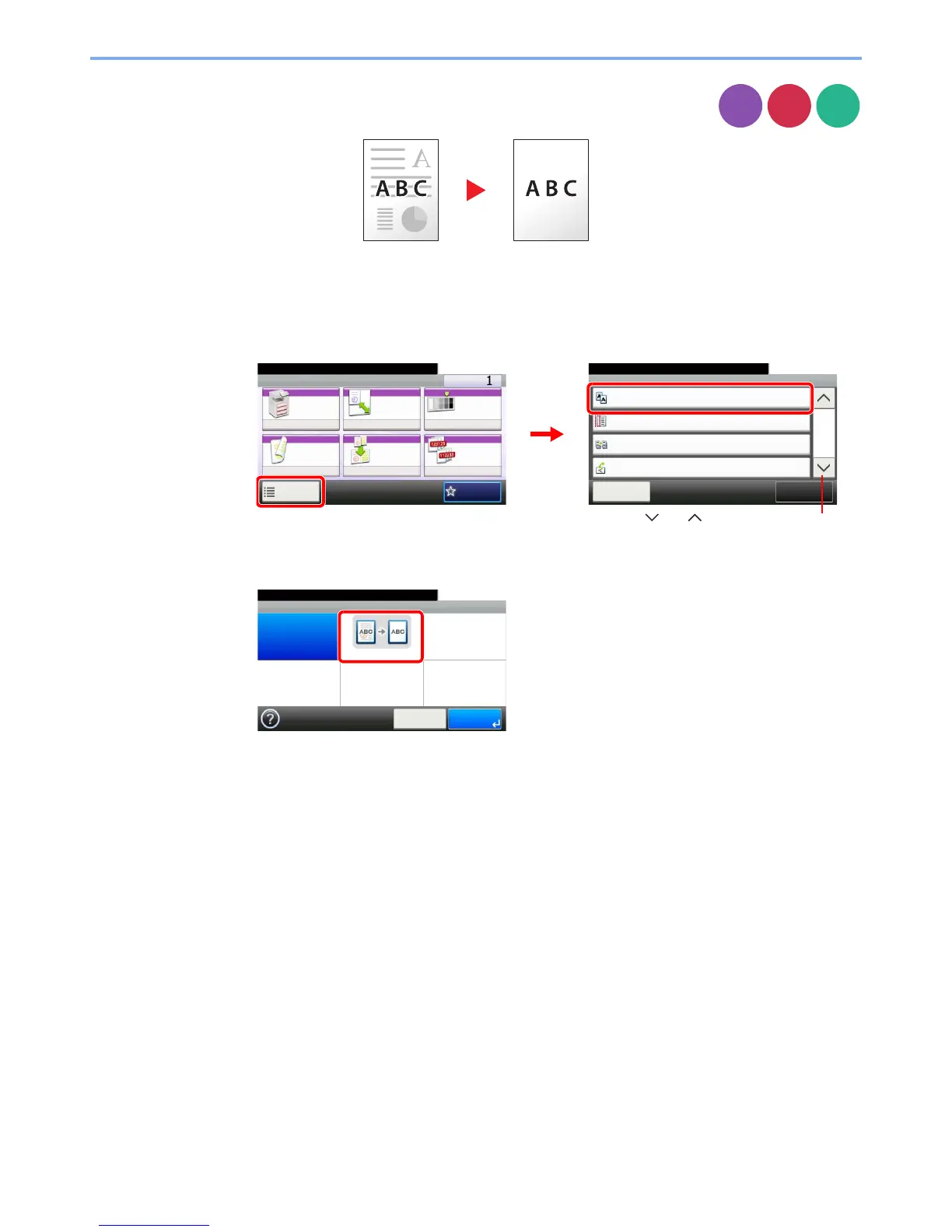
Prevent Bleed-through
Hide background colors and image bleed-through when scanning thin original.
1
Display the screen.
1 Referring to Using Various Functions on page 3-30, display the screen.
2 Press [Functions] and then [Prevent Bleed-through].
2
Select the function.
Copy
Send
Scan to
USB
Ready to copy.
Functions
Prevent Bleed-through
Off
Close
10:10
Margin
Off
On
Off
Continuous Scan
Auto Image Rotation
3/4
Add/Edit
Shortcut
Ready to copy.
Copy Copies
Paper
Selection
Zoom Density
Duplex Combine Collate/
Offset
1-sided>>1-sided
Auto 100% Normal 0
CollateOff
Functions
10:10
Favorites
GB0001_01
GB0002_02
2
1
Use [ ] or [ ] to scroll up and down.
Prevent Bleed-through
Off On
10:10
Cancel OK
Ready to copy.
GB0835_00

Table of Contents

Related product manuals