Autobipolar Electrode Function
Bipolar Surgery
ForceTriad User’s Guide 5-5
Virtual Ammeter
The virtual ammeter on the bipolar tab displays the current being delivered during
bipolar instrument activation. The ammeter registers current between 1 and 1050
milliamps. An audio tone sounds to indicate increases and decreases in current
delivery. A mute button allows the user to silence the ammeter tone but not the
activation tone.
Autobipolar Electrode Function
The ForceTriad energy platform is equipped with an autobipolar feature that
allows the user to configure the system for automatic activation and cessation of
bipolar energy.
The Autobipolar mode must be enabled in the system setup menu before the
autobipolar function can be used. Refer to the System Setup chapter for
instructions on how to enable the Autobipolar mode.
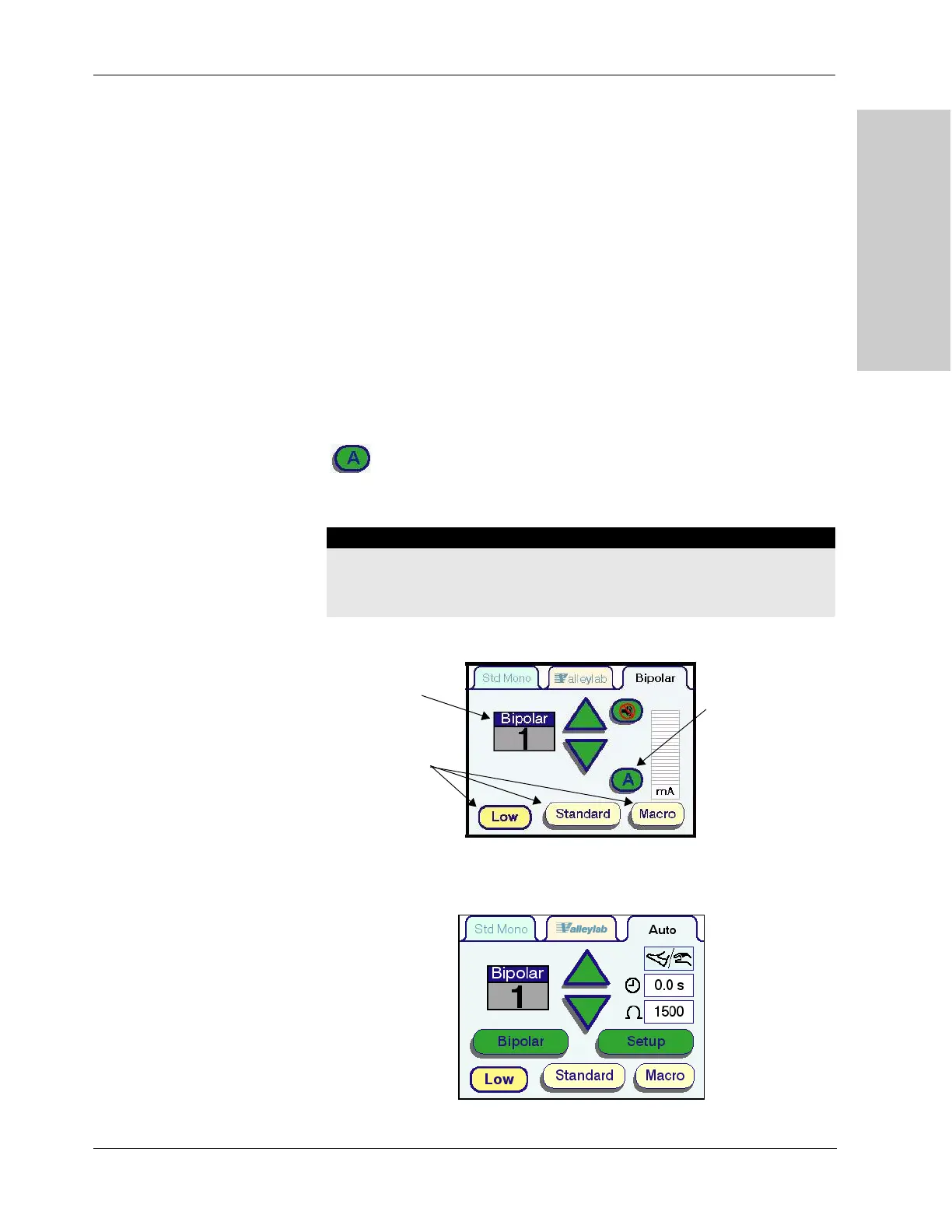
When the Autobipolar mode has been enabled, a green button with an “A”
will appear on the Bipolar tab.
Note: The autobipolar electrode function requires the use of the Valleylab E0018
bipolar instrument cord.
1.
Press the Autobipolar mode button. The tab title will change from Bipolar to
Auto, and the screen below will appear.
Warning
Use of other Valleylab bipolar cords or cords produced by other manufacturers
may not result in electrical output for which these instruments were designed and
thus may not result in the desired clinical effect.
Power Output
Mode Waveforms
Power Output
Modes (Watts)
Autobipolar Mode
Button



 To Next Page