55
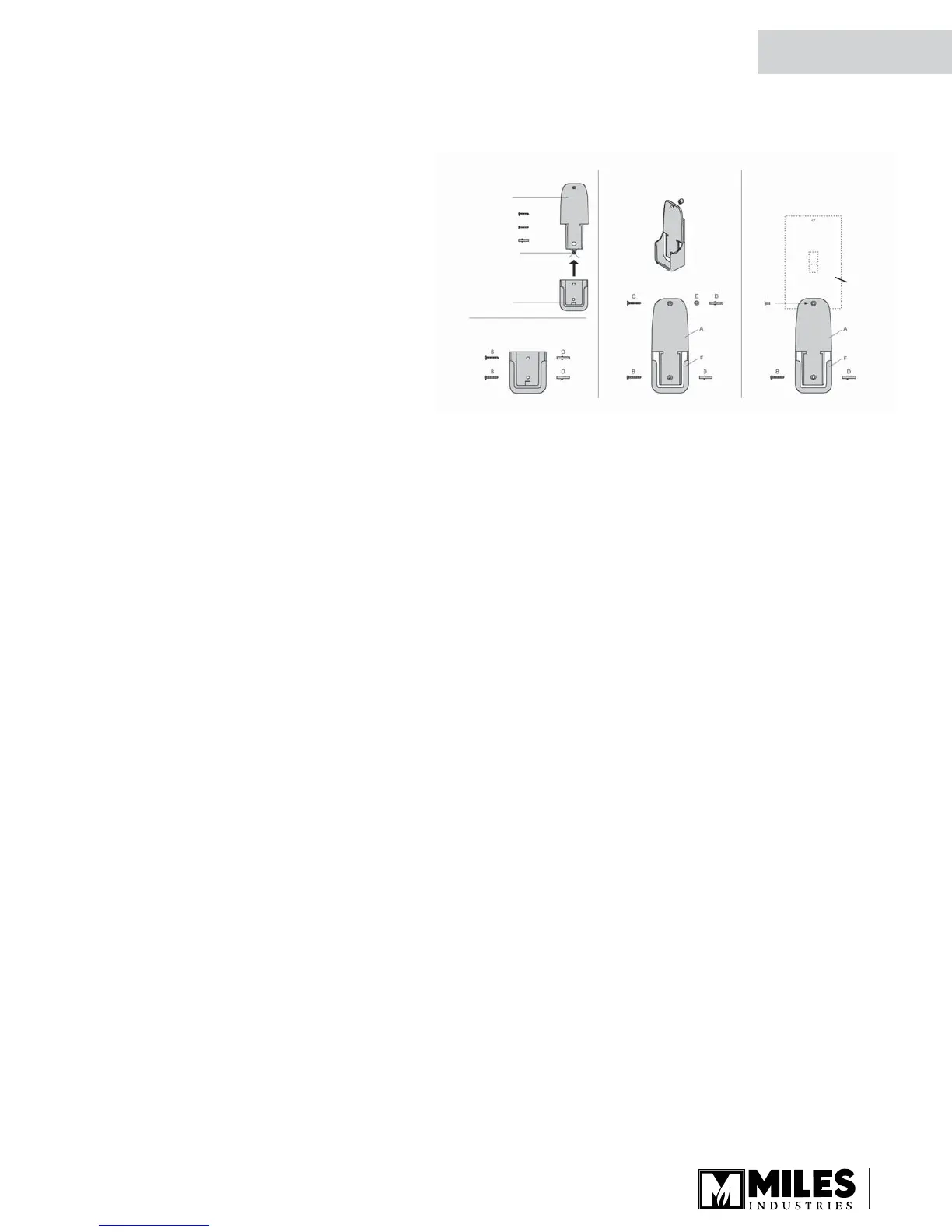
Packing Contents:
1 Wall Bracket A
2 Screws B
1 Screw C
2 Wall Anchor D
1 Spacer E
(detach before assembly)
1 Wall Bracket F
Switch Plate
Alternative 1
Alternative 2
Alternative 3
Install Remote Control Handset Wall Holder
The remote control kit for this fi replace comes
complete with a wall-mounted holder. This
holder is not required in all installations but
is provided as an optional feature for those
customers who wish to mount the remote
handset to the wall.
To install the holder to the wall, fi nd a
convenient location and use the hardware
provided with the kit. See the diagram below for
required hardware and confi gurations. Note that
the holder can be installed at the base of a light
switch plate.
IMPORTANT. The location of the remote
control handset is important to assure proper
temperature regulation. To obtain a constant temperature, we recommend that the handset
should be between 3 and 15 feet away from the appliance but not directly above it. We also
advise that the handset should be located away from any other heat source and not in direct
sunlight as this may affect the temperature sensor located in the remote handset.
Installation
QUALIFIED
INSTALLER



 To Next Page
 Loading...