USER MANUAL
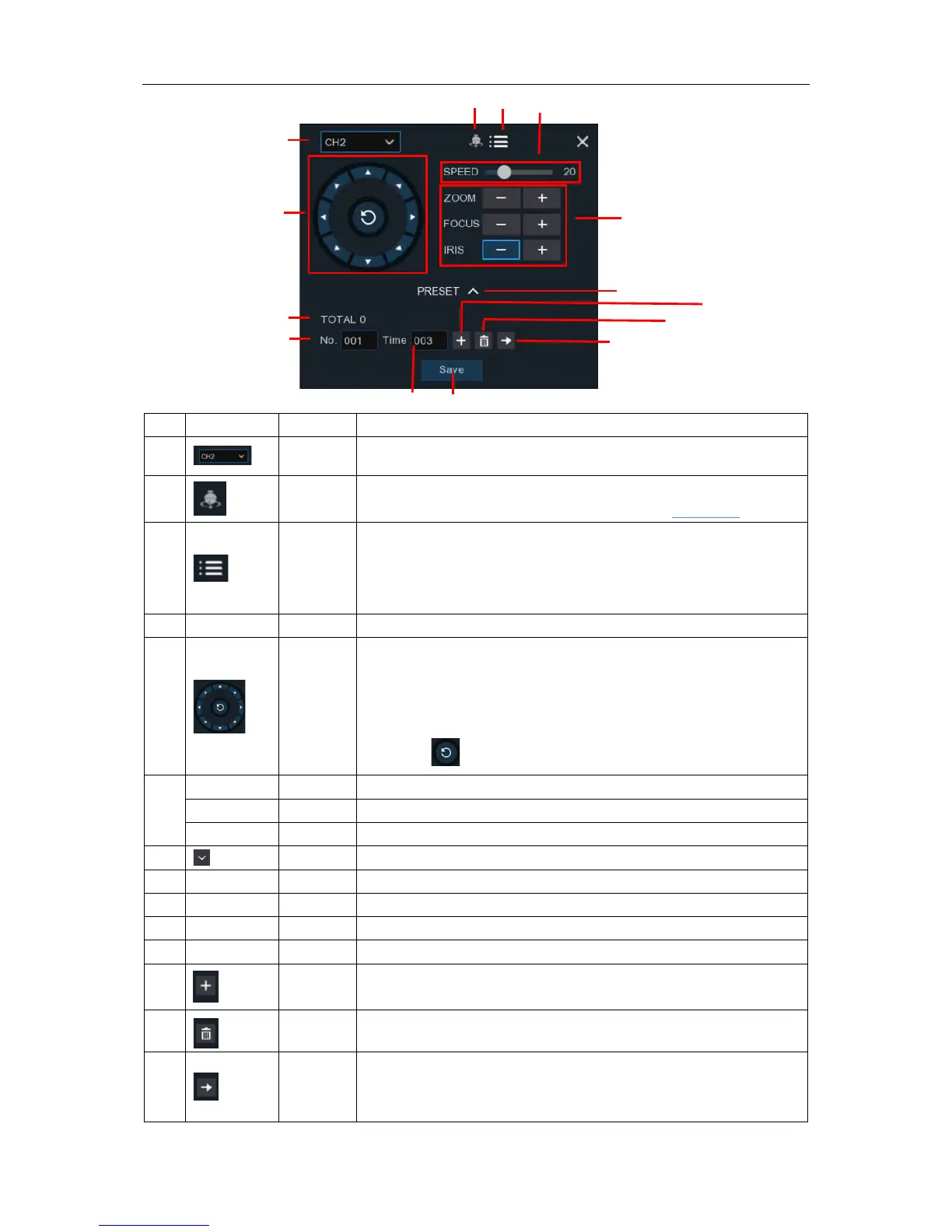
2) PTZ control panel will be displayed.
No. Icon Item Description
1
Channel Click to select the channel of the PTZ camera.
2
Cruise
Start / stop PTZ cruise by preset points. Make sure you had
enable the Cruise function for this channel in 5.1.4 PTZ
.
3
UTC
Menu
If you have chosen protocol for this channel as COAX1 or
COAX2, the UTC menu button will be display. Click this icon to
enter UTC OSD menu. It is also the confirm button for your
selection in the UTC OSD menu.
4 Speed Speed Adjust the PTZ speed
5
Pointer
Panel
A) Click the direction arrow to select the direction of the PTZ
camera
B) Click up/down/left/right arrow to move cursor in UTC OSD
menu
C) Click to switch to auto pan mode
6
Click to adjust the focus
Click to adjust the iris setting
7
PRESET To display or hide the preset point panel
8 Total Total Display the total number of preset points
9 No. No. Number of preset point
10 Time Time Set the time how long the camera will stay in the preset point
11 Save Save Click to save the settings and preset points
12
set
Enter the number of a specific preset point, click this button to
move your PTZ camera to the preset point
13
Delete Click to delete the selected preset point
14
Go to
Click to set a specific preset point on a PTZ camera.
You can add up to 255 preset points for the DVR.


 To Next Page