USER MANUAL
Post Recording:
You can set how long alarm record will last when alarm ends (30s, 1minutes,
2minutes, 5minutes).
Show Message:
Display the alarm messages on the screen when sensor is triggered.
Send Email:
Set to send email to specified email when sensor is triggered.
Full Screen:
When sensor is triggered, the corresponding channel will be switched to the full
screen mode.
FTP Upload
: To upload alarm images to FTP server when I/O alarm is triggered. To enable FTP,
please view 5.4.4 FTP
.
5.3.3 PIR
Operation is same as
5.1.6 PIR
5.3.4 PTZ Linkage
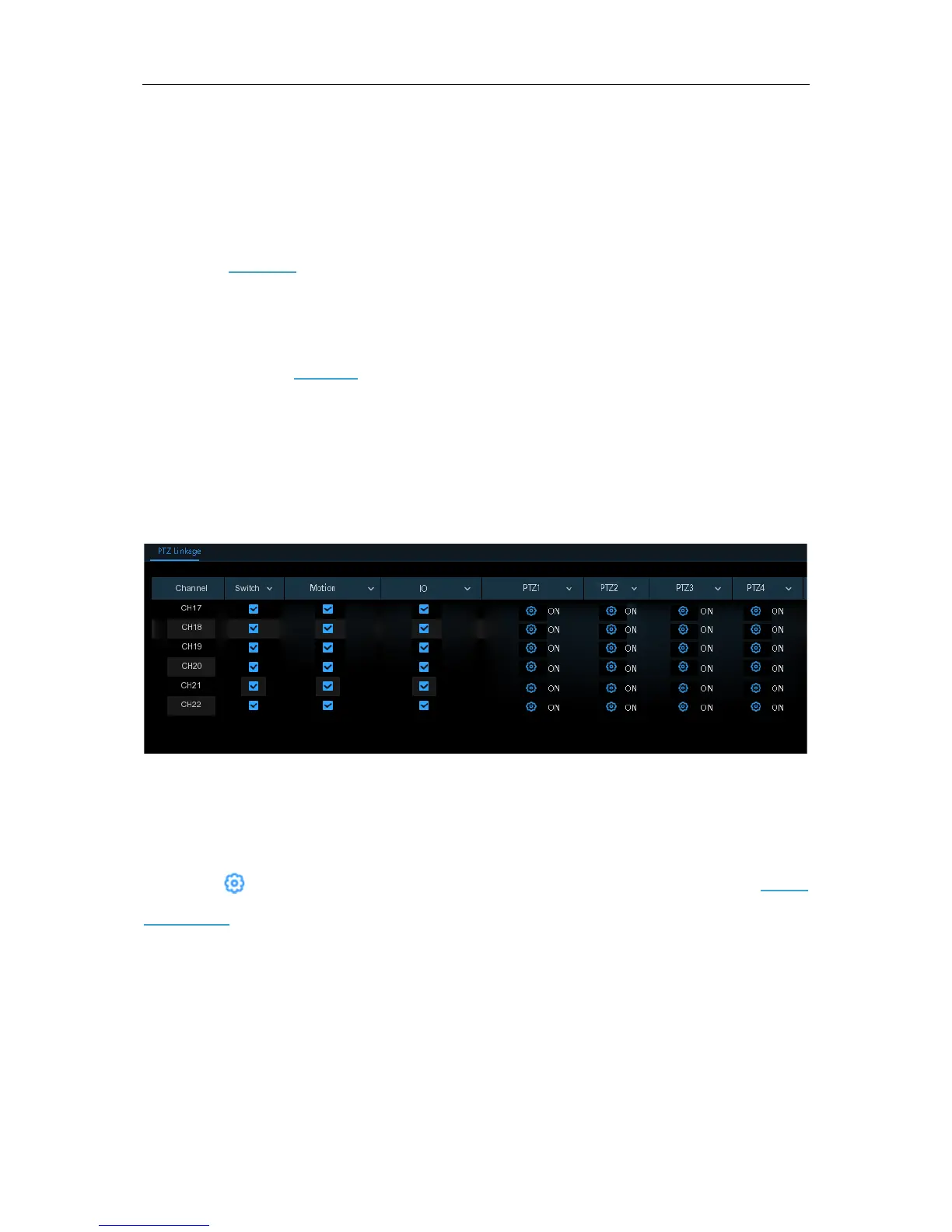
If you had connected the PTZ cameras, you can set the linkage between PTZ cameras and Motion
Alarm and/or external I/O sensor alarm. With the linkage function, you can turn your PTZ cameras
focus to the preset point when a motion or I/O alarm happens.
Switch
: Enable or disable the PTZ linkage function.
Motion:
Motion detection alarm will trigger the PTZ linkage function it is checked.
IO:
IO alarm will trigger the PTZ linkage function it is checked.
PTZ:
Click icon to associate the PTZ cameras with preset points. View preset point at
5.1.4.1
PTZ control
.
49


 To Next Page