USER MANUAL
Time Offset
: Select the amount of time that Daylight Saving has increased by in your time zone.
This refers to the difference in minutes, between Coordinated Universal Time (UTC) and the local
time.
Enable DST:
You can select how Daylight Saving starts and ends:
Week:
Select the month, a particular day and time when Daylight Saving starts and ends. For
example, 2 a.m. on the first Sunday of a particular month.
Date:
Select the start date (click the calendar icon), end date and time when Daylight Saving starts
and ends.
Start Time / End Time
: Set the start time and end time for Daylight Saving.
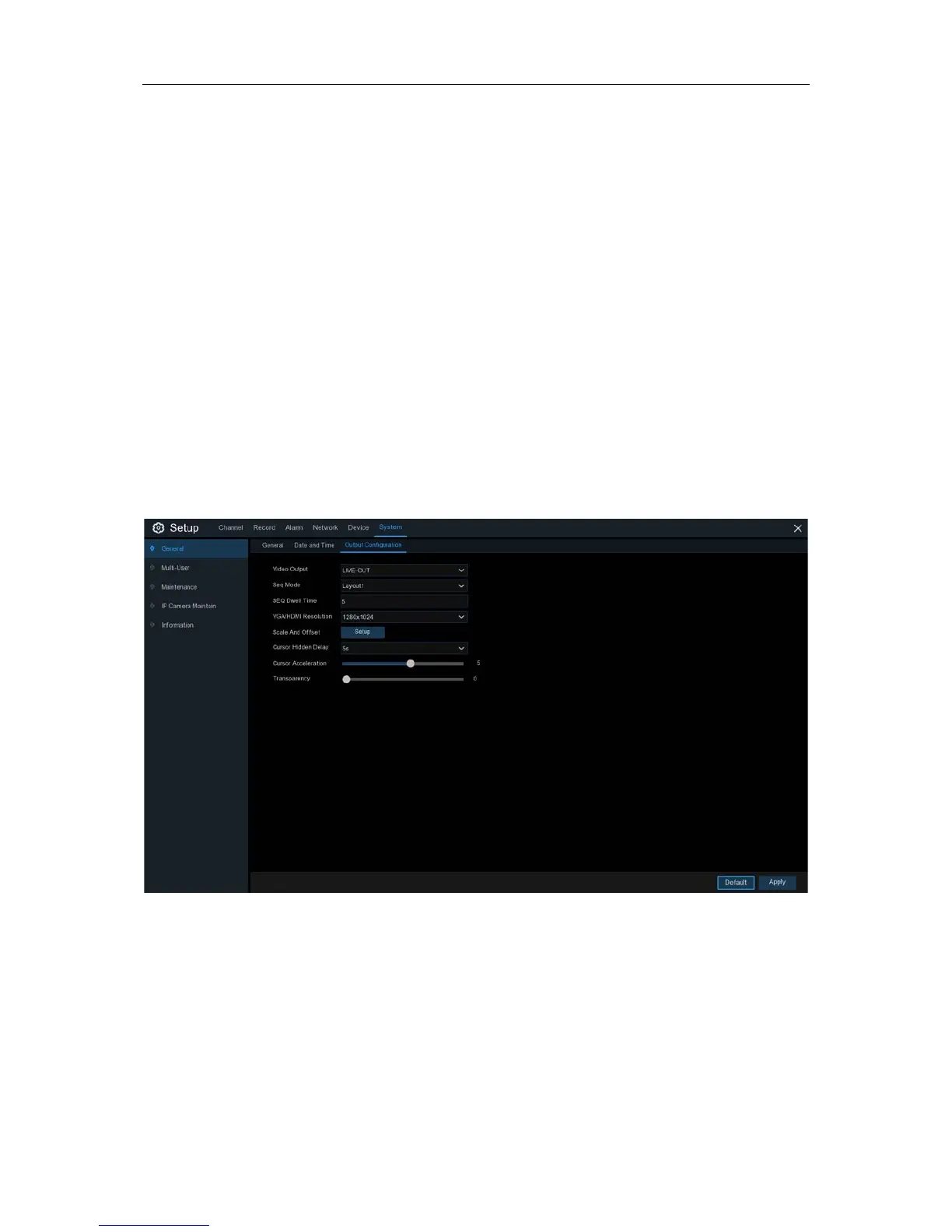
5.6.2 Output Configuration
This menu allows you to configure video output parameters.
Video Output
: To choose the output options:
LIVE-OUT
is used to configure the main output parameters.
SPOT-OUT
is an optional option to config the VGA spot output parameters.
65


 To Next Page