USER MANUAL
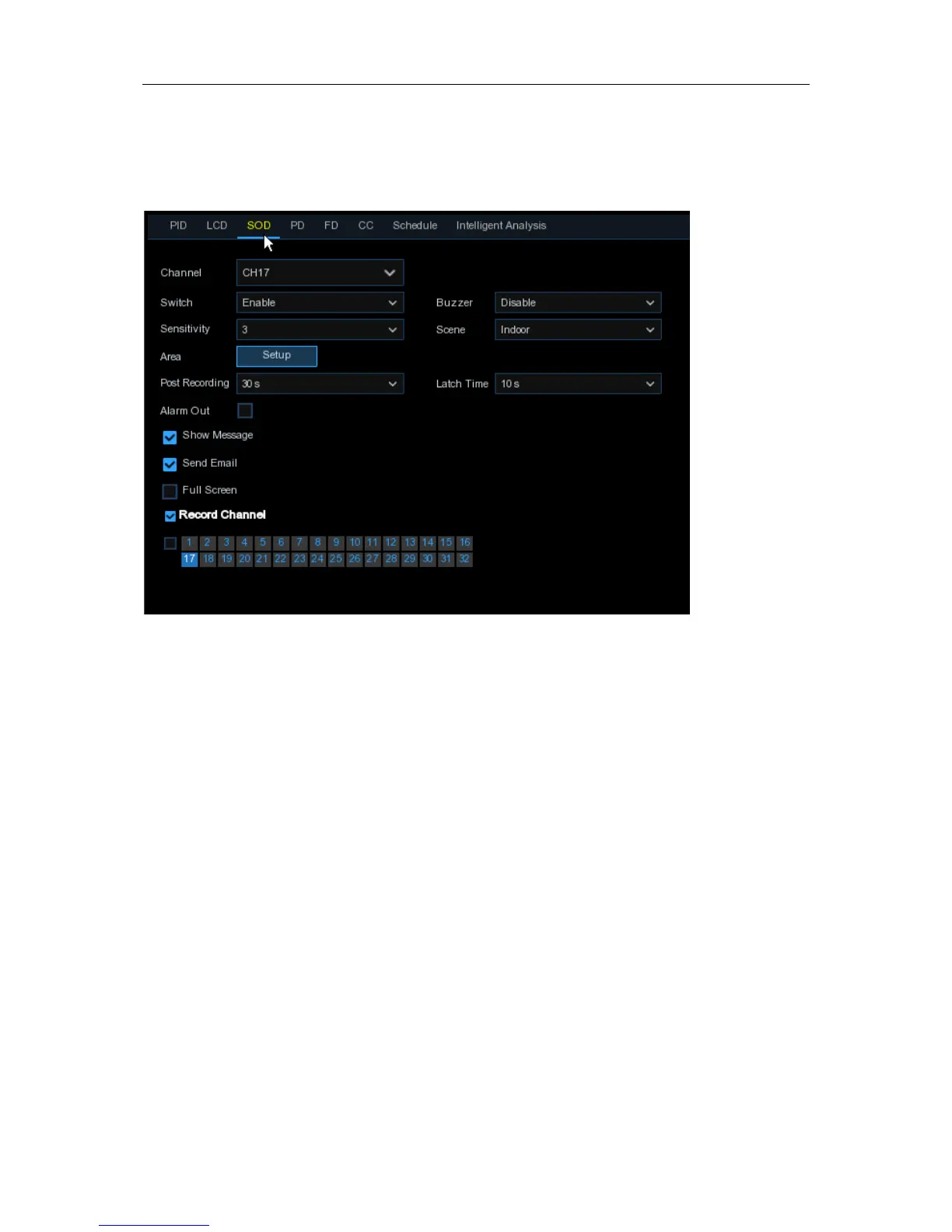
5.1.8.3 SOD (Stationary Object Detection)
Stationary Object Detection function detects the objects left over or lost in the pre-defined region
such as the baggage, purse, dangerous materials, etc., and a series of actions can be taken when
the alarm is triggered.
Channel
: to select the channel you want to configure
Switch
: to enable or disable the SOD function
Buzzer
: to disable or to active the buzzer to emit an alarm tone in 10, 20, 40 or 60 seconds when
the detection is triggered
Sensitive
: The sensitivity level is from 1 to 4, with a default value of 2. Higher sensitivity will be
easier to trigger the detection.
Scene
: Scene setting includes Indoor and Outdoor. Please choose the scene to match with the
place your camera installed.
Post Recording
: You can set how long after an event occurs that the DVR will continue to record.
Latch Time
: To configure the external alarm time when the detection is triggered.
Alarm Out
: If your DVR support to connect to external alarm device, you can set to emit an alarm
tone.
Show Message:
A letter “S” will be displayed on the screen when the intelligent detection is
triggered.
Send Email:
If an alarm is triggered, an Email will be sent to your preset email account.
Full Screen:
When the detection is triggered, the channel will be enlarged into full screen.
Record Channel:
to select the channel(s) you want to record when a detection is triggered.
Area:
Click [
Setup
] to draw a virtual region in the camera picture.
35


 To Next Page