VARI❋LITE® - VL2402™ WASH LUMINAIRE USER’S MANUAL
22 17-Sept-01 02.9671.0001 C
Align Lamp for Flat Field
The design of the VL2402 optical system is based on a flat field. A flat field is one
where there is no detectable hot spot.
After a new lamp is installed, it will be necessary to align the lamp to optimize the
beam. Knobs located at the luminaire’s backcap will allow adjustment.
WARNING: Backcap and adjustment knobs will be HOT during lamp operation.
Wear gloves and/or use tools to prevent burns.
To align lamp:
1. Using internal menus select Lamp test to set beam. See “Lamp” on page 70
for more information.(If using console, set intensity to 100% and adjust
diffusion to produce a tight beam.)
2. Position beam on a white wall at a distance of 10' to 20'.
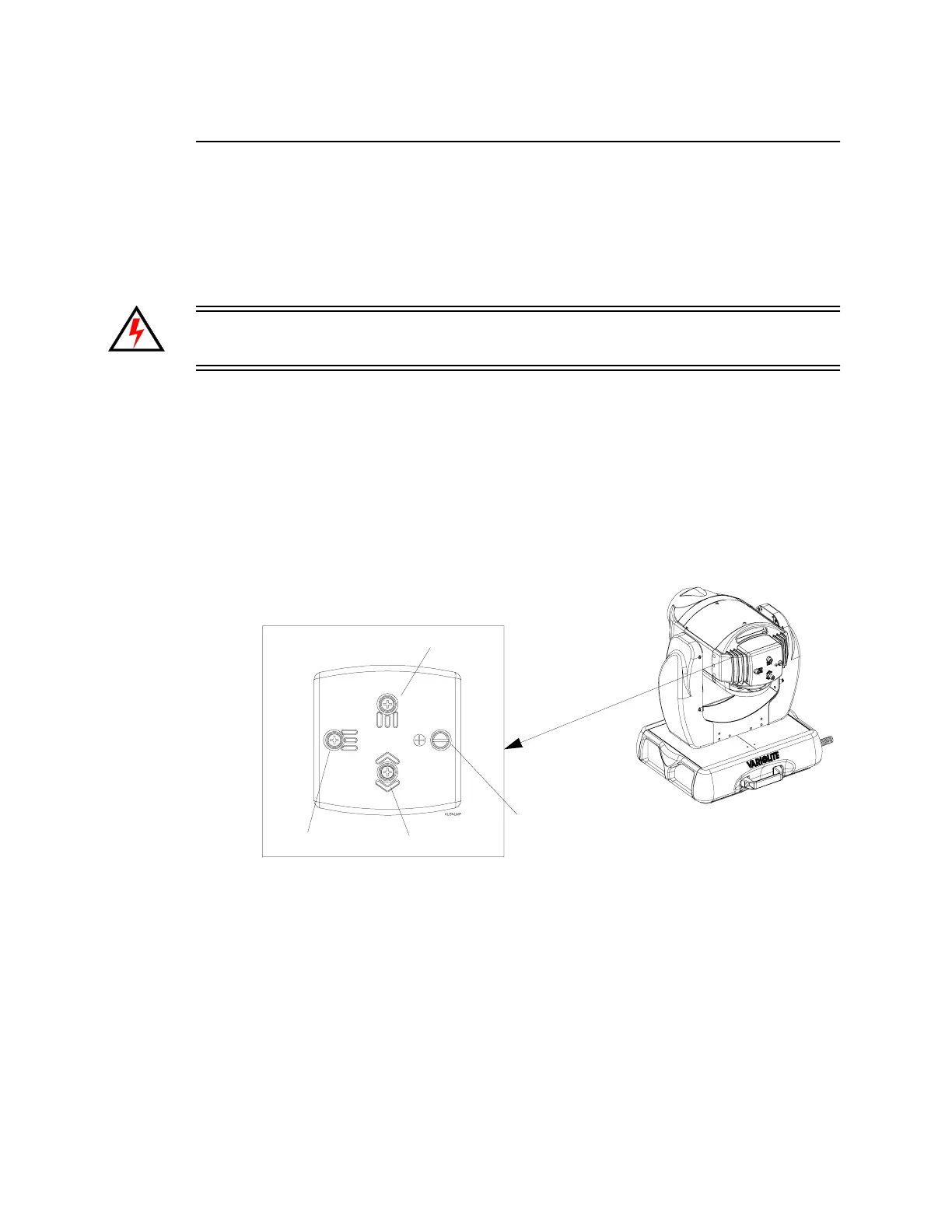
3. At backcap, using Vertical and Horizontal knobs, adjust hot spot to center of
beam.
4. Using Focus knob adjust beam for flattest field.
Vertical
Horizontal
Focus
Captive Knob for lamp access
(does not adjust beam)


 To Next Page