C&C Mode C&C Mode Setup Categories
44
METER CALIBRATION
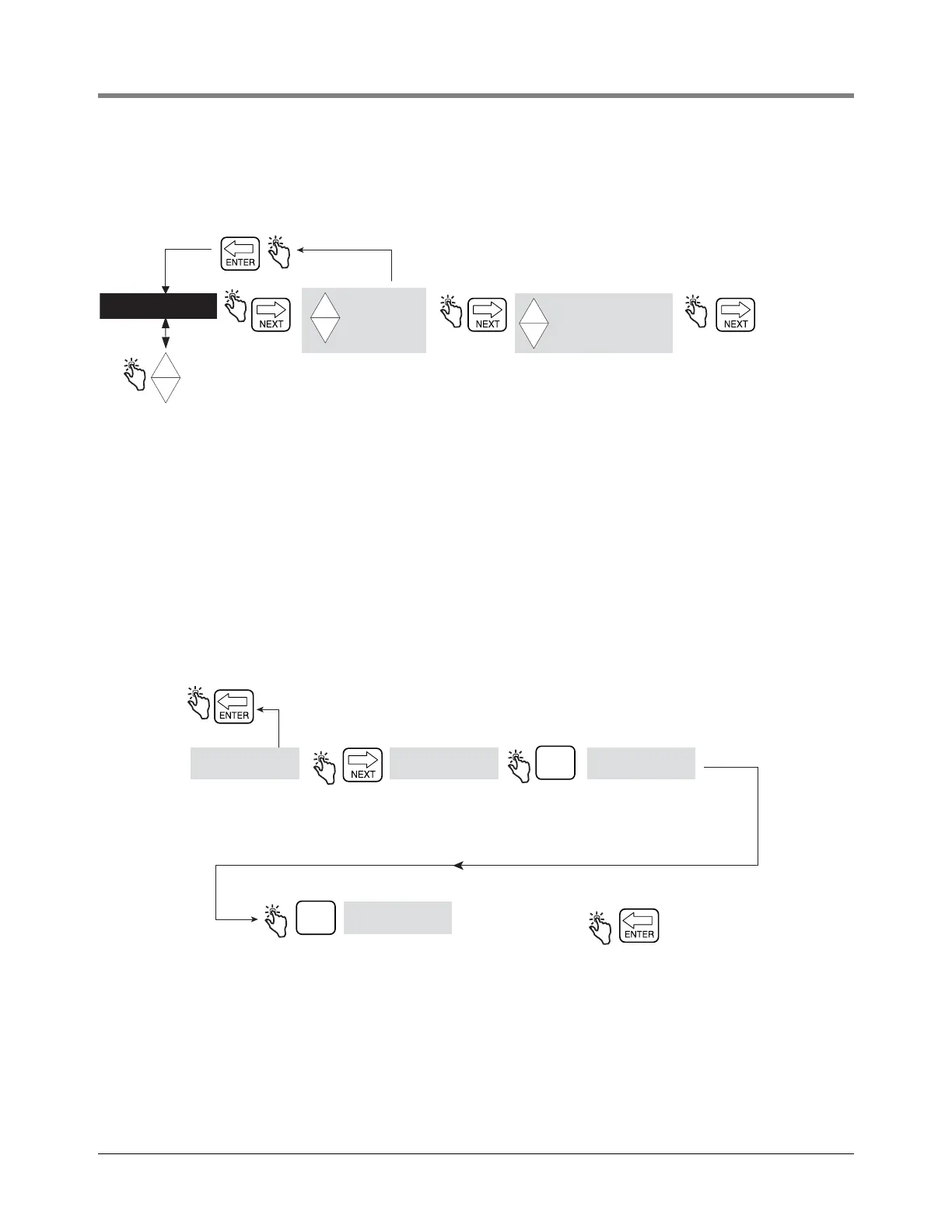
Figure 41 illustrates Meter Calibration setup in C&C Mode.
Figure 41. Meter Calibration Setup
Auto Calibrate
Figure 42 illustrates meter Auto Calibration (single point) setup procedure.
Figure 42. Meter Auto Calibration Setup
CONFIGURE I/O
OEM MESSAGE
DELIVERY OPTIONS
REPORT FORMATS
RESTART
SECURITY CODE
LANGUAGE
DISPLAY SYNTAX
TEMPERATURE
FUEL SOURCE
PROD CAL 1
PROD CAL 2
PROD CAL 3
PROD CAL 4
+
-
+
-
+
AUTO CALIBRATE
MULTICALIBRATE
MANUAL CALIBRT
+
-
+
Press the up/down
buttons to cycle
through remaining
C/C Mode categories
Press ENTER to accept any changes in any column -
and/or continue pressing to return to METER CALIBRTN
See Meter
Calibration
figures for each
selection's setup.
Product calibration
values 2, 3 and 4
are only shown
when if previously
assigned under
Product Description
as shown in Figure
42.
METER CALIBRTN
AUTO CALIBRATE
START DISPENSE
DISPENSING
Note: Dispense product into
a proving can, then press finish
when you have dispensed a
calibrated amount.
START
ENTER NTC VOL
Note: Enter volume dispensed
into proving can for NTC VOL
Press up/down arrows
to scroll through the
numbers, and NEXT
to move from one
digit to the next.
FINISH
RETURN TO
PROD CAL 1
(FIGURE 41)
PRESS ENTER TO ACCEPT
ENTRY. PRESS BUTTON
UNTIL YOU RETURN TO
METER CALIBRTN
(FIGURE 41)


 To Next Page