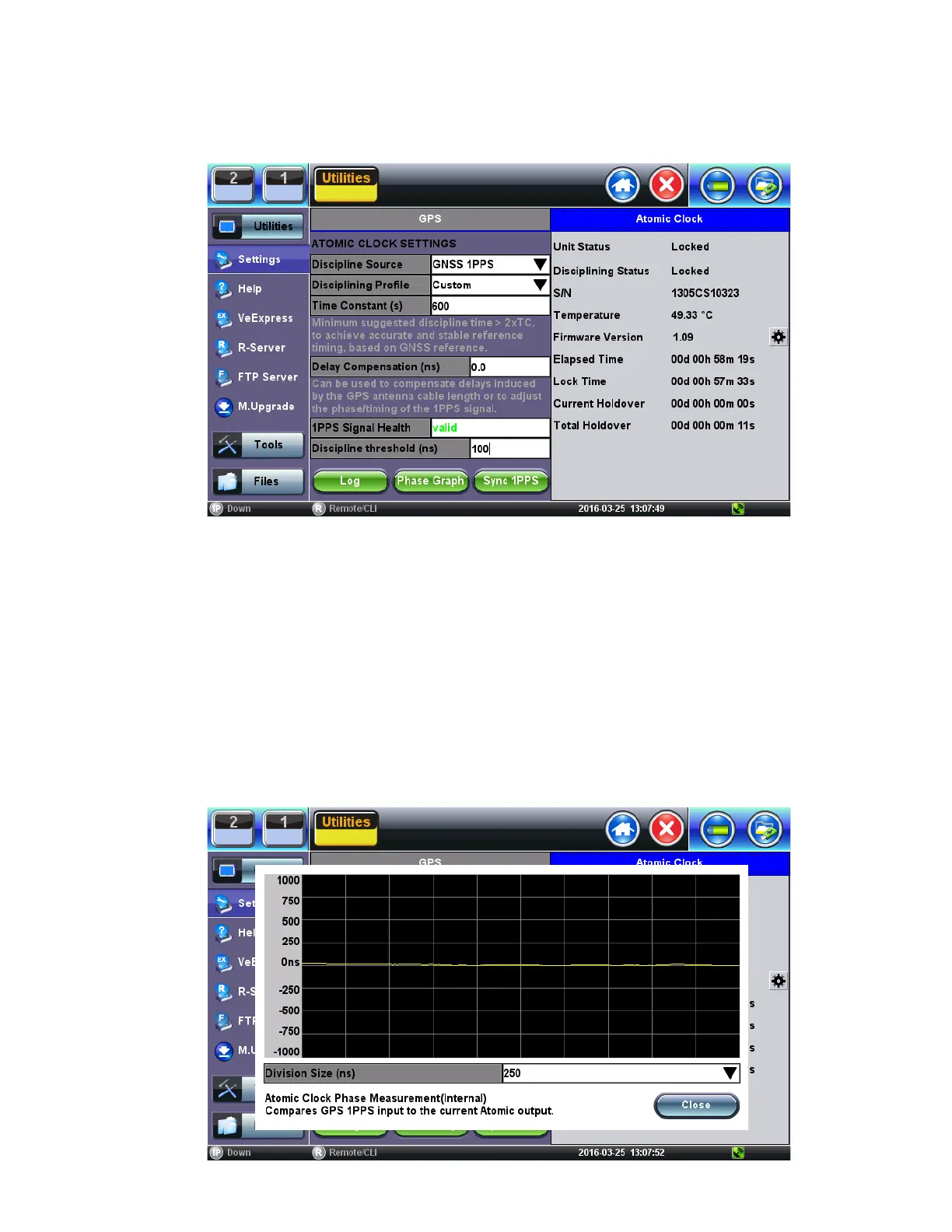
Clock Disciplining - Using the built-in GNSS 1PPS
1. With the GNSS module already locked, go to >Utilities >Settings >More >High Precision Clock >Atomic Clock.
2. Set Discipline Source = GNSS 1PPS, to use the traceable (UTC aligned) 1PPS timing signal from the GNSS receiver.
Discipline Source
3. Verify that 1PPS Signal Health = Valid, to confirm that the one-pulse-per-second signal is being detected.
4. Set Discipline Profile = Custom.
5. Set Time Constant (s) = 60 (this small window is only used to expedite the initial phase alignment process).
6. Set Discipline Threshold (ns) = 100 (a more stringent 50ns could also be tried if applicable. Use the Phase Graph to
determine the stability range).
7. Verify that Disciplining Status = Acquiring. This indicates that the disciplining process is in progress.
8. Tap on the Phase Graph to monitor the relative phase error, until it becomes a horizontal line close to 0ns. The time required
for this may vary (it should take less than 15 minutes)
9. Close the Phase Graph and set the Time Constant (s) = 900. You can also experiment with larger time constants (e.g.
1800s, 3600s, 5400s). The larger the setting the more stringent the disciplining process becomes and the longer it takes to
achieve disciplining lock. To declare lock, the Atomic Clock verifies that the relative phase stays within the defined
Disciplining Threshold for about 2x Time Constant (to confirm its stability). You can use the Phase Graph to monitor the
actual phase variations on your current GNSS environment for the past 600s.
Discipline Source Phase Measurement
10. Open the Phase Graph again to monitor the time error. Once it stabilizes again around 0ns, wait for about 60 minutes. The
line should stay flat and very close to 0ns. If not stable, please check the GPS satellites and antenna installation.
TX300s_Platform_Manual_RevB00



 To Next Page