28
HPS50 PersonalScope
TM
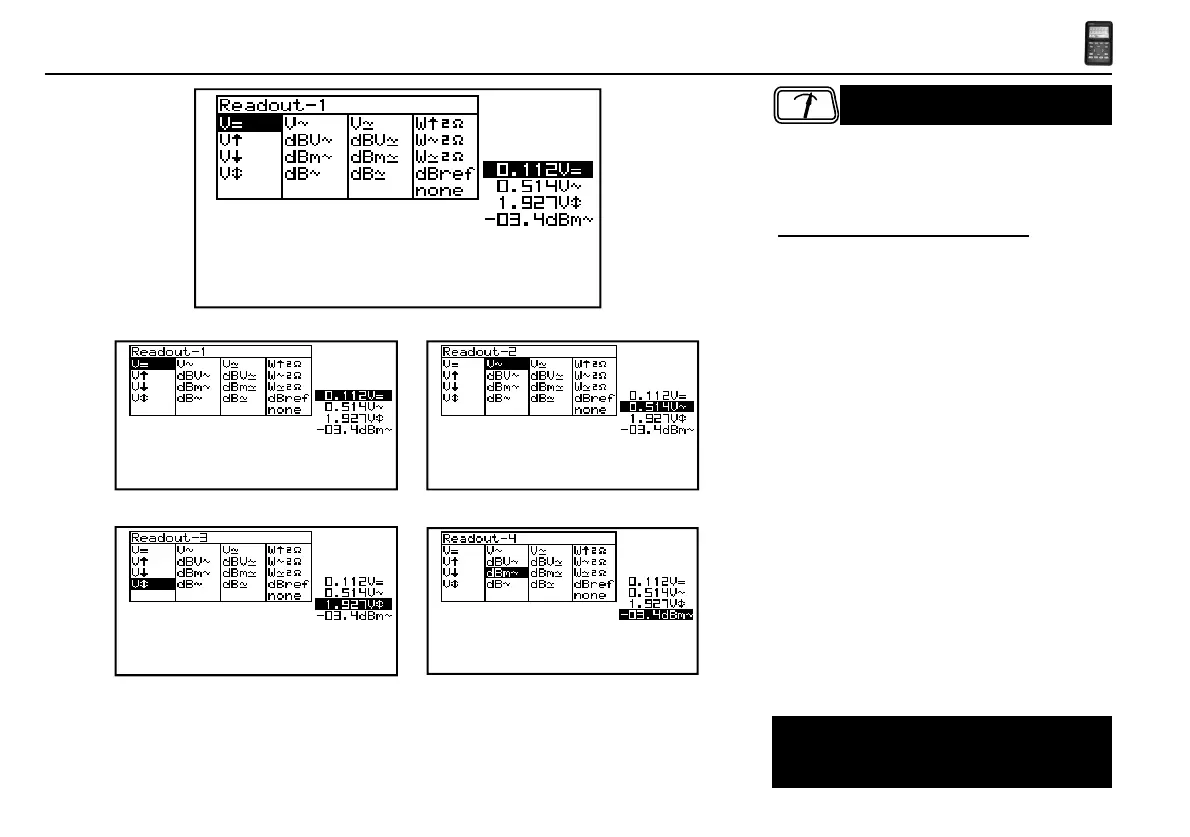
Meter readout
Fig 24
Fig 22 Fig 21
Fig 23
Fig 20
Press to call the meter 1 to 4 selection menu. Make
use of the cursorkeys to set a readout for up to 4
meters
Setting up the measurement readouts:
1. Pressing the ‘meter’-key selects the first readout
location.
2. Press the cursorkeys to highlight the desired readout
function for meter 1 readout. (Fig. 21)
3. Pressing the ‘meter’-key selects the second readout
location
4. Press the cursorkeys to highlight the desired readout
function for meter 2 readout. (Fig. 22)
5. Pressing the ‘meter’-key selects the third readout
location
6. Press the cursorkeys to highlight the desired readout
function for meter 3 readout. (Fig. 23)
7. Pressing the ‘meter’-key selects the fourth readout
location.
8. Press the cursorkeys to highlight the desired readout
function for meter 4 readout. (Fig. 24)
9. Pressing the ‘meter’-key returns to scope mode.
READOUT SET-UP
The Personal Scope offers many measuring
possibilities.



 To Next Page
 Loading...