50
HPS50 PersonalScope
TM
Input sensitivity
t-V /div
Fig 40
1
2
Fig 41
1
3
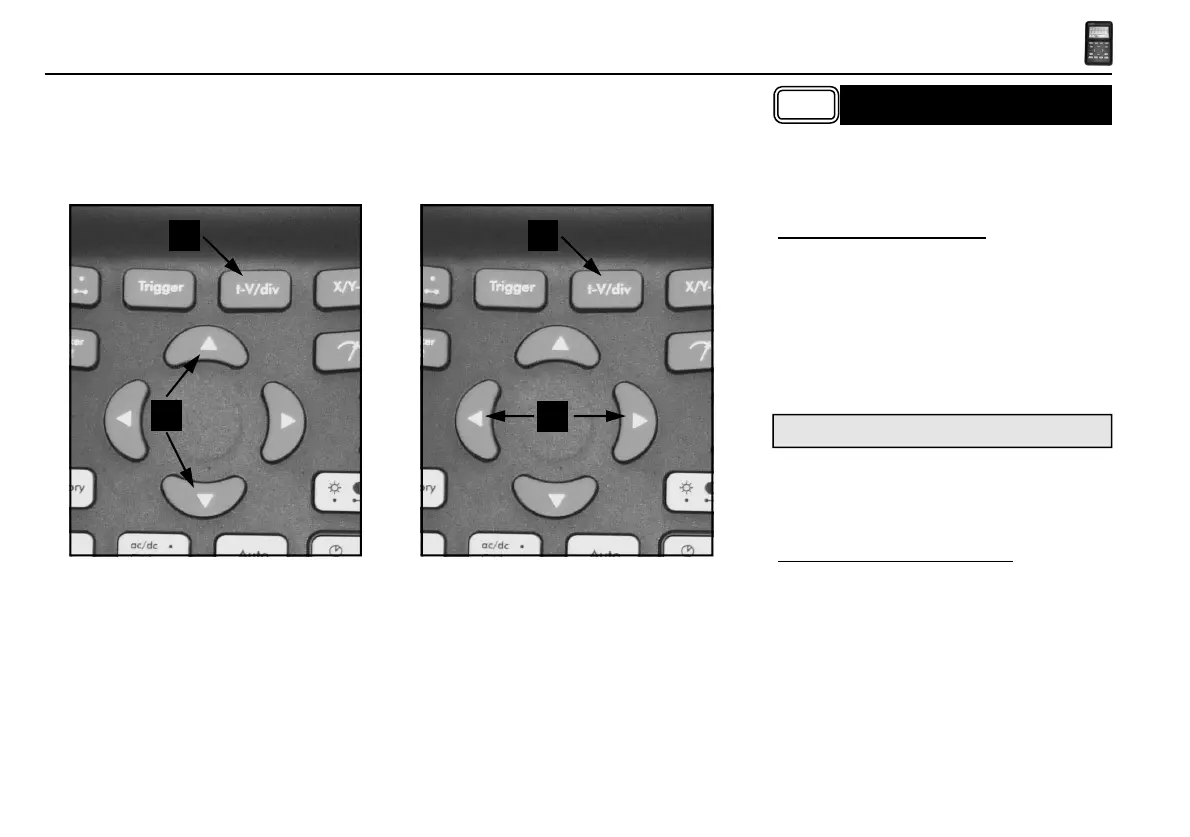
First press the „t-V/div“ key (1), use up/down
cursorkeys (2) for changing the input sensitivity
(V/div) (Fig 40). Press the left/right (3) cursorkeys
for changing the timebase (time/div). (Fig 41)
1. Changing Volt/div (Fig. 40):
The signal on the screen can be enlarge or reduce
vertically by adjusting the displayed voltage per
division. (V/div = voltage per division). The divi-
sions can be made visible through the Display set-
up key (see display setup).
Select the sensitivity : from 5mV to a maximum of
20V per division.
CHANGING THE INPUT
SENSITIVITY AND TIMEBASE
50mV to 200V with X10 probe selection
• Pressing the up cursor key increases the input
sensitivity (lower value for V/div).
• Pressing the down cursor key decreases the
input sensitivity (higher value for V/div).
2. Changing the timebase (fig. 41):
Adjusting the time base will visualise more or fewer
periods of a signal (t/div = time per division).
The divisions can be visualised through the display
set-up key (see display setup).
Set the time base between 1h and 50ns per division.
• Press the ‘t-V/div’-key to set the cursorkeys
action into ‘timebase’ mode.
• Press the ‘left’ or ‘right’ cursor keys to increase
or decrease the timebase (time/div).



 To Next Page
 Loading...