18 | Page
Version 00
© Verder Liquids B.V
Ds500, Ds500+ Operating manual
Original instructions (en)
10. Navigating the Screens
10.1 First Time Power On
The unit has been factory reset before shipping. The following
stepsarerequiredbeforenormalusagecanbegin.
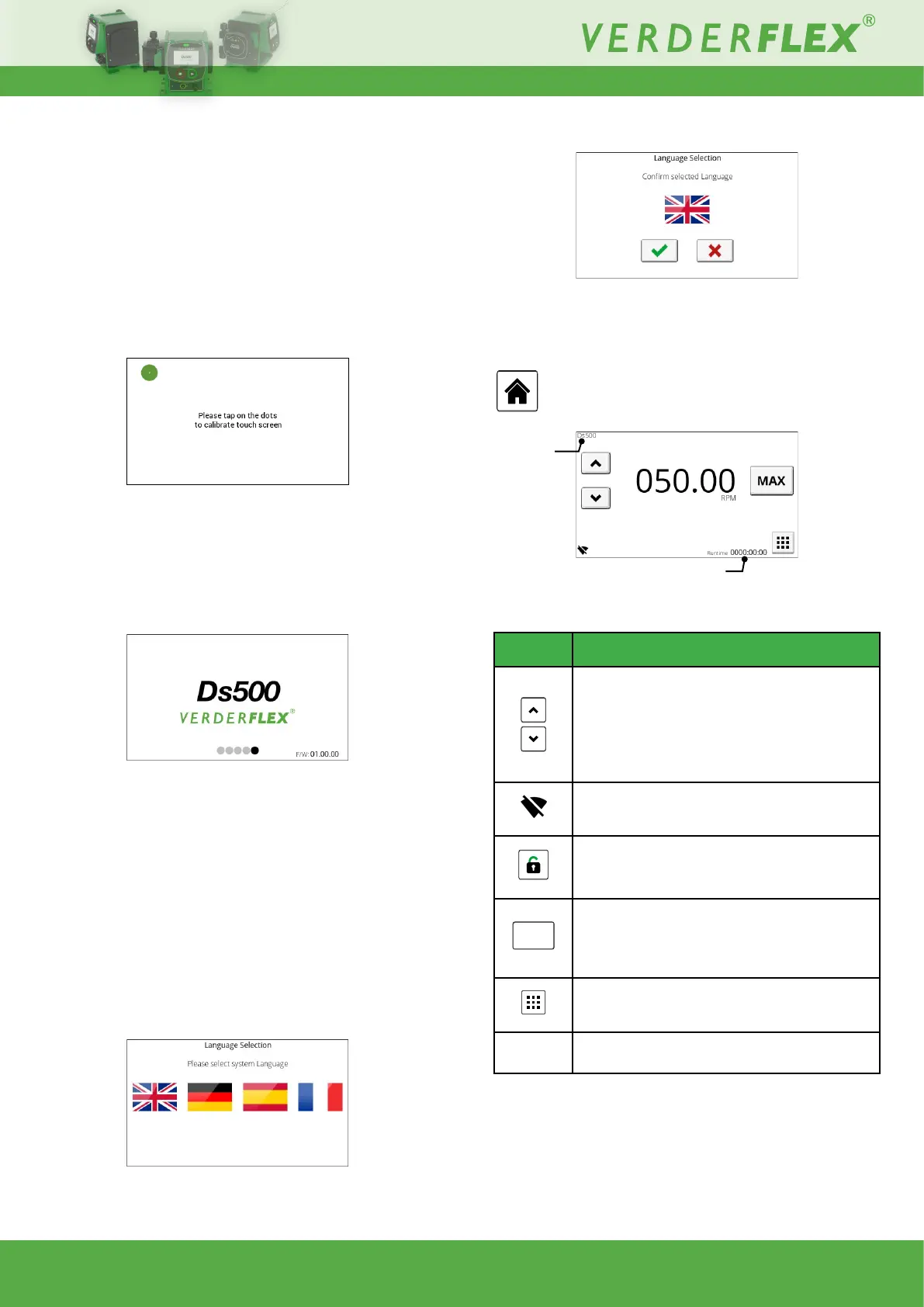
10.1.1 Touch calibration
Inorderforthescreentocorrectlyrespondtotouchitrequires
calibration.Iftheunitispoweredonforthersttime,factory
reset or manually initiated, the following screen will be
displayed:
Figure 8. - Touch calibration
Touchthegreendotwhenrequested;thelocationofthedot
will change.
Upon successful touch calibration the following screen is
displayed:
Figure 9. - Boot screen
During this time the unit will perform background system
checks. Identied errors will be displayed on the main
screen along with the current rmware version. For a list
of error codes and their causes, see 12.2 Error Codes.
Once initial setup is complete, this will be the loading screen
forthenexttimetheunitispowercycled.
NOTE: Touch calibration can be performed at any time by
holding the Start button and power cycling the unit.
10.1.2 Language select
Select the correct language for your country of operation:
Figure 10. - Language select
Conrmtheselection:
Figure 11. - Languageconrm
Once initial setup is complete, the Operating screen becomes
available:
10.2 Operating Screen (home)
Figure 12. - Operating screen
Symbol Description
Flow rate increase/ decrease (hold to increase
adjustmentspeed).
For large adjustments, press the numerical
value to be adjusted; a keypad will appear for
numeric entry. Clear the current entry (C) and
enterrequiredvalue.
Wiconnectionstatusandpumpname
(currentlyshowingaswienabled).
Screen lock (status, lock, unlocked).
Only available if enabled in Security Settings.
MAX
Press and hold to operate pump at maximum
owrate-usefulforpriming.
Note:Durationofowcanbesetfrom0-90s-
see 10.3.2 Pump settings.
Press to access main menu.
Pump
label
Name of this unit to distinguish it from others.
Table 13. - Operating screen symbols
Runtime since pump was started
Pump label



 To Next Page