20 | Page
Version 00
© Verder Liquids B.V
Ds500, Ds500+ Operating manual
Original instructions (en)
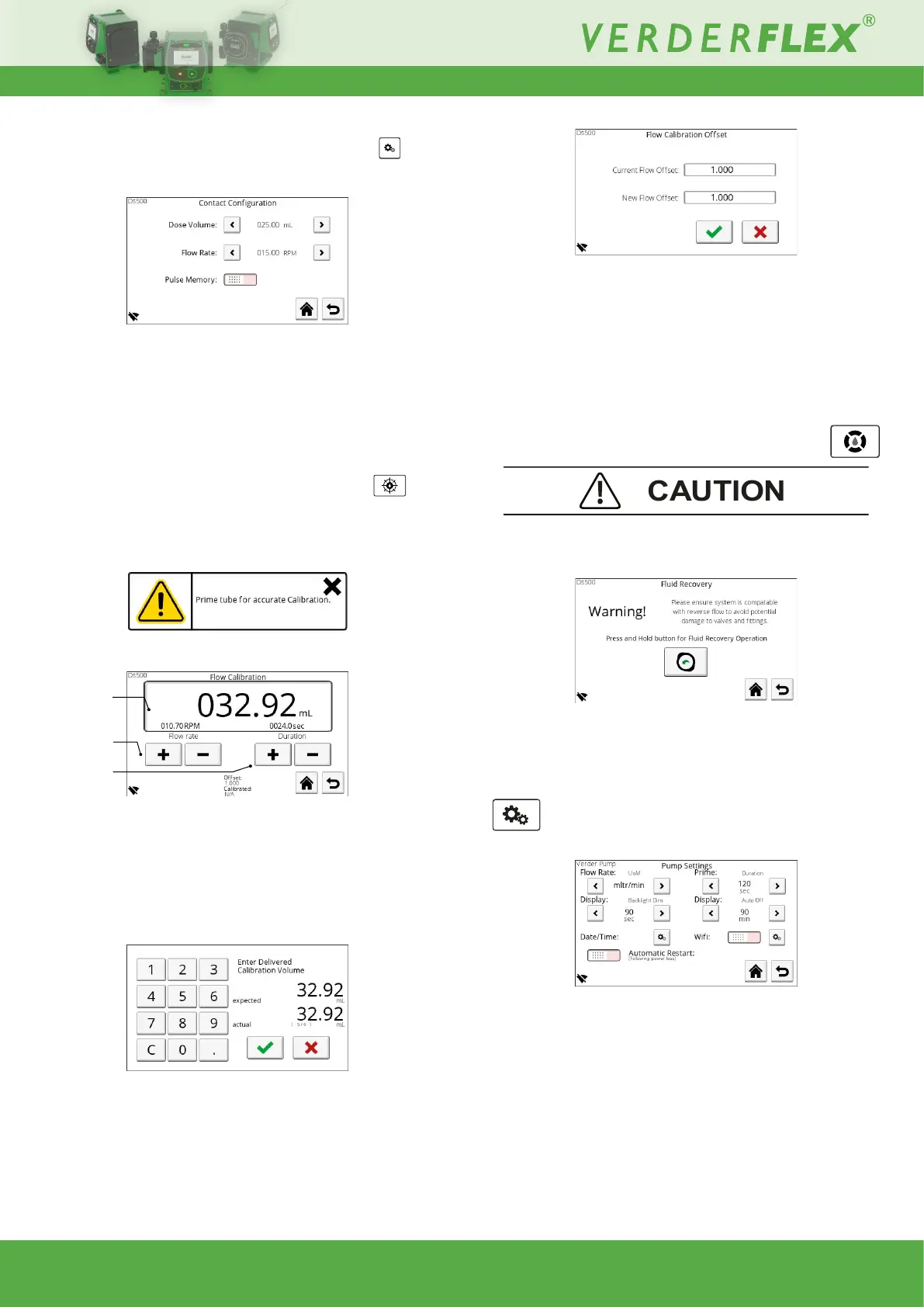
10.3.1.2 Contact
Contactmodeisusedtodeliverapredeneddosebasedona
recievedpulse(requiredpulsewidth40ms-1000ms):
Figure 19. - ContactConguration
DoseVolume:Adjustrange000.01-999.99ml
FlowRate:Adjustablerange000.01-65rpm
Pulse Memory: Enable to queue doses; if the unit is dosing
whilst a pulse is received, another dose will be added to the
queue.
10.3.1.3 Flow calibration
Calibration is essential in order to ensure accurate and
consistentowratedelivery.
Uponenteringtheowcalibrationscreenapopupwillappear:
Thisisadviceonlysothatthebenetsofcalibrationarerealised.
Figure 20. - Flow Calibration
1. Enter the volume to be delivered in order for calibration to be
performed.
2. Set the ow rate OR the duration for which the above
speciedvolumewillbedelivered.
3.PresstheStartbutton;thespeciedvolumewillbedelivered
and the following screen will be displayed:
Figure 21. - Calibration delivery volume
4.Entertheactualdeliveredvolumesothattheosetratiocan
becalculated.Theosetratiowillbedisplayedonscreen:
1
2
Figure 22. - FlowCalibrationOset
Theusercanconrmorrejectthisnewowoset;iftheoset
is rejected, the previous oset will be retained. Oset range:
0.1 to 10.0
NOTE: Accuracy is further improved by increasing the
calibration volume.
10.3.1.4 Fluid recovery
Ensure the system, to which the unit is connected, is compatible
withreverseow!
Figure 23. - Fluid recovery
Thisallowstheusertorecoveruidbyoperatingthepumpin
reverse for as long as the button is pressed.
10.3.2 Pump settings
Figure 24. - Pump Settings
Fromthisscreenthefollowingparameterscanbeadjusted:
• Flow rate
Choose from mL/min, mL/hr, ltr/min, ltr/hr, ltr/day, USG/h,
USG/d,Oz/min,RPM,%
• Prime duration
DurationadjustforMax(prime)function
(valueof0=disabled,max90seconds).



 To Next Page