21 | Page
Version 00
© Verder Liquids B.V
Ds500, Ds500+ Operating manual
Original instructions (en)
• Display
Backlightdim-Adjustthetimebeforethebacklightdims.
Display auto o - Adjust the time before the display
switcheso.
• Date/Time
Adjustthedateandtime.
• Wi
Onceenabled,presstogotowisettingsscreen.
• Automatic restart
Unit will automatically restart if the motor was running at
the time of power loss.
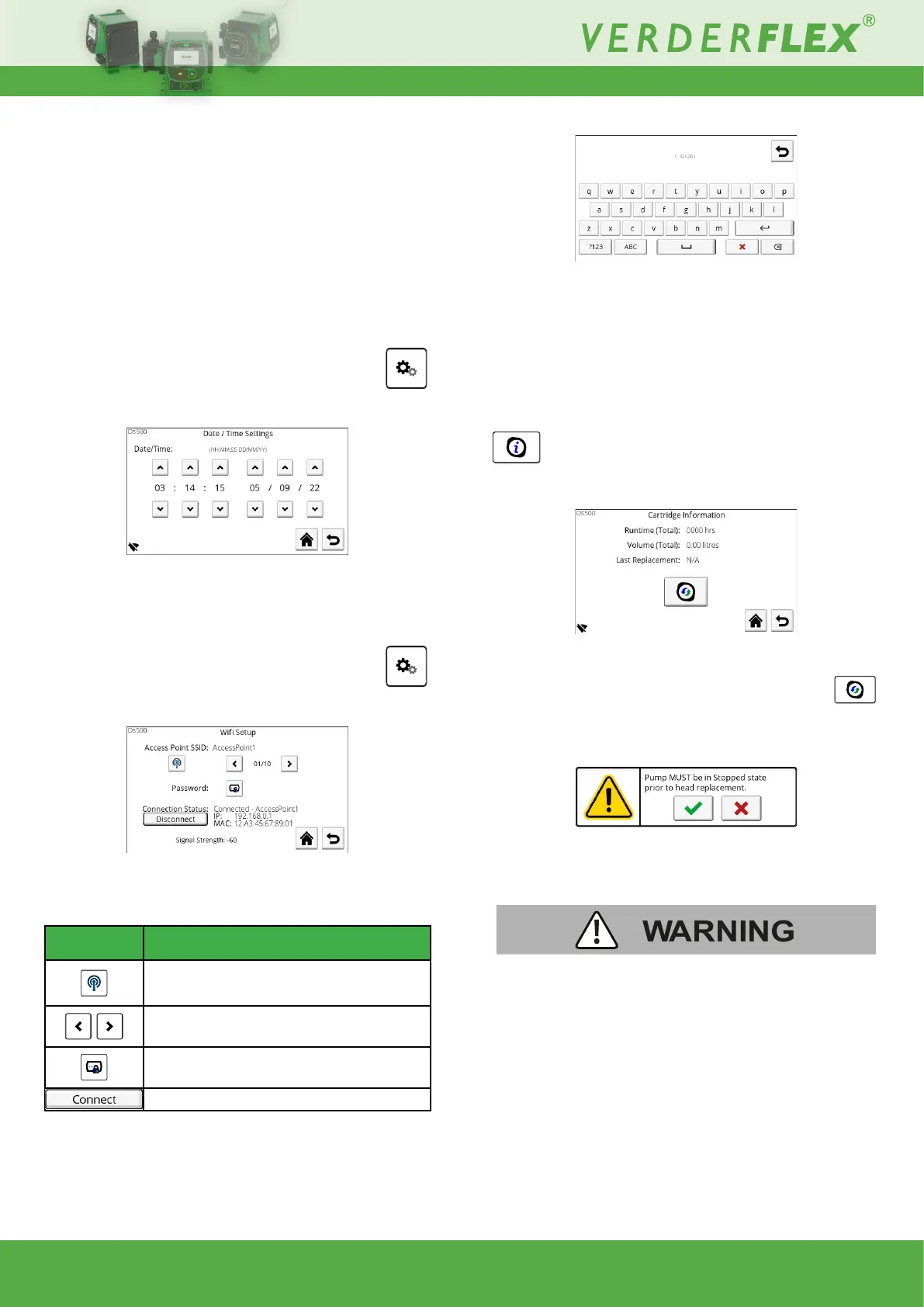
10.3.2.5 Date/Time
Fromthisscreenthedateandtimecanbeadjusted:
Figure 25. - Date / Time Settings
Batterybackupensuresthatminimaldateandtimeadjustments
arerequired.
10.3.2.6 Wi
This screen allows the operator to connect to a wi access
point:
Figure 26. - WiSetup
Note:wineedstobeenabledfromthepumpsettingsscreen.
Symbol Description
Press to start scanning for available
wireless networks
Wireless SSID selection buttons
Press to enter the password to connect to
the selected SSID.
Press to connect to the selected SSID.
Figure 27. - Popupkeyboardforwipasswordentry
10.3.2.7 Unable to connect / signal strength
Under normal conditions (no connection issues) the screen will
report the signal strength;thegreaterthevalue,thestronger
the signal will be (-50 will be stronger than -100).
If there is an issue with the connection, unable to connect will
be shown in place of signal strength.
10.3.3 Cartridge information
This screen provides information about the cartridge and
facilitates replacement:
Figure 28. - Cartridge Information
Press to stop the unit so that the cartridge can be
replaced.
A popup will appear to warn the operator that the pump must
be in a stopped state. Press accept to stop the pump:
With the pump stopped, the motor is disengaged and the
cartridge can now be removed:
AlwaysusePPE(eyeprotectionandclothing)ifhazardous
uidshavebeenpumped.
1. Drain the system.
2. Safely release any pressure in the pipework.
3. Release the port sealing nuts and remove the tubes whilst
ensuringthatuiddoesnotspillout.
4. Release the cartridge lock.
5. Rotatethecartridge20°CWandremove.
6. Safely and responsibly dispose of the cartridge. Check
yourlocaldisposalguidelines,particularlywhenhazardous



 To Next Page