19 | Page
Version 00
© Verder Liquids B.V
Ds500, Ds500+ Operating manual
Original instructions (en)
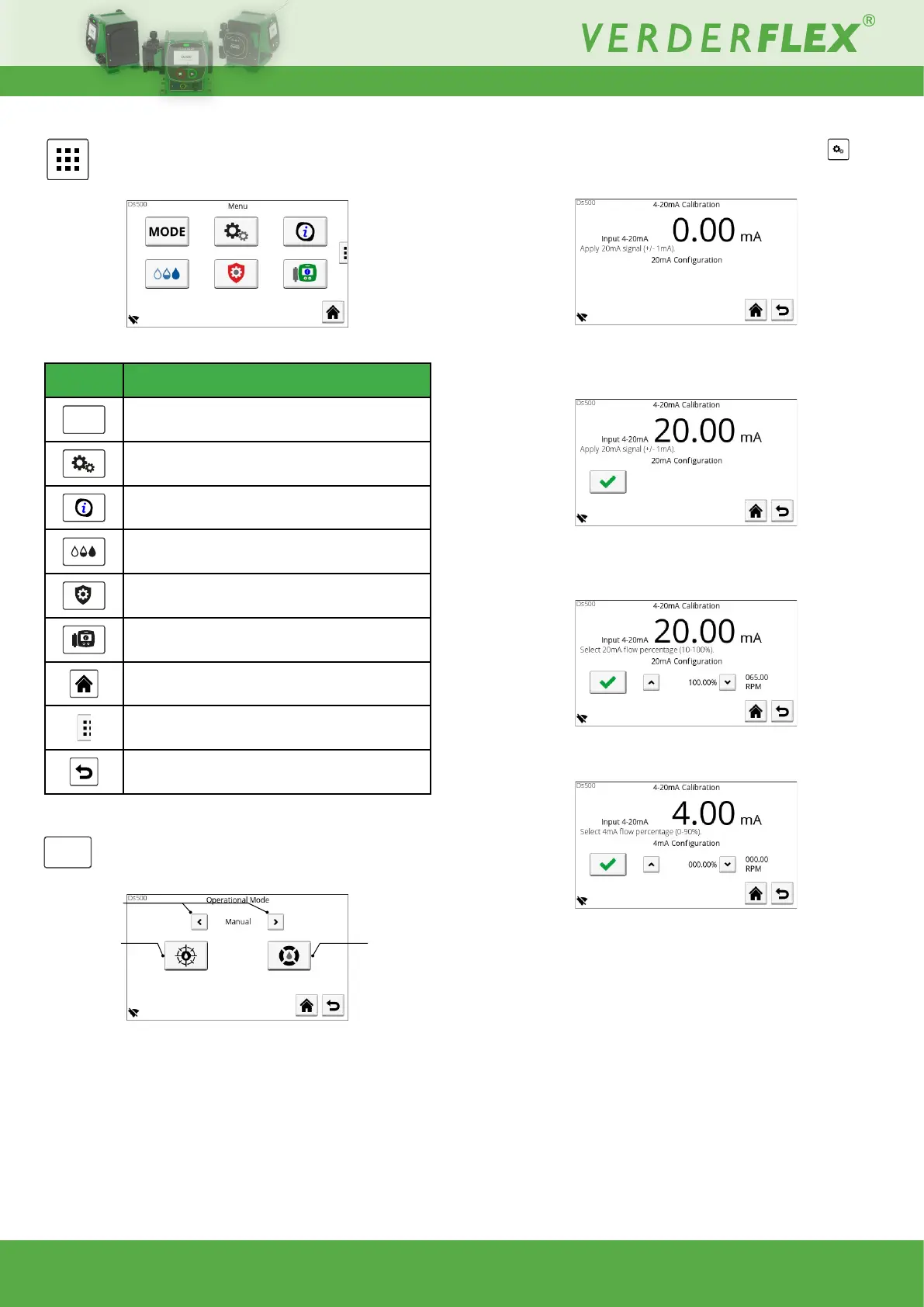
10.3 Main Menu
From this screen the operator can access other sub-menus:
Figure 13. - Main menu
Symbol Description
MODE
Operational mode
Pump settings
Cartridge information
Fluid level monitor
Security settings
Pump information
Press to return to the home screen at any time
I/O settings (Ds500+ model only)
Go to previous screen
Table 14. - Main menu symbols
MODE
10.3.1 Operational mode
Figure 14. - Operational mode
Available control modes:
• Manual (default mode)
• 4-20mA (Ds500+ only)
• Contact (Ds500+ only)
Note: The pump will not start when in 4-20mA or contact mode
if there is a pump head issue. This is to prevent unintentional
operation when remotely controlled. Manual operation is still
possiblewithaconrmationdialogue.
Flow calibration Fluid recovery
Change control
mode
10.3.1.1 4-20mA Calibration
Externalcontrolsignalscanbeusedtocontroltheowofthe
unit. To do so, calibration must be performed:
Figure 15. - 4-20mA Calibration (1)
The above screen is awaiting a 20mA input signal (±1mA).
Once20mAisreached,conrmationisrequired:
Figure 16. - 4-20mA Calibration (2)
At this point, 20mA can be set to to suit the application,
e.g., 20mA = 65 rpm:
Figure 17. - 4-20mA Calibration (3)
The same procedure needs applying to the 4mA input signal:
Figure 18. - 4-20mA Calibration (4)
At this point, 4mA can be set to to suit the application,
e.g., 4mA = 0 rpm.
Once calibration is complete, the speed can be set proportionally
bytheexternalcontrolsignal.



 To Next Page