EXS
84 User Manual 10H52260UM60 - Rev. 1 - 10/2017
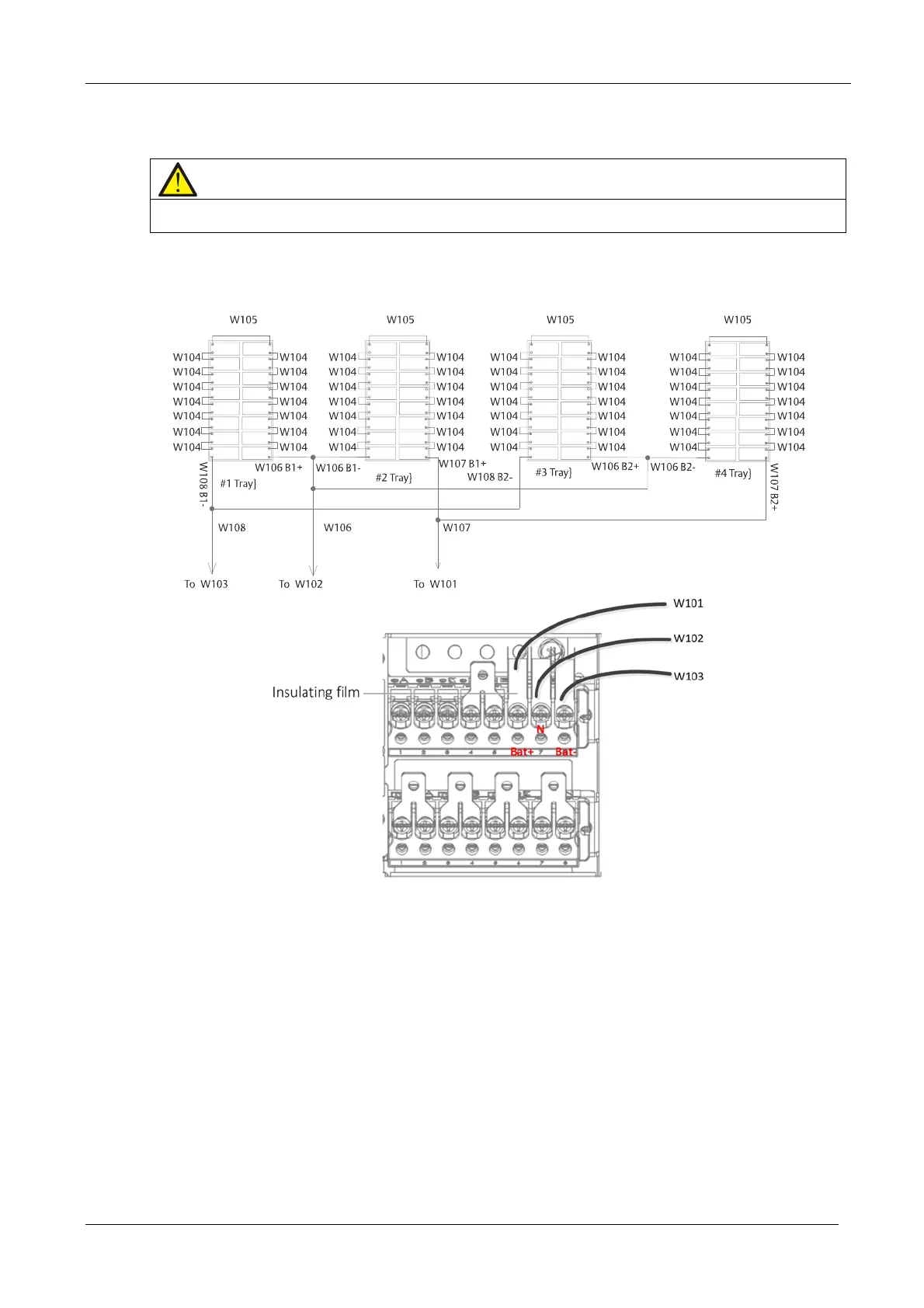
c) Insert four battery trays into the battery compartment (from bottom to top, see Figure 8-4). Connect cables
W106, W1
07 and W108 as shown in Figure 8-2, then use the screws (accessories) to secure the battery trays.
d) Connect the cables W101, W102 and W103 to the Bat+, N and Bat- terminals, respectively.
Note
The user must remove the insulating film before connecting the cables, and replace the insulating film after the connection
procedure is complete
e) Connect the cables: W101 and W107, W102 and W106, W103 and W108.
f) Use a multimeter to guarantee the battery polarities are co
rrect.
g) Rep
lace the cover on the battery co
mpartment.
Figure 8-2 Installing standard UPS internal batteries










 To Next Page