Chapter 3 Micro-Controller
This section contains content related to the Controller, basic System maintenance, and Routine Troubleshooting
which enables the customer to get to understand the functioning of the equipment. It helps customers gain insight into
the inner workings of the product comprising of information such as System Setup, Alarm menus, and Basic
Maintenance.
3.1 Micro-Controller
The Micro-controller for CR012 air conditioners comes packed with features that help to monitor and manage the AC
unit.
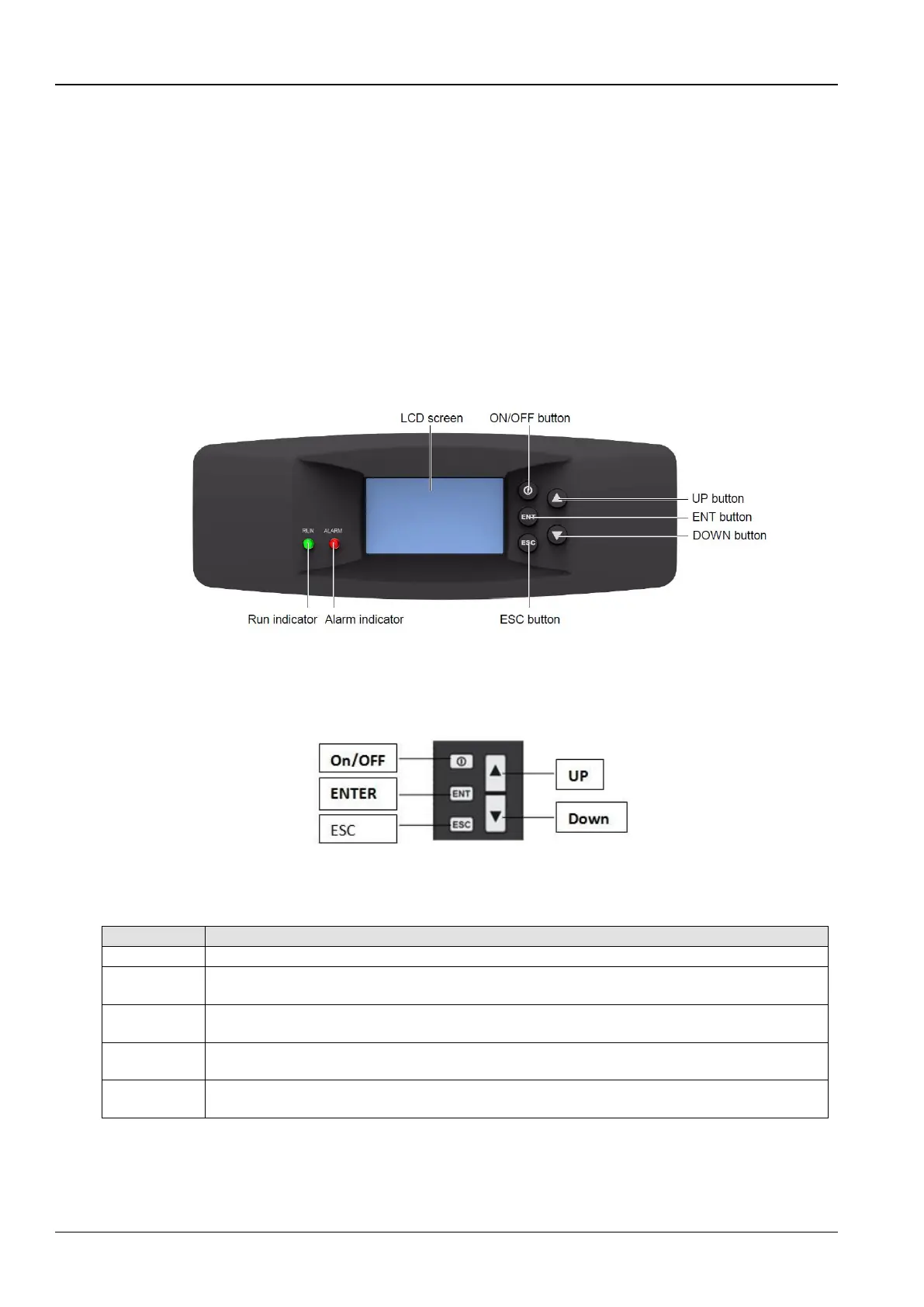
Figure 3-1 depicts the appearance of the micro-processing controller:
Figure 3-1 Appearance of the micro controller
3.2 Control buttons
The micro-controller provides 5 control buttons as depicted in Figure 3-2:
Figure 3-2 Control Buttons
The table 3-1 includes the detailed functions of the control buttons:
Table 3-1
Exit the current menu and return to the Main screen or previous menu screen. Abort parameter change;
silence the audible alarm
Move the cursor up or increase the parameter value. For a toggle selection: scroll through the options. For a
multi-screen menu: scroll up the screen
Move the cursor down or decrease the parameter value. For a toggle selection: scroll through the options. For
a multi-screen menu: scroll down the screen



 To Next Page