5. Start the blower and turn the switch counterclockwise until the alarm is energized.
6. Turn the adjusting knob one turn clockwise or to the desired filter change point.
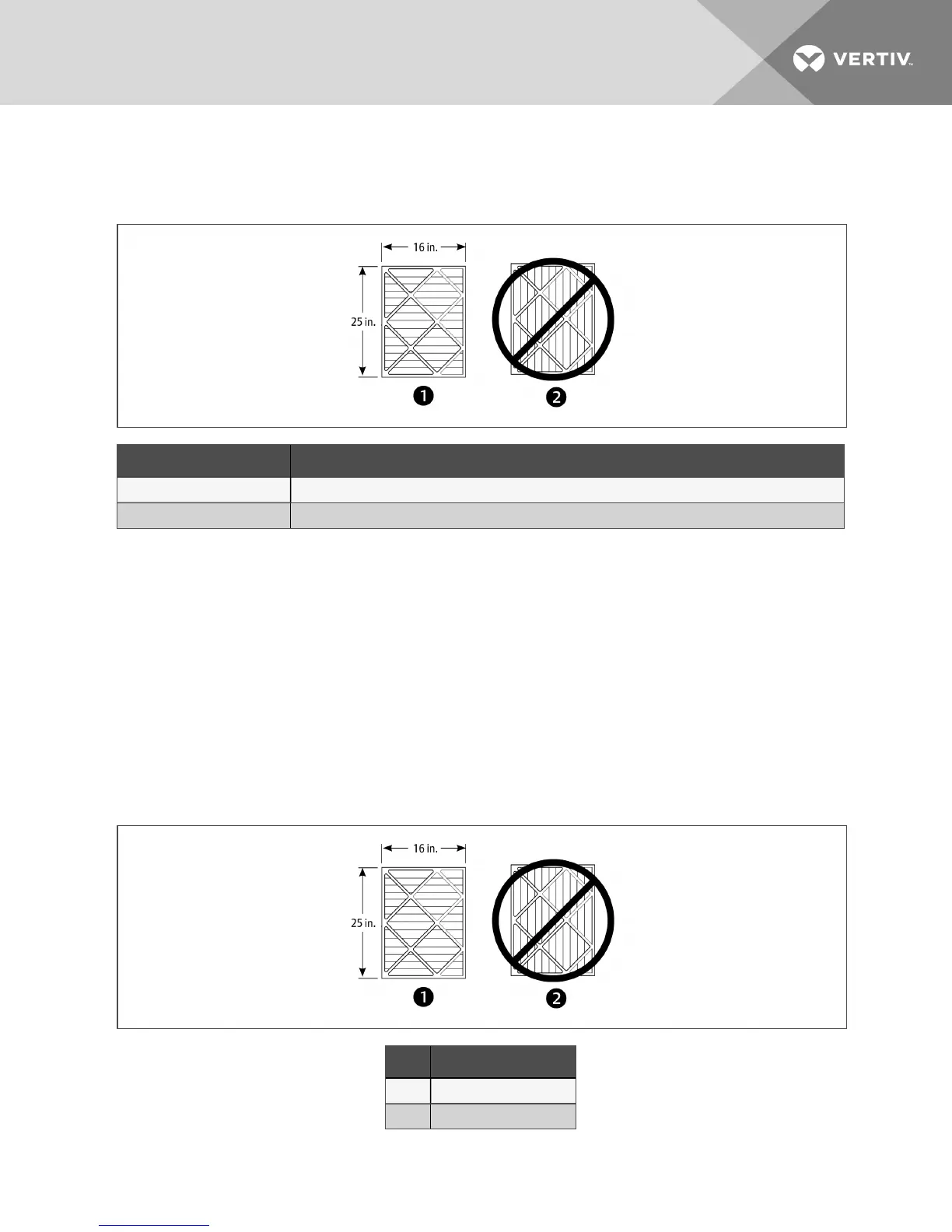
Figure 10.1 Proper filter pleat direction
Item Description
1 Short pleat construction
2 Long pleat construction
10.1.2 Filter-replacement for Upflow Units
1. Disconnect power from the unit.
2. Open the front access panel and remove the filter(s).
• For upflow front return units, remove the lower front access panels, lift filters to the top of
the filter rack and tilt forward for removal.
• For upflow rear return units, remove filters using filter access door in rear return filter box.
3. Replace with new filter—install the filters in the proper direction of the airflow. The proper
direction is marked on the filter.
4. Test the operation of the filter clog switch.
The unit panels must be in place and closed to find this point.
5. Start the blower and turn the switch counterclockwise until the alarm is energized.
6. Turn the adjusting knob one turn clockwise or to the desired filter change point.
Figure 10.2 Proper filter pleat direction
Item Description
1 Short pleat construction
2 Long pleat construction
10 Maintenance 55




 To Next Page