26
Temperature Sensor (RTD)
Removal
The Temperature Sensor (RTD) is located in the
back of the oven cavity. It is used to sense oven
temperature.
WARNING: Disconnect power to oven
before servicing. Follow lockout/tagout
procedures.
Condition Requirements:
Door Assembly Removed
Oven Racks Removed
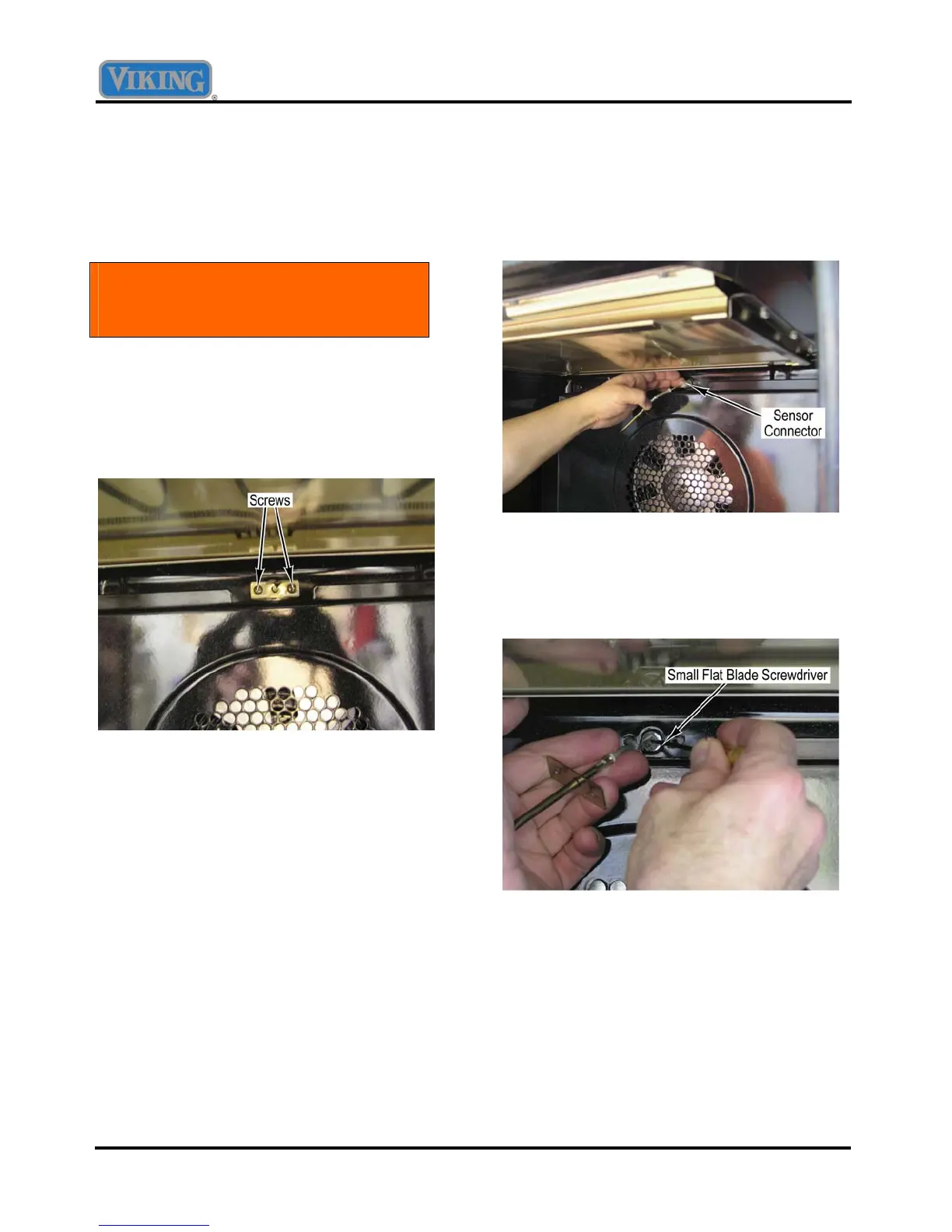
1. Remove two screws that attach the sensor
to the back of the oven liner.
2. Pull the sensor from the liner until the
sensor connector protrudes into the oven
cavity.
3. Apply side pressure to the sensor
connector to secure the connector against
the opening in the oven liner.
4. While maintaining side pressure on the
connector, disconnect the old sensor and
connect the new sensor.
NOTE
When reinstalling the oven sensor, it may be
helpful to insert a small screwdriver or awl into
the connector and push the wiring and connector
into place.
5. Install two screws that attach the sensor to
the back of the oven liner.



 To Next Page